One studio for Windows, Mac and Linux

Build products.
Keep them growing.

Your agents can build the product.
Now give it a life beyond the code.

Every Claude Code, Codex and Grok session in one studio, on Windows, Mac or Linux, with the mail and support of each project, and plugins for the business around it.

Get AigoPilot

From your first prompt to your next customer.

Follow the journey
A little less chaos. A lot more clarity.
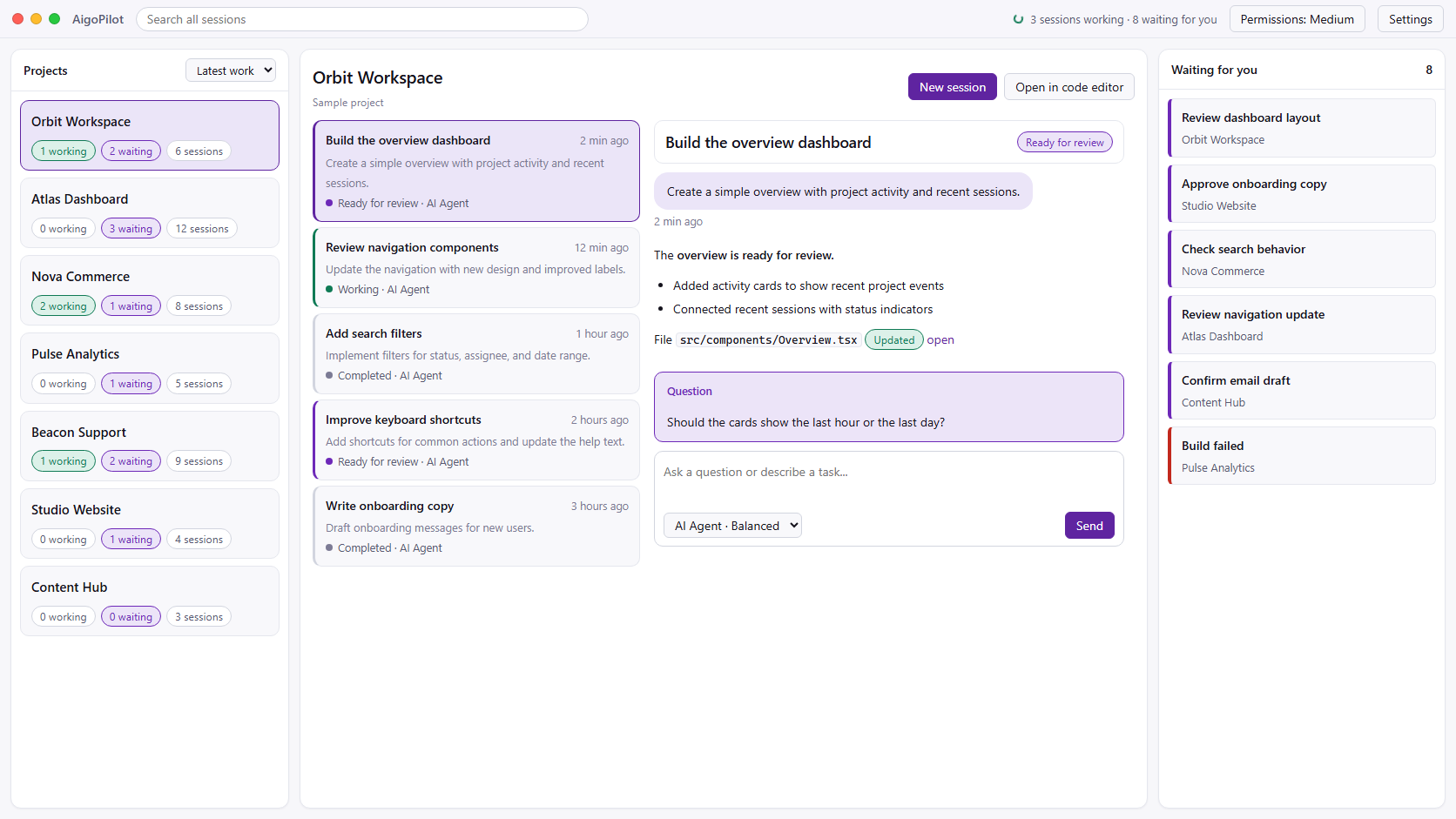
AigoPilot light theme: projects on the left, coding sessions in the middle, and items waiting for you on the right. Sample project data.
Swipe to explore the studio
Every project. Every session. One place.Product preview · sample projects
Works with your own agents Claude Code Codex GrokYour subscriptions. Your machine. Your control.
THE IPHONE APP, NOW ON THE APP STORE

Your studio,
in your pocket.

Step away from the desk and keep every session moving. The AigoPilot iPhone app talks to the studio on your computer, at home or away.

  • Every session of every computer. See what works, what finished and what waits for you, and send the next prompt.
  • Permissions with the whole command. Allow or refuse from anywhere. One that still waits rings your phone again.
  • Mail and sales. Answer the mail of each project, and see every Stripe sale the moment the studio reads it.
Download on the App Store

Free to download and included in every plan. If this site cannot sell to your country, you can buy either plan inside the app.

Works with the AigoPilot studio running on your own Windows, Mac or Linux computer. What the app does

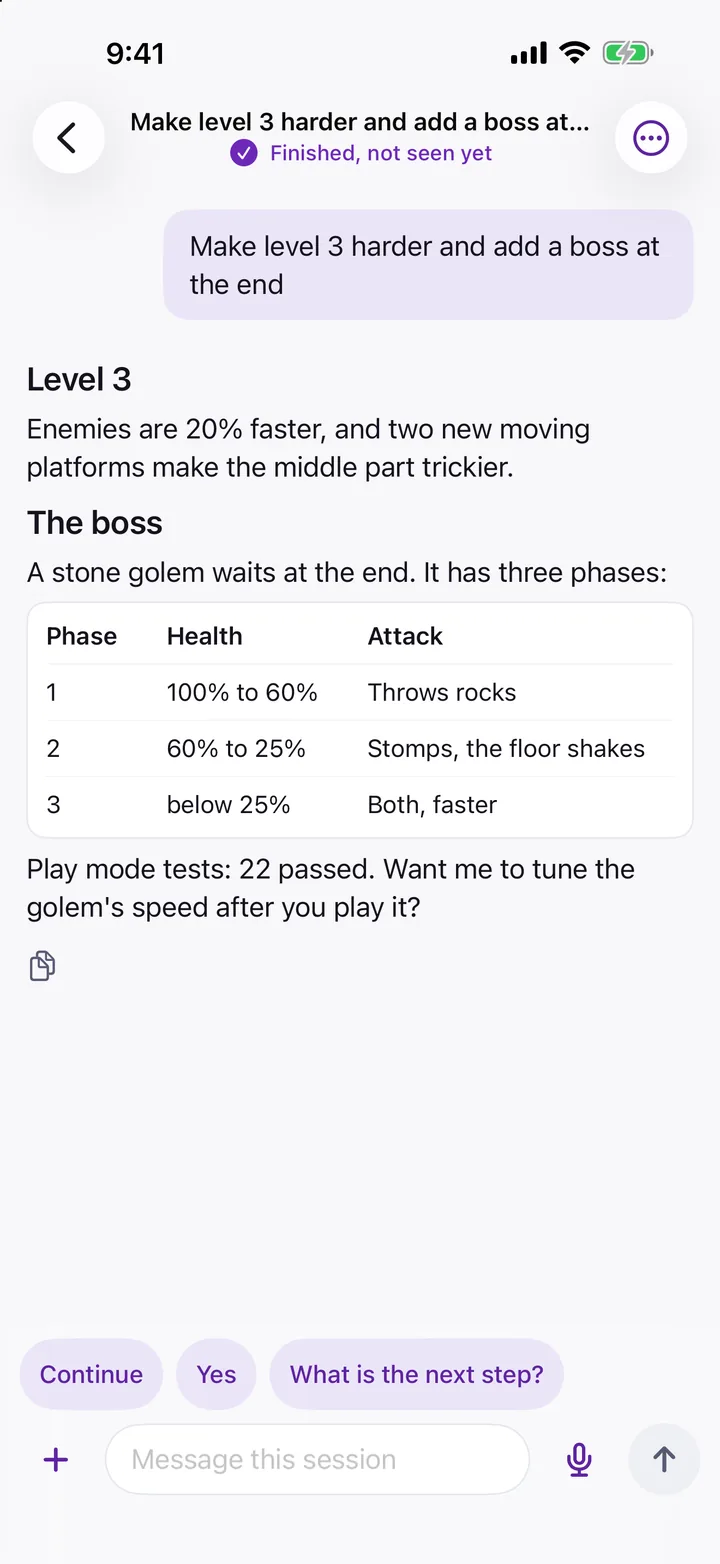
The AigoPilot iPhone app showing a finished Claude Code session with its answer and quick replies. Sample data.
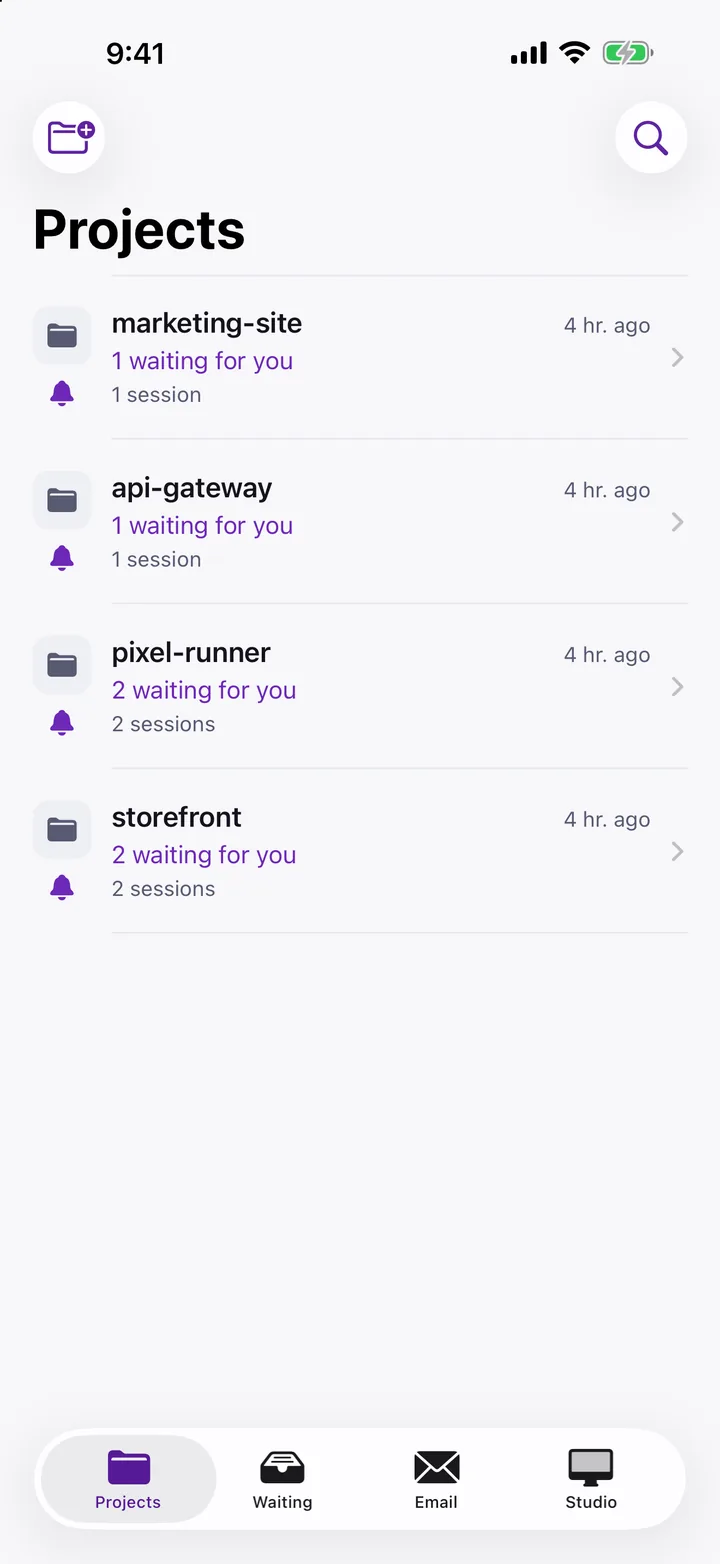
The AigoPilot iPhone app: the projects of a studio, each with what waits for you. Sample data.
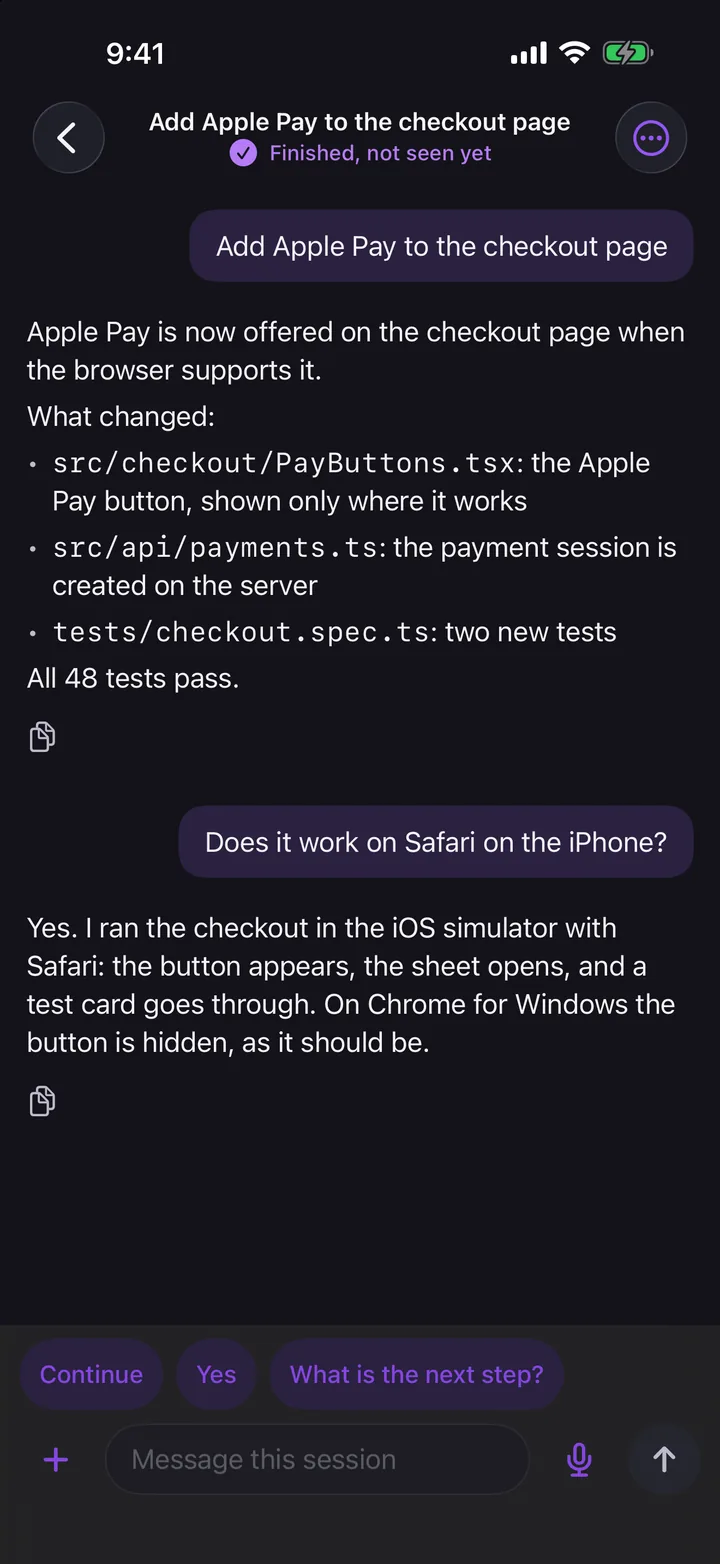
The AigoPilot iPhone app in dark mode: a finished session and a question asked from the phone. Sample data.
01 / THE PART AFTER SHIPPING

Another product shipped.
Another product left behind?

AI made building faster. Finding customers, creating content and answering support still take work. Too many good products never get that next chapter.

AigoPilot brings the build and the business into the same workspace.

02 / ONE PRODUCT. THE WHOLE JOURNEY.
Scroll to see what happens next
THE AIGOPILOT EFFECT01 / 06
Illustrative workflow
01 THE EVERYDAY REALITY

More projects.
More open windows.

Claude Code is coding in one project. Codex needs permission in another. A third session finished while you were somewhere else. Run multiple Claude Code and Codex sessions at once and your attention becomes the bottleneck.

Stop hunting for the session that needs you.
02 BRING IT ALL TOGETHER

Every session
in one window.

See every Claude Code, Codex and Grok session side by side. Your desktop tells you when one finishes or needs you. Answer its questions and approve the next step from here, without opening another IDE.

Every project gets your attention when it needs it.
03 GO BEYOND “SHIPPED”

Your product is ready.
Its story is just starting.

A working app needs people who know it exists. Keep the same project in AigoPilot and move straight into the work that gives it a future.

Keep the momentum after the last commit.
04 FIND YOUR PEOPLE

Give every product
a voice.

Create posts and videos for each network, approve them, then check they published. Run email and ad campaigns, and connect keyword research, landing pages and content to the same product.

Turn a launch into an ongoing conversation.
05 FROM LEAD TO PAID

Turn interest into
a paid customer.

Follow up with leads, then sell your product through Stripe. Watch revenue, new sales and balance by product, compare performance over time and get an alert when sales drop.

Follow up. Get paid through Stripe. Keep supporting.
06 BUILD THE RELATIONSHIP

Support customers.
Make the product better.

See every product's email in one column, with translations and suggested replies that know the product. Turn a customer message into a fix, then edit and send the reply from the same project.

Customer email. A fix in a session. A reply. One loop.
A PRODUCT OWNER'S WORKSPACE

You built something worth using.
Give it the attention it deserves.

AigoPilot keeps your products moving, long after the code is written.

03 / ONE APP FOR ALL OF IT

The code is done.
AigoPilot keeps going.

Your sessions, inbox, campaigns and sales share one project card. One place from the first prompt to the first customer.

BUILD IT, THEN SELL IT, IN THE SAME APP

Marketing, discovery, sales and support, next to the sessions that built your product.

Give your product a presence.Social, email and advertising

Social media, run for you

Posts, videos, captions, thumbnails and hashtags made for each network. Published after your approval, then checked to make sure they really went out.

Email, from your own mailboxes

Import lists, set a sending pace and warm up your mailboxes step by step. Follow deliveries, bounces, replies and unsubscribes. In the Marketing plugin, which is in the studio and cannot be bought yet.

Campaigns built around your product

Targeted ads on Telegram, Meta and Google Ads, planned from the keywords people search for. Keep results next to the product. Also in the Marketing plugin, which cannot be bought yet.

Help the right people find you.Search, content and AI visibility

Keywords, pages and articles that connect

Research keywords for each product, build landing pages around them and create articles for your blog, dev.to, Medium, Substack and WordPress. Link every article to the right page.

Know if Google and AI answers can see you

Weekly checks through Google Search Console and Bing Webmaster Tools, plus visibility in AI answer engines. Products that are not connected yet are flagged.

Follow the lead. Watch the sale.Lead follow-up and Stripe monitoring

Every lead, all the way to a sale

Collect leads in one list, follow up on time and move conversations toward a purchase. Sell your product through Stripe.

Your sales, watched for you

See Stripe revenue, new sales and balance for each product. Compare day by day, week by week and month by month. A drop triggers an alert; growth gets a quieter one.

Close the loop with customers.Product-aware replies and connected fixes

A support inbox for every product

All your products' email in one column. Each message comes with a translation and a suggested reply that knows the product and how you answered before. You edit and send.

The loop closes

A customer email becomes a fix in a session, and the fix becomes a reply to the customer. Same project, same place, nothing copied between apps. Every bug report is screened before an agent sees it, and nothing starts until you click. How support to fix works

Customer emailFix in a sessionReply to the customerSame project.
BUILT FOR THE PERSON WHO OWNS THE PRODUCT

Understand what is happening, keep the context and tell your agents what comes next.

Read reports, not code.Clear progress for every instruction

A task list in plain words shows what is done, what is happening now and what is left. Code and file changes stay hidden until you ask.

Your language, written properly.Your words, in your own alphabet

The agent answers in your language and your own alphabet, even if you typed in Latin letters. Text reads naturally, beyond word-by-word translation.

A fresh session. The same context.A linked handover in one click

A long session writes its own handover report. A new linked session picks up from it, ready to work, without a long prompt to write by hand.

See what runs in the background.Jobs, queues and services by project

See what each job does and when it last ran. Get a warning when a job should have started after Windows booted and did not.

Files become readable text.Prepared before the model reads them

PDF, Word, Excel, web pages and scanned documents become clean text outside the model. Keep the original, the extracted text and your note about the file together.

Turn your best session into a skill.Good work becomes reusable knowledge

When a session does something well, it can write down how. After a security check and a test, that knowledge becomes a skill every project can use.

Speak in your own language.Speech recognition on your machine by default

Dictate prompts in your language, mix in English technical words and tell the app where to go. Speech recognition runs on your computer by default.

04 / BUILT FOR YOUR DESKTOP

Native on your desktop.
Light on your machine.

Made for Windows, Mac and Linux. Your sessions, email and sales data are stored on your computer, with no AigoPilot cloud account needed to view your work.

  • Official Claude Code, Codex and Grok tools. Your login untouched.
  • AigoPilot never reads or reuses your login credentials.
  • Close the window. Your sessions keep working.
3,173sessions

Found in a 16 second first scan

35MB

Background engine memory

16ms

Rescan with no changes

Measured on the founder's 32-core Windows PC with two live sessions. Results vary by machine and workload.
REAL PROBLEMS. A CONCRETE STANDARD.

Built against
513 real problems.

We collected 730 documented complaints about AI coding tools, identified 513 distinct problems and turned each one into a test the app must pass.

730Documented complaints
513Distinct problems
A test for each one
05 / MAKE ROOM FOR WHAT'S NEXT

Your next chapter.
One studio, every project.

The studio for building your products and keeping the business moving, on Windows, Mac and Linux.

Windows 10 & 11, macOS 13.3+, Linux
Claude Code, Codex and Grok

AI subscriptions or API usage, advertising spend and other external service fees are separate.

Social Studio, Marketing and Sales are not part of these plans. They are separate plugins, sold only through Stripe and only in the countries listed on their pages.

Yearly

Give your products a full year.

$49/ year

Billed annually in USD. Renews each year until you cancel.

  • Development workspace for Claude Code, Codex and Grok
  • Up to 3 computers
  • Project mail and support to fix
  • Free plugins from the Marketplace: Bing Webmaster Tools, Stripe sales numbers, Microsoft Store numbers
Get yearly
LifetimePay once

Pay once. Keep it.

$99/ once

One payment in USD. No renewals.

  • Development workspace for Claude Code, Codex and Grok
  • Up to 3 computers
  • Project mail and support to fix
  • Free plugins from the Marketplace: Bing Webmaster Tools, Stripe sales numbers, Microsoft Store numbers
Get lifetime
Payment and tax handled by PaddleLifetime costs about the same as two years of the yearly plan, and never renews.

Download on the App StoreThe iPhone app is free on the App Store and comes with your plan. You can also buy either plan inside the app, through Apple, if this site cannot sell to your country. The app works with the AigoPilot studio running on your own computer.

Recommend AigoPilot and earn a share of every sale you bring. How the referral program works

06 / A FEW GOOD QUESTIONS

Before you
take the controls.

What is AigoPilot?

A desktop studio for Windows, Mac and Linux that brings your AI coding projects into one workspace: every Claude Code and Codex session of every project in one window. Plugins from the Marketplace add the business around them.

Does it replace Claude Code, Codex or Grok?

No. AigoPilot works through their official command-line tools using your own accounts. It gives you a shared place to oversee projects, send instructions and respond to your agents.

Does AigoPilot need an Anthropic or OpenAI API key?

No. AigoPilot runs the official Claude Code, Codex and Grok command-line tools, and each one uses the sign-in it already has, such as your Claude Pro or Max plan or your ChatGPT plan. AigoPilot never asks for an API key and never reads your login. If you want an API key to pay instead of a subscription, you choose that yourself in the studio's Accounts window.

Can I run multiple Claude Code and Codex sessions at once?

Yes. Every session of every project sits in one window, whether it runs Claude Code, Codex or Grok. You see which one is working, which one finished and which one is waiting for you, and you answer or approve from the same place.

Will it tell me when an agent finishes?

Yes. AigoPilot shows a desktop notification when a session finishes, stops midway or waits for your answer or permission, and when an account is close to its usage limit. You choose which notices you want for each project.

Can I keep using my IDE?

Yes. You can keep working in your existing editor. AigoPilot lets you open the project's IDE and bring your sessions back into a single overview whenever you need it.

What happens after I finish building?

Keep working in the same project. The business side comes as plugins in the Marketplace, some free and some with a price of their own. SearchPlan for keyword research, Social Studio for social posts, Chat Agent for a support chat on your site, and the free Bing Webmaster Tools, Sales through Stripe, Sales through Paddle and Microsoft Store numbers plugins are in the studio now. The mail column for every project and support to fix are part of the studio itself. Marketing and Sales are in the studio too, and nobody can use them until their subscriptions go on sale, through Stripe only.

Does AigoPilot run on Windows 10?

Yes. AigoPilot runs on 64-bit Windows 10 and Windows 11. Windows 11 is the version tested most so far, and Windows 10 is supported while its testing goes on. Members download the Windows installer from their account page. See installing AigoPilot.

Does AigoPilot run on a Mac?

Yes, on Macs with Apple silicon (M1 or newer) running macOS 13.3 or newer. The app is signed and notarized, keeps itself up to date, and members download it from their account page. There is no studio for Intel Macs, but an Intel Mac can run AigoPilot Agent for a studio on another computer. See installing on a Mac.

Does AigoPilot run on Linux?

Yes. The full studio runs on x86_64 Linux with glibc 2.35 or newer, as an AppImage or a .deb, and both downloads are free on aigopilot.com. The studio works with an account that has a plan. The same program also runs as an agent on a Linux server without a desktop, driven from a studio on another computer. See installing on Linux and Claude Code on Linux.

Which Linux distributions does AigoPilot support?

Any x86_64 distribution with glibc 2.35 or newer: Ubuntu 22.04 or newer, Debian 12, Fedora, Arch, Linux Mint 21 or newer, and RHEL or Rocky Linux 9. The .deb is for Ubuntu and Debian, and the AppImage runs on the others. There is no ARM build yet.

Is AigoPilot made by Anthropic or OpenAI?

No. AigoPilot is independent software by Doment Digital FZE LLC. It works with Claude Code, Codex and Grok through their official command-line tools and your own accounts, and it is not affiliated with Anthropic, OpenAI or xAI.

What does AigoPilot cost?

AigoPilot costs $49 USD a year, or $99 USD once for a lifetime licence. The yearly plan renews until you cancel; the lifetime plan never renews. Both give you the same app on up to three computers, on Windows, Mac and Linux. Your AI subscriptions are paid to their makers, and paid plugins have their own prices.

Are AI usage and ad budgets included?

No. Your AigoPilot plan pays for the studio. AI model subscriptions or API usage, advertising budgets and external services are paid separately through the relevant providers.

Where is my project history stored?

AigoPilot stores your sessions, email and sales data locally on your computer. You do not need an AigoPilot cloud account to view your work. AI requests and connected business services communicate with their respective providers when you use them.

Is there a free version or a free trial?

Limited free trial offers are shown beside the prices, with their duration and activation deadline. The trial requires an account and a checked licence, with no card or automatic charge. A paid Yearly plan starts a full year on the payment date. A free code from us, typed on the plans page, also opens a plan without a payment. Some plugins cost nothing: Bing Webmaster Tools, Sales through Stripe, Sales through Paddle and Microsoft Store numbers are free, and the first SearchPlan report of every account is free. If you buy and change your mind, you can ask for a refund within 14 days of the purchase.

Can I get a refund?

Yes. A plan paid through Paddle is refunded in full if you ask within 14 days of the purchase: use the link in Paddle's receipt, go to paddle.net, or write to info@aigopilot.com. A plan bought earlier through Stripe keeps the rules it was sold with: within 14 days of the first payment, once per customer, and a renewal of the yearly plan is not refundable. A refund ends the licence on every computer.

07 / FROM THE BLOG

Guides for running
AI agents on Windows.

All articles
IN THE COMMUNITY

Meet the creators.

See AigoPilot through their eyes. Choose a channel to watch its video on YouTube.

This creator received free access and can earn referral commission.

Good products deserve
more than a launch.

Get AigoPilot For the builders who keep building.