
AigoPilot vs the
Claude Code desktop app.
Both run Claude Code. They are built for different jobs.
Every difference, row by row: Anthropic's own docs for its side, AigoPilot's own list for ours, and the public issues people report.
Get AigoPilot Available for Windows 10 & 11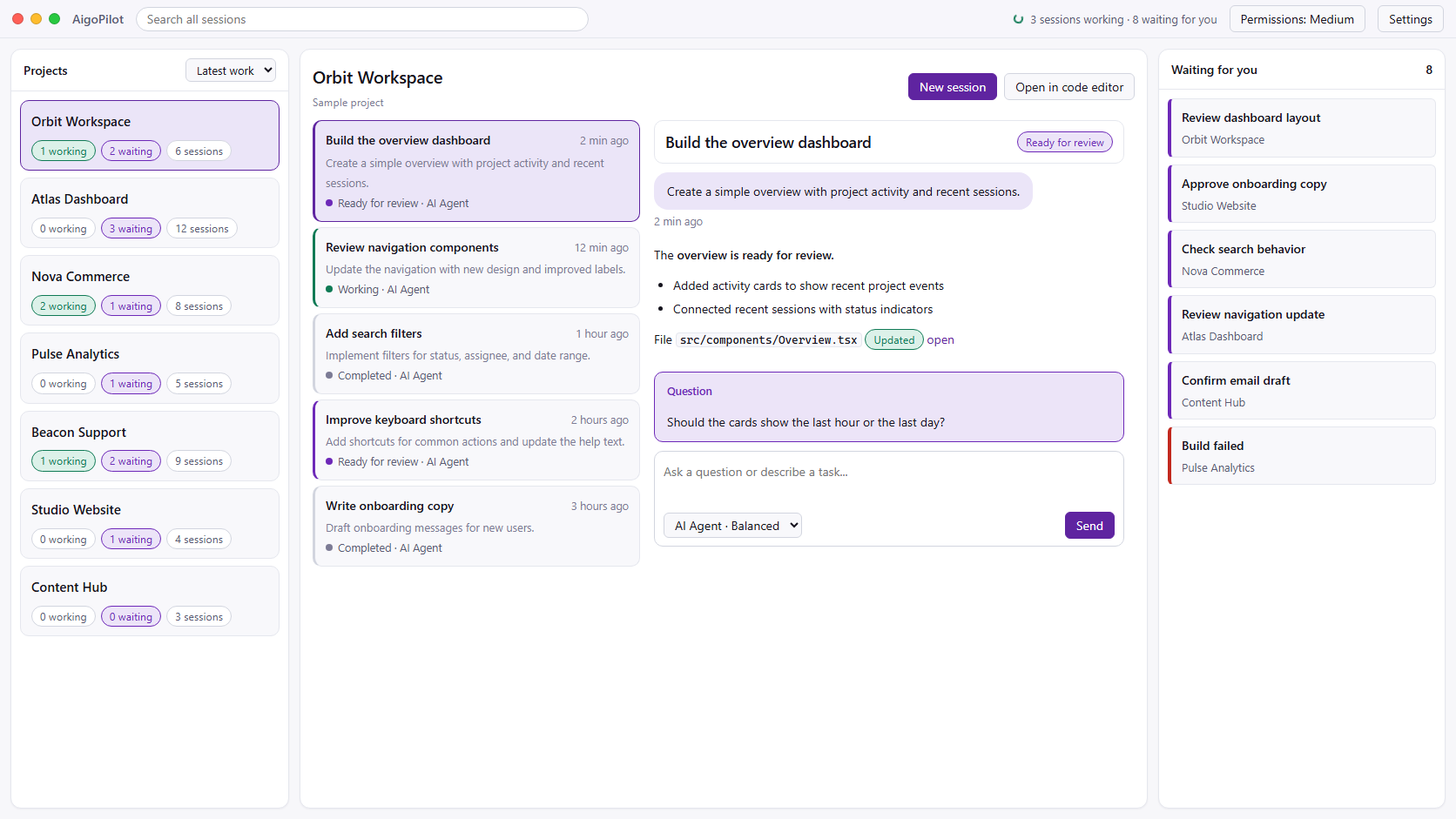
 Claude Code
 Codex
Codex GrokYour subscriptions. Your machine. Your control.
Two good apps.
Different jobs.
Checked against Anthropic's own pages and the public issue tracker on 7 October 2026.
The Claude Code desktop app is Anthropic's own. It is the Code tab of the Claude desktop app, it comes with a paid Claude plan (Pro, Max, Team or Enterprise), and it runs on macOS, Windows and, as a beta, Linux. By its own docs it is good at a lot: a sidebar of parallel sessions, optional git worktrees, cloud and SSH sessions, five permission modes, a diff viewer with comments, a terminal, a file pane, a browser pane, pull request and CI watching, and scheduled tasks. If you use Claude Code on one or two repositories, it may be all you need, and it costs nothing extra.
AigoPilot is independent software from Doment Digital FZE LLC. It is not affiliated with Anthropic. It runs the official Claude Code and Codex command-line tools on your own computers, under your own accounts. It is built for one person who runs many sessions across many projects, often on more than one computer, and wants to see all of them in one place, answer from a phone, and know which project is eating the plan. It costs USD 49 a year or USD 99 once, on top of your Claude plan.
This page lists the differences in detail, in 11 groups and 102 rows. Anthropic's side comes only from Anthropic's pages, linked under Sources. Where those pages say nothing, the cell says "Not in its docs", which is different from "No". On AigoPilot's side, a row marked "Built with a limit" works and states the limit, "Planned" is not available, and the iPhone app is built but not on the App Store yet. A good part of AigoPilot is new, and some of it has been seen working only in tests or in the simulator. Where that is so, the cell says it.
Jump to: Projects and sessions, Agents, Other computers and moving a project, The phone, Permissions and safety, Usage and limits, Notifications and alerts, Files, documents and voice, The machine and background work, Email of your projects, Platform, price and privacy, what the official app does that AigoPilot does not, known issues people report.
Projects and
sessions.
How each app shows, finds and handles the sessions you have.
| What | AigoPilot | Claude Code desktop app |
|---|---|---|
| All projects in one window | Every project is a card that says how many of its sessions are working and how many wait for you. The cards can be ordered by latest activity, by most waiting, by name, by number of sessions or by usage. | A sidebar lists sessions and runs several in parallel. Controls at its top filter by status, project or environment, and group by project. Ctrl+click (Cmd+click on a Mac) opens a second session in a pane beside the first. |
| Telling sessions apart | Nine states: working, waiting for your answer, waiting for permission, maybe waiting for permission, finished and not yet seen, hit the usage limit, stopped unexpectedly, idle, archived. The state comes from the CLI's own hooks, from whether the process is alive and from whether the transcript still grows. A session that only looks stuck is called "maybe waiting", not claimed. | Filtering by status is described. A list of states is not in its docs. |
| One list of what waits for you | A column across all projects: questions to answer, permissions to give, finished work you have not opened, and sessions that changed an instruction file. | Not described as one cross-project list. The sidebar can be filtered by status. |
| Sessions started outside the app | Reads the session files that Claude Code and Codex already keep on disk, so sessions started in VS Code, a terminal or the Codex desktop app appear with nothing to import, and new activity shows within moments. Measured on the maker's PC: 3,173 session files, first scan 16 seconds, a rescan with nothing new 16 milliseconds. | Typing /resume in a local session lists sessions you started from the CLI on the same computer and continues the same session, not a copy. Its docs name the terminal CLI as the source and do not mention VS Code extension sessions. Not available in SSH, WSL or cloud sessions. The desktop app and the CLI each keep their own session list. |
| Moving a terminal session into the app | Nothing to move. Any earlier session can be continued, including one from VS Code or a terminal. A session that is open in another window opens read-only first and the studio asks before it takes over (built, not yet seen working). | /desktop in the terminal, or claude --desktop (Claude Code 2.1.285 or later), saves the session and opens it in the app. macOS and x64 Windows only, claude.ai sign-in only. It does not move a session that is open in another terminal or still running in the background. |
| Search across conversations | One search box looks through the text of all conversations of all projects, Persian and other scripts included. A local SQLite index, no network. Names you gave a session rank first. | Not in its docs. /resume searches by title, folder or branch. |
| Watching a session work | New text is followed as it is written. Tool work is folded into rows such as "Edited 2 files, ran a command +11 -4" for Claude Code and Codex, with the full input and result one click away. While a session works, a line says how long it has been silent, which tool is still running, how many of its programs are alive and how much of a processor core they use. After a turn: "Worked for 1 min 2 s". | It has a background tasks pane. A silence timer and per-session process figures are not in its docs. |
| A task list under every prompt | The tasks the agent made for a prompt are shown under it with ticks, earlier prompts included. It can be switched off. | Not in its docs. |
| What fills the context | A one-row bar shows how full the session's memory is. One click opens the parts: system prompt, tools, MCP tools, sub-agents, instructions and memory, skills, conversation, free space. It is built on the CLI's own get_context_usage, which answers in about a second at no cost. The header also shows tokens against the window and the cost so far, labelled as API prices. | A usage ring next to the model picker shows the session's context window usage together with the plan usage for the period. |
| Handing a long session over | One click and the session writes a handover note (goal, what is done, decisions and why, what is open, files, next step). A new linked session opens with it and waits for you; the old one is left as it was. The button shows an estimated cost first. Proven on the real CLI with a Claude Code session of 150,830 tokens. Codex sessions have the same button since October 2026; there it has run only against a test program so far. | Not in its docs. |
| When the context is full | A card says the conversation no longer fits and offers three ways out: compact it, hand it over, or move to a model with a bigger window. Built; the real CLI ending a turn for size has not been seen. Before you send to a session that has been idle longer than its prompt cache lasts, the box warns with the number of tokens that will be read again (seen on a session idle for 61 hours: about 860 thousand tokens). | Not in its docs. |
| Writing the next prompt while it works | A line of prompts: write the next one while the agent is busy and it goes out when the turn ends, even if you closed the window. Waiting prompts can be edited, moved, taken out or sent in a new session. "Send now" pushes one into the running turn, for Claude Code and for Codex. Each prompt says whether it is sending, in line, taken by the model or did not arrive. | Queued messages and a "Send now" button exist (its changelog for 2.1.292 mentions both). Whether queued prompts survive closing the app is not in its docs. |
| Stopping a session | Three controls: stop after this step (waits for a safe point), stop right now (interrupts, then force-closes after five seconds), and close the session with every program it started. | Not in its docs. |
| Names, pins and archive | Rename a session in place, pin it so it keeps its place in the waiting column, archive it and take it back. The name is kept by AigoPilot; the CLI's own file is not rewritten. Old sessions fold into one archived card. | Archiving a session is documented (it removes the session's worktree). Rename and pin are not in its docs. |
| The instruction files behind a session | A list of every file that acts on the session (CLAUDE.md, AGENTS.md, auto memory, settings) in load order, with who wrote each last and when. When a session changes one, it rises to the top of the waiting column, shows the change line by line, and offers "put back". Put back is refused if the file changed again, and what the file held is saved first. A markdown instruction file can be switched off and on from the list. | Not in its docs. |
| Sessions made by scripts | Sessions started by programs (entry points sdk-cli and codex_exec, Codex's own reviewers) are marked automated and hidden unless you ask. On the maker's data 482 and 609 sessions of these kinds were found and hidden. | Not in its docs. |
| Closing the window | Sessions are run by a small engine program of their own, so closing the window, or the window crashing, does not stop them. A sign stays in the Windows tray. When you quit with work in progress it asks whether to let the work go on in the background (built, not yet seen). | Cloud sessions continue if the app is closed. For local sessions the docs we read do not say. |
Agents:
Claude Code and Codex.
Which coding agents each app runs, and how.
| What | AigoPilot | Claude Code desktop app |
|---|---|---|
| Claude Code | Starts Anthropic's official Claude Code CLI on your computer, under your own plan. It never reads or reuses your sign-in. If the CLI is missing it installs it with Anthropic's own installer when you say yes, and opens Claude Code's own sign-in. | Claude Code is built into the app, so Node.js and the CLI are not needed for the Code tab. Needs a Pro, Max, Team or Enterprise plan. |
| Codex | Codex sessions sit in the same projects and the same waiting column. Output streams live, with reasoning summaries and a "worked for" line. The model list is read from Codex itself, and its limits from its own files. Since October 2026 Codex asks the studio before every command and every change to a file, through its own app-server protocol, and the studio answers by your permission mode as it does for Claude Code (seen on the real Codex CLI 0.160). A Codex session can also be handed over to a fresh one, which has run only against a test program so far. Limits of the studio for Codex: no cost figure, no language rule and no question forms. | The Code tab runs Claude Code only. Its desktop reference does not mention Codex or any other vendor's agent. |
| Grok and other agents | Grok is built: its sessions sit in the same projects and lists, they are started and continued through xAI's own Grok CLI under your own xAI account, and every tool call is answered by your permission mode (seen with the real Grok CLI). There is no plan mode for Grok. Several Codex and Grok accounts are built, but a second signed-in account has not been seen in use yet. No other agent is built. | Claude Code only. "Third-party providers" in its docs means which model provider Claude Code talks to (a gateway, Bedrock, Agent Platform, Foundry), not other agents. |
| Several Claude accounts | Built with a limit: each project can have its own Claude Code account (a config folder each), and a session continues with the account whose folder holds its transcript. Signing in to a second account and running a session with it has not been seen working yet. | Not in its docs. |
| Who pays for a session | Every row and header says whether the session is paid from the subscription, a paid API key or Codex credit. Key variables are removed from the environment of sessions of their own provider unless you accept. Seen with a subscription; a session paid by a key has not been seen. | Not in its docs. |
| Model, effort and mode while it runs | Switch the model, the effort or plan mode of a session that is running, without restarting it. The screen shows a change only after the CLI confirms it, because the real CLI answers yes to controls it does not apply. For Codex a new model applies from the next turn. | A model picker sits beside the usage ring and permission mode is remembered per folder. Changing model or effort in the middle of a running turn is not in its docs. |
| Slash commands | Type "/" and the studio lists the CLI's own commands for that project: built-in, plugin, project and user commands. /compact and /clear work, and the page follows /clear to the new session. Asked of the CLI with no prompt, so it costs nothing. Codex run this way has no commands. | Slash commands exist (for example /resume, /desktop, /btw, /code-review, /remote-control). Some terminal-dialog commands, such as /permissions, answer that they are not available in this environment. |
| Questions from the agent | When Claude Code asks you something it appears as a form: single choice, multiple choice or free text. A kind of request the studio does not know still gets a reply box. A question Codex recorded is shown as a message but not answered with a form. | Questions (AskUserQuestion) stay open until answered, and a connected phone can answer them. |
| Answers in your language | New Claude Code sessions are told, through the CLI's own system-prompt option, to answer in your language and script, even when you type in Latin letters. 21 languages to choose from. Proven on the real CLI with a Finglish prompt answered in Persian script. Claude Code only. | Not in its docs. |
| Keeping the CLIs current | Once a day, while no session works, each engine runs claude update and codex update and logs the versions. Seen on the maker's laptop. | Not in its docs. |
Other computers, and
moving a project.
Running sessions somewhere else, and carrying a whole project with its history.
| What | AigoPilot | Claude Code desktop app |
|---|---|---|
| Where sessions can run | This PC, and other Windows PCs and Macs that run the AigoPilot agent (the same program started with --agent). The studio drives their sessions as if they were local: start, continue, stop, answer permissions and questions, read conversations. Seen on the maker's Mac (M1 Pro) and his Windows laptop. | An Environment picker offers Local, Cloud, SSH and, on Windows, WSL. For SSH the remote machine must run Linux or macOS. |
| Connecting a computer | The computer you add shows six digits, you type them in the studio. No AigoPilot account, no server in between, no address to type. The digits go through SPAKE2 (as Magic Wormhole does) and then a Noise handshake, and the computer makes new digits after three wrong tries. Computers on the same network are found by name through the system's own mDNS service. | SSH: you name the host, and the desktop app installs Claude Code on the remote machine automatically on first connect. Administrators can push SSH connections (sshConfigs) and restrict hosts (sshHostAllowlist). |
| The line between them | After pairing, every connection is locked with Noise_IK between the two public keys, the pattern WireGuard uses. A computer that was not paired is answered nothing, not even that the engine is there. A dropped line is opened again. Keys are kept in Windows Credential Manager or the Mac Keychain. | An SSH connection. SSH sessions support permission modes, connectors, plugins, MCP servers, the file pane and side chats; the terminal pane is for local sessions only. |
| Setting up the other computer | The studio says what a computer lacks, installs Claude Code and Codex there with the provider's own installer on your yes, and opens the CLI's own sign-in on that computer. Real installers ran on the maker's Mac and laptop. | Installs Claude Code on an SSH host by itself on first connect. |
| A cloud | None, by design. Sessions run on your own computers, so the computer has to be on for work to continue. | Cloud sessions run on Anthropic-managed infrastructure (or an organization's self-hosted environment) and continue if the app is closed. They can use several repositories, need GitHub for cloning and pull requests, and count toward plan limits with no separate compute charge. |
| WSL and Linux machines | Planned, not built: sessions inside WSL, and an agent for Linux. | WSL 2 sessions work, with listed limits: no integrated terminal, connectors, plugins, session forking, file browser pane or @ file suggestions. Linux machines work as SSH hosts. |
| Carrying a whole project to another computer | A window reads the project first and lists what goes (files and size), what stays because tools rebuild it, the free room there, and warns if Unity has the project open. Files go in pieces, each checked by hash; at the end both sides are compared file by file; a cut line goes on from where it was. A real Unity project of 25.9 GB and 54,599 files was carried this way and compared on both sides. | The pages we read describe no feature that carries a local project, with its sessions, to another computer. The nearest documented routes: Open in > Cloud continues a session as a cloud session, with the conversation carried as a summary (not for SSH or WSL sessions). claude --cloud from a repository with no usable GitHub remote uploads a bundle of the local repo (under 100 MB, untracked files not included). claude --teleport pulls a cloud session into a terminal (needs the same repository checked out, a clean git state and the branch pushed). |
| What goes and where it lands | Folders that tools rebuild stay behind (Unity's Library, 19.3 GB, in the maker's project), and every part can be ticked back in. The project keeps the same path on the other computer when it can, drive letter included; if that drive is missing, a letter is made and the plan says so. The sending studio never changes the project; the receiving side writes only under the place you agreed to. | Not in its docs. |
| The conversations travel too | The project's Claude Code and Codex conversations go with it, added to the CLI's folder there and never overwriting a file, so work can go on with its history. A carried Codex session was continued on the laptop. A carried Claude Code session has not been seen continued yet. Marking the old copy "Continued at" and the new one "Came from" is built but not yet seen. | A cloud session carries the conversation as a summary. Terminal sessions can be opened in the app with /desktop. |
| What the project needs there | The Unity editor version is read from the project and installed on the other computer with Unity's own command-line tool, on your click, with the room checked first and a progress bar. Modules such as Android are listed and installed too, with Google's licence terms shown and accepted only by your click. A real editor install ran on the laptop. Node.js, Docker Desktop, Python, Rust and Git are found from the project's own files and installed with winget on your click; winget itself has not been run yet for any of the five. | Not in its docs. (On Windows it asks for Git only when a session runs in its own worktree.) |
| Windows to Mac, and back | Built with a limit: the engine's tests run on the Mac, but no carry to or from a Mac has been run in the studio, and installing tools on a Mac is not built. Carrying back only what changed is planned, not built. | Not in its docs. |
The phone.
Anthropic's phone route is the Claude app. AigoPilot has its own iPhone app, which is built and in use but not on the App Store yet.
| What | AigoPilot | Claude Code desktop app |
|---|---|---|
| What the phone app is | A native iPhone app written in Swift, coming to the App Store. It cannot be downloaded yet: the maker's own copy is installed through Xcode. There is no Android app. | Claude Code has no separate mobile app. The Claude app for iOS and Android (iPad uses the iOS app) is a client for Claude Code sessions; the code runs elsewhere. |
| Ways in | One way: pair the phone with your studio by typing the six digits it shows. The phone then holds a key of its own for that studio. No account. | Four: cloud sessions, projects (in the cloud), a Claude Code session on your own computer through Remote Control, or the desktop app through Dispatch. Cloud sessions need Pro, Max or Team (or some Enterprise seats). Remote Control needs Pro, Max, Team or Enterprise, with no API keys. Dispatch needs Pro or Max and is in limited beta, "not available to new users". |
| Which sessions the phone sees | The projects of every computer in the studio, each session with its state, time, account and pin. Sessions started in VS Code or a terminal are in the list too and can be continued from the phone; if one is open somewhere else the app asks first. | A local session reaches the phone only after it is started with claude remote-control, claude --remote-control or /remote-control, or when "Enable Remote Control for all sessions" is on. The phone finding existing local sessions by itself is not described. |
| At home and away | At home the phone talks straight to the studio on your network, with no AigoPilot server in the way. Away from home it goes through relay.aigopilot.com, a small program that only hands bytes across and cannot read them. Seen with the maker's iPhone on mobile data. The phone must connect once at home to learn the studio's address. | Outbound HTTPS only, no inbound ports. While Remote Control is connected the session transcript is stored on Anthropic's servers. The computer must stay on and the claude process keep running; server mode gives up after about 10 minutes of network outage. |
| Reading a conversation | A conversation opens at its end with the last 20 messages and loads 30 earlier ones as you scroll up. A session of 5,000 turns opened in under 3 seconds in the simulator. A working session shows its answer as it is written and the steps of its tools, each with its full input and result. | Not in its docs. |
| Answering permissions | A permission shows the whole command, or the change as what is taken out and put in, or the plan, with its group, "also for similar cases" and a reason for refusing. Buttons are large, and deleting and destructive requests need a press and hold. An answer given at the desk shows on the phone as "Allowed on another device". If two devices answer at once the engine does not yet refuse the second. | Permission prompts and AskUserQuestion questions stay open until answered, so a connected device can answer them. Modes from the app: cloud sessions offer Accept edits, Plan and Auto; Remote Control sessions offer Manual, Accept edits and Plan. Bypass permissions cannot be chosen from the app. |
| A check before allowing | Built with a limit: one tick asks for Face ID or passcode before a permission is allowed or a session is started. The simulator has no face, so it has not been seen working. | Optional Trusted Devices (beta) requires device enrollment and a sign-in no older than 18 hours. |
| Stopping a session | Three ways while a turn runs: stop after this step, stop now, or cut off. | Not in its docs. |
| Starting new work from the phone | Start a session on any computer of the studio: choose the computer, Claude Code or Codex, and the first prompt; it starts once even if you try again. Or start a new project: browse the folders of any computer, make a folder, make it a project and start its first session. Seen in the simulator; not yet on the maker's iPhone or with Windows folders from a phone. | Cloud sessions can be started from the app, and a project starts cloud threads. Starting a new session on your own computer from the phone is not in its docs. |
| A prompt that cannot get lost | A prompt is kept on the phone with an id until the computer has it, then runs once. If the line is cut between writing and sending, it waits and goes by itself, once. Tried with the studio stopped for 1, 5, 10 and 60 minutes in the simulator; twenty prompts written at the desk while the app was closed arrived once each, in order. | Not in its docs. |
| Pictures and files | Pick a picture from the gallery; it is made at most 2000 points on the phone and kept on the session's computer, and its delivery is shown under the prompt. The camera and files as sources have not been seen working. | Photos and files can be attached in the Claude app. Claude sees photos directly; other files are downloaded to the computer and passed as @ file references. |
| What a session changed | The files the session wrote with lines added and removed, and each change line by line in colour. Long press a line, or choose several, and write a comment: the file, line numbers and lines go into the box as a quote. No commit, stage or merge buttons. | A connected device's diff pane shows the changes when the session's directory is a git repository. Cloud sessions have a diff view with inline comments. |
| Model, effort and slash commands | Header shows the model, the mode and how full the window is. The mode of a running Claude Code session can be changed at any moment and the model between turns (seen with a trial Claude only). A lone "/" lists the CLI's own commands for the project, with search, so /compact works. | Choosing a model or effort from a connected device applies it to the session on the computer (model needs Claude Code 2.1.238 or later, effort 2.1.234 or later). /compact, /clear, /context, /usage, /mcp (text summary) and /config key=value work; terminal-only commands such as /plugin and /resume do not. |
| Usage on the phone | Planned, not built. It was left out of the first version on purpose; usage is read at the desk. | /usage and /context work as text commands in a Remote Control session. No persistent usage indicator in the mobile app is described. |
| Notifications on the phone | Built with a limit: the studio seals each notice so that only your phone can read it, and it reaches the phone at any time through aigopilot.com and Apple's push service, with the project and the kind of waiting only. A test notice was seen arriving on a real iPhone; a notice from a real waiting session has not been seen yet. A widget and a live view for the lock screen are built and not yet seen on a phone. | While Remote Control is active Claude can push to the phone, usually when a long task finishes or it needs a decision. Two toggles set with /config: "Push when Claude decides" and "Push when actions required". Pushes are skipped while you type in the connected terminal. Dispatch-spawned sessions push when they finish or need approval. |
| Voice on the phone | Built with a limit: a microphone in the box records, the studio's engine writes the text and it comes into the box. Seen with a recorded file standing for the microphone; the real microphone has not been tried. | The voice dictation page covers the CLI and the VS Code extension and does not mention the mobile Code tab or Remote Control. |
| Search, pin, rename, handover | A magnifier over the projects list searches the conversations of every computer that is on. Pin, rename and archive sessions. "Continue in a fresh session" from the menu, with its estimated cost, and from 60 percent of the window a line offers it. Quick replies ("continue", "yes", "what is the next step") sit above the box. | Sessions are found by name; remote sessions show a computer icon with a green dot when online. The rest is not in its docs. |
| Knowing what is broken | When something cannot be reached, the app tests the phone's network, the home address, the relay, the studio and each computer separately and says which one is down. The colour of the line follows the age of the last answer. | Not in its docs. |
Permissions
and safety.
Who decides what an agent may do, and how.
| What | AigoPilot | Claude Code desktop app |
|---|---|---|
| Modes | Four. Safe asks for everything. Medium asks only for what is dangerous (outside the project, what cannot be undone). Full asks for nothing. Custom lets you set each of 13 groups. The studio's mode is the only decider: no session is ever started in the CLI's own bypass or auto-accept mode. | Five: Manual (the default), Accept edits, Plan, Auto and Bypass permissions. Auto runs a background classifier and needs Opus 4.6 or later, Sonnet 4.6 or later, or a Fable model. Bypass must be enabled in Settings on Pro and Max and is set by organization policy on Team and Enterprise. The mode is remembered per folder (Plan applies to the current session only). dontAsk exists only in the CLI. |
| Groups of actions | Thirteen groups: read, edit, delete and command, each split into inside and outside the project, plus destructive, web, install, extension (MCP) and other. Deleting a folder outside the project is a different question from deleting a file inside it. Installing into the machine is its own group, apart from installing into the project's environment. | Not in its docs. |
| Accepting a mode | A mode that allows things unasked counts only after you accept it, in a window that lists exactly what it grants. A mode is never accepted on your behalf, and each computer has its own, accepted separately. | Not in its docs. |
| How a command is judged | Every command is read as a program would read it (pipes, redirects, PowerShell, loops, paths handed through other programs), so what it really touches decides the group, not its first word. PowerShell is read as the language it is. 80 hand-written hostile commands were run against the reader and the holes found were closed. The CLI cannot be put in a cage; the decisions are about the requests it sends. | Auto mode uses a background classifier. How the other modes judge a command is not in its docs. |
| The permission card | It shows the whole command or the whole change, the group it belongs to, and the choices "allow", "do not allow", "do not allow and stop" and "also for similar cases". For Claude Code, and since October 2026 for Codex and Grok, which ask the studio in the same way. | Not in its docs. |
| Asked once, not ten times | What you allowed is not asked again, across continuing the session, other sessions and an engine restart. "Also for similar cases" writes a rule into the project's .claude/settings.local.json that you can see and take out in one click. Proven on the real CLI. | Not in its docs. |
| Hooks and a guard | A small program written into Claude Code's settings (with a copy of the file beside it, your own hooks untouched) sends the CLI's events to the studio, so a session waiting for permission in VS Code or a terminal is known for certain. An optional guard for sessions you run elsewhere refuses the few commands that cannot be undone; it is built and tried but waits for your click in Settings. | Not in its docs. |
| Codex permissions | Safe runs Codex read-only, medium and custom run it workspace-write, full runs it danger-full-access. There are no per-command approval cards for Codex. | Codex is not covered. |
| Stopping other programs | Killing other programs or closing windows is classed as outside the project and asked about. (A trial once closed all of the maker's VS Code windows; that is why.) | Not in its docs. |
Usage and
limits.
Seeing how much of your plan is gone, and where it went.
| What | AigoPilot | Claude Code desktop app |
|---|---|---|
| Seeing the limits | A chip in the title bar shows how much of each account's window is used (Claude weekly and the 5-hour window, Codex's windows) as the CLIs report it. Where there is no number it says "unknown" instead of inventing one. Seen with the maker's real data. | A usage ring next to the model picker shows the session's context window usage and the plan usage for the period. Plan usage is shared across all Claude Code surfaces. |
| How the reading is got | Every minute (setting: 1 minute, 5 minutes or off) the studio asks Claude Code's own /usage command. It costs nothing, spends no model turn and leaves no session file. A button reads it on demand. | Not in its docs. |
| Pace and reset | A usage page per window: the percent used, when it resets, and "at this pace full in about N hours". A window that has reset says the last number is old. | Not in its docs. |
| Which project eats the week | Each project card shows its share of this week's limit, the list can be ordered by usage, and the usage page lists projects with their share. A project's share counts every computer that is on. | Not in its docs. |
| One session, one turn | Open a project's sessions on the usage page and see each session's share, and a turn's share of its session. A share on a real session large enough to show was not seen yet. | Not in its docs. |
| Percent first, money labelled | Usage is shown as a percent of the limit first. Every dollar figure carries the label "API value, not taken from you", so a subscription user is not told they spent money they did not. A ledger holds one row per model call, keyed by the provider's request id. Any span can be written to a CSV file. | Not in its docs. |
| Budgets and runaway guard | Built with a limit: a budget for one session (a share of the weekly limit, or money) that can hold its turn when passed, and a guard that raises an alert when a session's last hour cost ten times its usual hour. API keys can have hard budgets per key, project, day or month, with warnings at 50, 80 and 100 percent and calls stopped at 100. All tested with the test program; none yet seen on the real CLI or with a real paid call. | Not in its docs. |
| A session at its limit | Built with a limit: a session that hit its limit shows when it resets and is continued one minute after the reset, even if its program ended meanwhile. It can be turned off for all, for important projects only, or per project. The studio or its engine must be running at that moment. Tested with the test program; no real limit hit has been continued yet. | Not in its docs. |
| Alerts for the limits themselves | Built with a limit: alerts when a limit jumps at once, when an account goes into paid extra usage, when a reset moves, and at 80 and 95 percent of a window. Tested in the engine, not yet drawn on the page with real data. A Codex prompt is refused while its plan window is at 100 percent until you press "spend the credit". | Not in its docs. |
| Your plan's cost in dollars | Planned, not built: enter what your plan costs and see each project's share in dollars. | Not in its docs. |
Notifications
and alerts.
How each app tells you something needs you.
| What | AigoPilot | Claude Code desktop app |
|---|---|---|
| Desktop notices | Built with a limit: a Windows notice when a session asks a question, needs permission, finishes, stops midway or hits its limit, and when an account reaches 80 or 95 percent; a click opens the session. The code is built and tested, but it has not been seen shown: on the maker's own PC Windows took no notices from any program when tried. | An OS notification when a Code session finishes a task and you are not viewing that session. Sessions that belong to a project use the project's notifications instead. A scheduled task that fires also notifies. Desktop only. |
| Choosing what you hear about | Choose the kinds per project and how much detail they show, down to no names. Sound is for critical alerts only by default, switchable per kind, with quiet hours (built; the sound itself was not heard in testing). | A project notifies when Claude posts in the conversation, a thread hits an error, or a thread needs your input; an option adds one for each finished turn. The notifications are desktop-only. |
| A column of alerts | One column for everything that needs you, by how grave it is (critical red and first, warning, good news, note). One alert per thing, so the same trouble is not repeated, and alerts that say nothing any more close by themselves. Alerts of other computers carry that computer's name. | In a browser, a dot on the Overview button is the signal. A single alert column is not in its docs. |
| With the window closed | Built with a limit: the engine program tells you about sessions itself while the window is gone, and a click starts the studio on that session. It depends on Windows showing notices (see above). | Not in its docs. |
| Telegram | Built with a limit: short notes (project, session and what happened, never the conversation) go to a bot you made. Each message is read back letter by letter after sending and retried without duplicates. It has been played in tests only: no bot has been connected yet, so no real message was sent. Only the notices go to Telegram, not every kind of alert. | Not in its docs. |
| Reminders and connection warnings | Built with a limit: a list of things only you can do, with a date and a project; due ones turn into alerts. An alert when nobody is signed in to a provider any more, or a computer stops answering. Tested, not yet seen in a picture with real data. | Not in its docs. |
Files, documents
and voice.
What each app does with files a session names, files you attach, and speech.
| What | AigoPilot | Claude Code desktop app |
|---|---|---|
| A file a session names | A web address goes to the browser. A file or picture a session names opens in a pane of the studio, from the computer the session runs on (a Mac or a laptop too), up to 12 MB, inside the project or among your attachments. A program or script is only shown in its folder, never started. One button opens the whole project in your code editor. | Click a file path in the chat or diff to open the file pane, make spot edits and save (local and SSH sessions only). HTML, PDF, image and video paths open in the Browser pane. Right-click offers Open in (VS Code, Cursor, Zed), Show in Explorer, Copy path and Attach as context. |
| Documents turned into text | PDF, Word, Excel and PowerPoint files you attach are turned into plain text on your PC with no network, and the session reads the text. Under every file it says how many tokens the original would have cost and how many the text costs. Persian and Arabic PDF lines are rebuilt in the right order. The same file is converted only once. A big picture is made smaller before it goes, and the box says from what size to what. | Images and PDFs can be attached to prompts. Turning them into text first is not in its docs. |
| Web pages | Give the box a web address: the page is fetched once and kept as a file with its main text. On aigopilot.com in a trial: 2,911 tokens of text for 9,806 of HTML. | Not in its docs. |
| Scanned pages | A page that is only a picture of text is found by itself and never passed off as read. One click reads it with your own subscription's model, or with Tesseract installed by the studio, free. The output is labelled and the tokens it cost are shown. Tesseract read five real scan pages in the trial. | Not in its docs. |
| Voice typing | Built with a limit: a microphone beside the paper clip records and writes the text where the cursor is; it is never sent by itself. Whisper on your own computer is the default, so nothing is sent anywhere; the settings can use OpenAI with one of your own keys instead. Measured only on Persian so far: on 20 programming sentences read by synthetic voices, local whisper got 37.3 percent of the words wrong (34 percent with a larger model). English technical words inside Persian speech fail. The builder has not yet heard it work with a real voice. | The desktop reference does not mention voice input. The voice dictation page says dictation is for the Claude Code CLI (/voice) and the VS Code extension, needs a claude.ai account and a local microphone, and does not work in cloud or SSH sessions. |
| Talking to the studio | Built with a limit: a microphone beside search takes short spoken requests (open a project by name, find a session, list what waits, read the last answer aloud). It only moves the page; it never writes to a session or answers one. The real microphone has not been tried by the builder. | Not in its docs. |
The machine and
background work.
What the apps cost your computer, and what they know about the programs your sessions leave running.
| What | AigoPilot | Claude Code desktop app |
|---|---|---|
| What the app itself costs | No continuous animation while the window is unused. The idle studio measured 0.05 percent of a 32-core machine and 558 MB with no session open. | Not in its docs. |
| What each session uses | A window lists each open session with the memory, processor and graphics card it uses, and what the programs it started use. A ceiling per session (4096 MB) and a count of same-name programs (20) raise an alert; both numbers are yours to change, and they only tell, they stop nothing. | Not in its docs. |
| Programs a session left behind | Built with a limit: programs that sessions started and left running are listed under the session that made them. Nothing is closed by itself; "Close" asks first and works only on a program that stands in that list. Seen listed; a real Close has not been pressed yet. | Not in its docs. |
| Background workers by project | Scheduled tasks, pm2 programs and sign-in entries of every project on a computer, in one list by project with their state (running, ended with an error last time, did not start after Windows started, never ran). Read-only listing seen on the maker's machine: 57 workers found in 3.4 seconds. Run, stop, turn off and remove automatic start are built, each showing the exact command first, but a real stop has not been done yet. Five minutes after boot the studio checks that the workers that should have started did. | A different thing: its Routines page schedules Claude tasks. A local scheduled task runs only while the app is open and the computer awake; a skipped run is caught up once. Cloud routines run with the computer off. |
| Keeping the computer awake | Built with a limit: per computer, on or off and how many minutes after the last work (a power request on Windows, caffeinate on a Mac). Not yet seen in Windows' own request list. | A local scheduled task runs only while the computer is awake. |
Email of
your projects.
Built on 7 October 2026 and tried so far only against a mail server the tests stand up. Not yet tried on a real mailbox, so every AigoPilot cell here carries that limit.
| What | AigoPilot | Claude Code desktop app |
|---|---|---|
| Mailboxes for a project | Built with a limit: any number of mailboxes in a project's settings, each with an app password (presets for Google, Microsoft, Yahoo, iCloud, Zoho and Fastmail) or with IMAP and SMTP servers written out, each marked general, sales or support. Both servers are tried before anything is kept. The studio speaks IMAP and SMTP itself over TLS, with one open line per mailbox. Passwords go to the Windows Credential Manager or the Mac Keychain. | Not in its docs. (It has connectors, plugins and MCP servers, which are general extension points.) |
| Reading and priority | Built with a limit: every email is read once by Claude Code on your subscription (or Codex where Claude Code is not there), with no tools and no session kept, and given a kind, a sales or support tag, an urgency and a one-line reason. A mail column across projects, split or mixed, is ordered by priority (the urgency, plus waiting time, plus other unanswered mail of the same person) or by date. A mailbox with AI reading switched off is never sent to the model. | Not in its docs. |
| Answering and tidying | Built with a limit: answer in place and the reply goes from the mailbox the email came to, never another; a copy is read back from the sent folder and compared. Promotions, notices and spam are moved to a folder named AigoPilot on the server and never deleted, and come back with "a person sent this". Each project card shows its count of unanswered sales and support mail. A mailbox that fails turns red with the server's own words. | Not in its docs. |
| On the phone, and what is not built | The engine half of email on the phone is built (list, thread, answer, put away, delete); the phone screens are not finished. In development, being built now: support to fix. A customer's bug report is screened by an AI for instructions aimed at an AI and other risky requests, then on your click it becomes a coding session in that project, and the fix comes back as a reply drafted in the customer's language for you to review. Built, and not yet seen on a real mailbox: a translation under an email in another language, and a suggested reply drawn from your earlier answers. Planned, not built: email search and a daily summary. | Not in its docs. |
Platform, price
and privacy.
Where each app runs, what it costs, and where your data sits.
| What | AigoPilot | Claude Code desktop app |
|---|---|---|
| Where it runs | The studio window runs on Windows 10 and 11 only. The agent runs on Windows and on a Mac, and the phone app on an iPhone. The engine builds and passes its tests on a Mac, but the window is not built for it. | The Claude desktop app (Chat, Cowork and Code tabs) for macOS (Intel and Apple Silicon), Windows x64, Windows ARM64 (a separate installer), and Linux as a beta (apt or .deb for Ubuntu and Debian). |
| Getting it | Bought on aigopilot.com; the download link is emailed two days after purchase. Windows 10 and 11. | A download from Anthropic, with Claude Code built in. On Windows, Git is asked for only when a session runs in its own worktree. |
| Price | USD 49 a year, or USD 99 once (a lifetime licence). No monthly plan. You also pay for your own Claude plan and, for Codex, your own ChatGPT plan or API key. | Included with a paid Claude plan. Pro is $17 a month billed annually or $20 monthly, Max from $100 a month, Team $20 a month per standard seat on annual billing ($25 monthly), Enterprise $20 a seat plus usage at API rates. The Free plan does not include Claude Code. |
| Where your data sits | The database is one file in your user folder. There is no AigoPilot cloud and no account. Your prompts go to Anthropic or OpenAI through their own tools exactly as in a terminal. No analytics or telemetry package was found in its dependencies. Paid keys, mail passwords and each computer's private key are kept in the Windows Credential Manager or Mac Keychain. | Cloud sessions run on Anthropic's infrastructure, and while Remote Control is connected the session transcript is stored on Anthropic's servers. For local sessions the pages we read do not say. |
| Your sign-in | AigoPilot never reads, stores or reuses a subscription token or cookie and never calls a private endpoint of Claude or Codex. It asks the CLIs for their own account status and keeps only the fields it shows. This is a design rule and a code structure; an audit of the network traffic has not been done. Every paid call goes through one file, and a test fails if another file names an HTTP client or a model provider. | It is Anthropic's own app and uses Anthropic's own sign-in. |
| The window itself | English interface, with one light and three dark themes, four text sizes, and agent replies in 21 languages. It is built to take other languages, right-to-left ones included, but none is offered today. | Not in its docs. |
What the official app does that AigoPilot does not.
Everything below is in Anthropic's docs, or is on AigoPilot's own list of things not built.
- Git worktrees. The official app can run a session in its own worktree (optional, set next to the branch name), with a .worktreeinclude file for gitignored files. AigoPilot has no worktree per session and it is not in its build plan.
- Pull requests and CI. After a pull request is opened, the official app polls checks through the GitHub CLI, can fix CI failures and review comments, auto-merge, and archive the session once the pull request is merged. AigoPilot reads git and never writes it: no commit, stage or pull request actions.
- A diff viewer with comments on the desktop. Click a line, comment, press Ctrl+Enter and Claude revises. AigoPilot shows what a session changed, file by file, but the line comments are on the phone only.
- A terminal, a file editor and a browser pane. The official app has an integrated terminal (local sessions), spot edits in a file pane, a tabbed browser pane that previews and checks your app, and a side chat. AigoPilot has no terminal pane, no editor and no live preview; it opens files read-only and hands the project to your own editor.
- Cloud sessions. They run on Anthropic's machines and keep going with your computer off. AigoPilot has no cloud, by design.
- Scheduled tasks and routines. The official app schedules local tasks and cloud routines with their own permission mode. AigoPilot has reminders and a list of your projects' background programs, not a scheduler for agents.
- Connectors, plugins, skills and computer use. The official app has a plugin browser, connectors, skills and MCP servers, and computer use as a research preview. AigoPilot's skills library is planned, not built.
- The Auto permission mode, which uses a classifier model. AigoPilot's modes are decided by its own command reader, not by a model.
- Real push notifications on the phone, an Android app and Dispatch. AigoPilot's iPhone app has local notices only until an Apple Developer account and a notification server exist, and there is no Android app.
- Other systems. The official app runs on macOS and Linux (beta) and has a Windows ARM64 installer; it reaches WSL 2 and Linux hosts. The AigoPilot window runs on Windows only, and sessions inside WSL or on Linux are planned, not built.
- Organization controls. Pushing SSH hosts and host allowlists, bypass policy, and Windows deployment by MSIX package and registry policy are in the official docs. AigoPilot is built for one person and has none of these.
- Included with your plan and installed in one download. AigoPilot costs extra, and its installer and licence check are not finished yet.
- Claude Code built in. AigoPilot needs the Claude Code CLI on the computer (it can install it for you on your yes).
- Marketing, sales and support tools. The AigoPilot site describes planned tools for marketing plans, posts, campaigns, ads and Stripe sales. None of those is built. What exists is keyword research, as the SearchPlan plugin paid in credits, and the email of projects, which has been tried only against a test server.
What users report
on the public tracker.
Anthropic's project keeps its issues in public, so we read them. AigoPilot has no public tracker, and it has faults of its own, which the cells above name as limits.
On 7 October 2026 we collected 55 public issues on GitHub (anthropics/claude-code) that concern the desktop app or the Claude mobile app with Remote Control and Dispatch. 27 are about the desktop app: 23 open and 4 closed. 28 are about mobile: 24 open and 4 closed. This is a sample we gathered, not a count of every issue, and an issue is a user's report, not a confirmed fault. "Closed" means the report was closed when we looked; we did not check each fix.
Here are fourteen that touch the differences above: finding sessions, session history, notifications, memory, scheduled tasks, hooks, remote computers and the phone connection.
| Issue | Title | App | State | Date |
|---|---|---|---|---|
| #87710 | Fresh install: desktop app sidebar shows no session history despite intact ~/.claude/projects data | Desktop | Open | 2026-08-18 |
| #98642 | [BUG] Desktop: deleting a session from the sidebar now permanently deletes its local transcript (since Claude Code 2.1.284), wiping usage stats for that day | Desktop | Open | 2026-10-01 |
| #91663 | [BUG] Claude Desktop (Windows) crashes during self-update while sessions are active, then fails to relaunch | Desktop | Open | 2026-09-03 |
| #98864 | [BUG] Claude Desktop (Windows): 22 renderer processes retained for 9 sessions in a single pane - 7 GB RSS / 15 GB commit, one renderer at 7.7 GB commit, never released on session switch | Desktop | Open | 2026-10-02 |
| #96390 | [BUG] Desktop app (Code tab, Windows): pasting images with Ctrl+V stopped working after latest update | Desktop | Open | 2026-09-23 |
| #58176 | [BUG] Claude Desktop Windows - Code tab crashes within seconds on fresh install (no sessions, no connectors) | Desktop | Closed | 2026-05-11 |
| #92920 | [BUG] Scheduled task dispatch acknowledged by renderer but no session starts; 'Cleared stale pending dispatch' after 12 min, lastRunAt stamped anyway (3 of 18 tasks lost overnight) | Desktop | Open | 2026-09-08 |
| #79329 | [BUG] "Claude is waiting for your input" notification fires on ordinary responses when window is unfocused, despite "Response completions" being off | Desktop | Open | 2026-07-20 |
| #95833 | [BUG] PreToolUse hooks (Bash/PowerShell matchers) never fire in Claude Desktop app "Code" tab, even after full re-login | Desktop | Open | 2026-09-21 |
| #98122 | CLAUDE.md not auto-loaded in desktop app "Code" tab session, but loaded correctly via standalone terminal CLI (same UNC path, same file) | Desktop | Open | 2026-09-29 |
| #98605 | [BUG] Desktop SSH session + Remote Control: "401 OAuth access token has expired" once the PC sleeps, although the remote host has its own valid login | Desktop | Open | 2026-10-01 |
| #94549 | [BUG] Remote Control fails to connect from mobile (iOS app + Safari) and desktop app fails to reconnect to other local sessions on the same machine - "Can't connect to your computer" despite machine being awake and online | Mobile | Open | 2026-09-15 |
| #98879 | [BUG] Remote Control session disappears from the mobile Code | Mobile | Open | 2026-10-02 |
| #33041 | Remote Control (/remote-control) disconnects frequently | Mobile | Open | 2026-03-11 |
Every title is as the reporter wrote it. The full list we collected is in the sources below.
Sources
Checked 7 October 2026.
Anthropic's side of every table above comes from these pages. Checked 7 October 2026. If Anthropic changes its app, its docs will be right and this page may be out of date.
- Claude Code desktop reference: code.claude.com/docs/en/desktop
- Desktop quickstart and plans: code.claude.com/docs/en/desktop-quickstart
- Desktop on WSL: code.claude.com/docs/en/desktop-wsl
- Scheduled tasks: code.claude.com/docs/en/desktop-scheduled-tasks
- Claude Code on the web (cloud sessions, claude --cloud, claude --teleport): code.claude.com/docs/en/claude-code-on-the-web
- Claude Code on mobile: code.claude.com/docs/en/mobile
- Remote Control: code.claude.com/docs/en/remote-control
- Projects: code.claude.com/docs/en/claude-projects
- Voice dictation: code.claude.com/docs/en/voice-dictation
- Dispatch (support article): support.claude.com/en/articles/13947068
- Claude pricing: claude.com/pricing
- Claude Code changelog: github.com/anthropics/claude-code/blob/main/CHANGELOG.md
- Public issue tracker: github.com/anthropics/claude-code/issues (each issue linked in the table above)
AigoPilot's side comes from its own code, tests and notes, read on 7 October 2026. See the features pages for what is available today and what is still being built.
Before you
decide.
Is AigoPilot made by Anthropic?
No. AigoPilot is independent software by Doment Digital FZE LLC and is not affiliated with Anthropic. It runs Anthropic's official Claude Code CLI on your computer, under your own Claude plan, and never reads or reuses your sign-in.
Do I need AigoPilot if I already have the Claude Code desktop app?
Not necessarily. The desktop app is included with a paid Claude plan and handles parallel sessions, worktrees, cloud and SSH sessions, a diff viewer and pull request watching. AigoPilot is for people who run many sessions across many projects and computers, use Codex as well, want usage as a percent per project, or want to answer from an iPhone. The two do not depend on each other.
Can the Claude Code desktop app run Codex?
According to its docs, no. The Code tab runs Claude Code only, and the desktop reference does not mention Codex or other vendors' agents. AigoPilot runs Claude Code, Codex and Grok in the same projects and the same waiting list.
Can I move a whole project to another computer with the official app?
The pages we read describe no feature that carries a local project with its sessions to another computer. The nearest routes go through the cloud (Open in Cloud, claude --cloud, claude --teleport) and need the repository on GitHub or a bundle under 100 MB. AigoPilot carries a project over its own encrypted line, checks every file, and brings the Claude Code and Codex conversations with it.
Which one is better on a phone?
They differ more than one is better. Anthropic's Claude app on iOS and Android reaches cloud sessions and, through Remote Control, sessions on your computer, with push notifications. The AigoPilot iPhone app pairs with your studio, sees every project on every computer, and works at home with no server in between or away from home through a relay that cannot read your traffic. It is built but not on the App Store yet, has no Android version, and has local notices only until real push is built.
What does each cost?
The official app is included with a paid Claude plan: Pro is $17 a month billed annually or $20 monthly, Max starts at $100 a month. AigoPilot costs USD 49 a year or USD 99 once, on top of your own Claude plan and, for Codex, your own ChatGPT plan or API key.
Does AigoPilot run on Mac or Linux?
The AigoPilot window runs on Windows 10 and 11 only. Its agent program runs on a Mac and on another Windows PC, so a studio on Windows can drive sessions there. Linux and WSL sessions are planned, not built. The official app runs on macOS and Windows, with Linux as a beta.
Where do the issue reports on this page come from?
From the public issue tracker of the anthropics/claude-code repository on GitHub, collected on 7 October 2026. They are users' reports, not confirmed faults, and each one links to its page. AigoPilot has no public tracker and has faults of its own, which the comparison tables name as limits.
