
The Marketplace and plugins
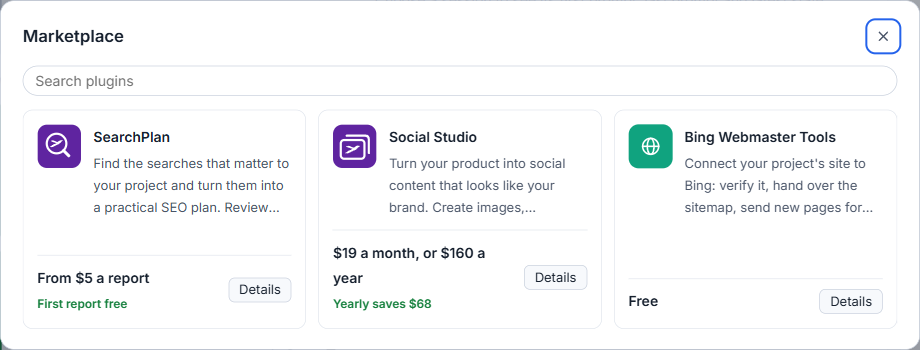
Plugins add tools for the business around your product, each naming its maker and its price.
The Marketplace is where the studio gets tools for the business around your product: keyword research, social posts, search engine connections. They are plugins. Your plan pays for the studio itself, and a plugin is never included in it. Some plugins are free, some have a price of their own, and every one names its maker.
Partly built. Four plugins are in the current studio: SearchPlan, Social Studio, Chat Agent and Bing Webmaster Tools. Update an older studio first. Two Google connections are written but not in the studio yet. Marketing and sales tools are planned and sold nowhere.


Open it
Click Marketplace in the top bar, beside the settings. The list shows each plugin as a tile with its maker and its price line. Open one to read what it does, what it needs and what it costs. A box searches the list, and the categories Marketing, Sales, App release and Tools filter it. There is nothing to install: a plugin is part of the studio.
Who makes them, and what they cost
The three plugins in the studio are made by AigoPilot Labs, and the name stands on each one's page.
- SearchPlan is paid in credits, one credit for one report, and the first report of every account is free. See SearchPlan.
- Social Studio is a subscription of its own, by the month or the year. See Social Studio.
- Bing Webmaster Tools is free, and the two Google connections will be free too. See Free site tools.
Your account, and who does the AI work
A free plugin needs no aigopilot.com account. A paid one does, and you link it once: choose Link to my account in the plugin, the studio shows a code, your browser opens aigopilot.com, and you confirm that the same code is on the page. Credits and subscriptions are bought on the plugin's page of your account there, and the studio shows the result when you come back.
What a plugin asks of an AI model runs on your own subscription, the Claude Code, Codex or Grok account you choose for the project. It never runs on a key of ours. If that account is signed out or reaches its limit, the work waits. The plugin does not move to another account behind your back. A plugin that reads your project reads a filtered copy that leaves out files of secrets, and it does not change the project.
What is not built
Chat Agent puts a chat button on your site that answers visitors. It is in the current Windows studio and is sold per site, monthly or yearly, on the Chat Agent page of your account. Download the current Windows studio, including Chat Agent, from your member profile. An active studio plan is required, and the download becomes available two days after purchase. The link is also emailed when it is due. The studio does not update itself; use the current installer to update an older studio. The plugin pages also list work that is only planned: a marketing tool for landing pages, articles and email campaigns, and a sales tool with Stripe figures. None is in the studio and nothing is sold for them.
For where your data goes when a plugin runs, read Where your data lives and what leaves your computer.
Small tips
Filter the Marketplace by what you need
The search box and the category buttons narrow the tiles. Open Details on a tile for what it does, what it needs and what it costs before you link an account.
Questions
Is a plugin included in my AigoPilot plan?
No. The yearly and the lifetime plan pay for the studio. A plugin is free or has its own price.
Whose AI subscription does a plugin use?
Yours. The Claude Code, Codex or Grok account you choose for the project does the AI work, never a key of ours.