Every session in one window
Run several Claude Code sessions at once, in as many projects as you like, and see what each one is doing without a wall of terminal tabs.

Every Claude Code session on your Linux machine, in one window.
Run several Claude Code sessions at once across your projects on Ubuntu, Debian, Fedora, Arch or Mint, see which one needs you, and answer from one place. Codex and Grok sit in the same window.
Get AigoPilot Available for Windows 10 & 11, macOS 13.3+ and Linux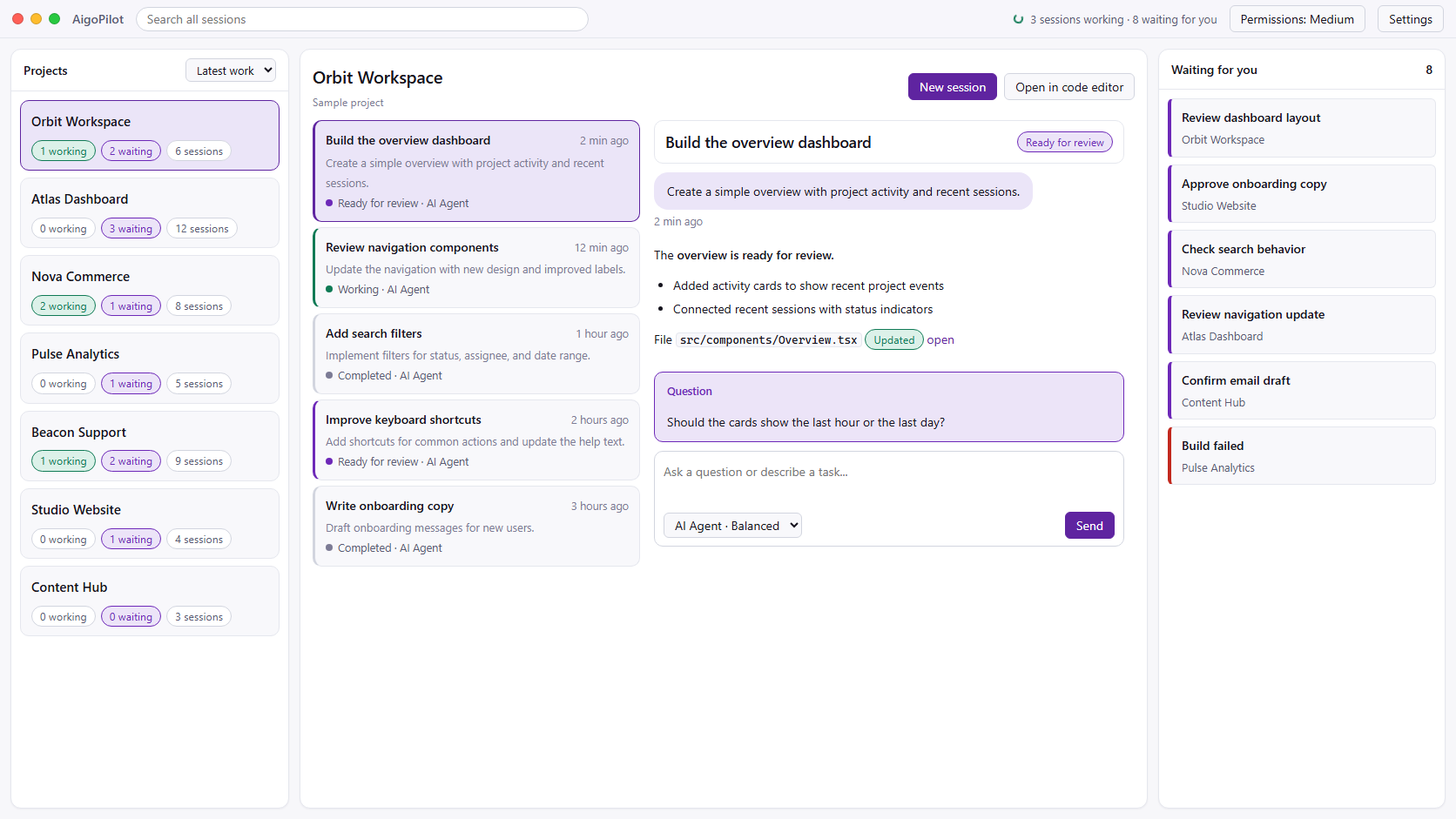
 Claude Code
 Codex
Codex GrokYour subscriptions. Your machine. Your control.
The same Claude Code you run in a terminal, with every session of every project in view.
Run several Claude Code sessions at once, in as many projects as you like, and see what each one is doing without a wall of terminal tabs.
A desktop notification when a session finishes, stops midway, or waits for your answer or permission. You choose which notices each project gets.
An AppImage for Fedora, Arch, Mint, RHEL and the rest, and a .deb for Ubuntu and Debian. One program, x86_64, glibc 2.35 or newer.
Keep OpenAI's Codex and xAI's Grok in the same list as Claude Code, so one agent can build while another reviews.
The same program runs as an agent over SSH. Drive its sessions from the studio on your laptop, whether that is Linux, Windows or a Mac.
Sessions, email and sales data stay on your own machine. No AigoPilot cloud account is needed to see your work.
AigoPilot does not replace Claude Code. It runs it.
AigoPilot starts Anthropic's official Claude Code CLI on your Linux machine, with your own Pro, Max, Team or Enterprise plan. Your CLAUDE.md files, settings, hooks and MCP servers work as they always do, because it is the same program. AigoPilot never asks for an Anthropic API key and never reads your sign-in.
If Claude Code is not installed yet, you can install it the way Anthropic documents it:
curl -fsSL https://claude.ai/install.sh | bashThen install AigoPilot. Download the AppImage, make it runnable with chmod +x and start it, or install the .deb with sudo apt install ./AigoPilot-*.deb. The AppImage keeps itself up to date. Every step, and the setup of a server, is in installing AigoPilot on Linux.
The downloads are free. The studio works with an AigoPilot account that has a plan, and the same plan covers up to three computers on Linux, Windows and the Mac.
Anthropic's own app came to Linux as a beta. Here is when each one fits, as each maker's docs say on 23 October 2026.
| Claude desktop app for Linux (beta) | AigoPilot | |
|---|---|---|
| Price | Included with a paid Claude plan | 49 USD a year or 99 USD once, plus your Claude plan |
| Distributions | Ubuntu 22.04 or newer and Debian 12 or newer; on Fedora or Arch, Anthropic points to the CLI | Any x86_64 Linux with glibc 2.35 or newer, Fedora and Arch included |
| Processors | x86_64 and arm64 | x86_64 only |
| Agents | Claude Code | Claude Code, Codex and Grok |
| A server without a desktop | Reaches remote machines over SSH from the app | Runs on the server as an agent, driven from a studio on another computer |
| After the build | No | Plugins for keyword research, social posts and a support chat |
If you only use Claude Code on an Ubuntu or Debian desktop, the official app may be all you need. If you run several agents across several projects, on Fedora or Arch, or on servers you reach over SSH, AigoPilot is built for that. Sources: Claude Desktop on Linux and Claude Code setup, Anthropic's docs. Conductor, a free tool for the Mac, is not available for Linux yet, by its own installation docs.
Yes, there are two. Anthropic's own Claude desktop app has a Linux beta for Ubuntu 22.04 or newer and Debian 12 or newer. AigoPilot is an independent desktop app that runs Claude Code on any x86_64 Linux with glibc 2.35 or newer, including Fedora and Arch, next to Codex and Grok.
Any x86_64 distribution with glibc 2.35 or newer: Ubuntu 22.04 or newer, Debian 12, Fedora, Arch, Linux Mint 21 or newer, and RHEL or Rocky Linux 9. The .deb is for Ubuntu and Debian, and the AppImage runs on the others. There is no ARM build yet.
No. AigoPilot starts Anthropic's official Claude Code CLI, which signs in with your own Claude Pro, Max, Team or Enterprise plan, the same way it does in a terminal. AigoPilot never asks for an API key and never reads your login.
Yes. The same AigoPilot program runs as an agent on a server you reach over SSH, with no window. A studio on your Windows PC, Mac or Linux desktop pairs with it by six digits and drives its Claude Code, Codex and Grok sessions as if they were local.
The download is free, and the studio works with an AigoPilot account that has a plan: 49 USD a year or 99 USD once, on up to three computers, on Linux, Windows and Mac alike. A free seven-day trial is available on request in the chat on aigopilot.com.
Conductor's own installation docs say it is not available for Linux yet (checked on 23 October 2026). AigoPilot runs several Claude Code and Codex sessions side by side on Linux today, on your own computer, with your own subscriptions.
