Several agents, one window
Run several Codex and Claude Code sessions at once, with Grok too, and see which one is working, finished or waiting for you.

Your Codex sessions on Linux, next to everything else.
Run Codex next to Claude Code and Grok on your Linux desktop or server. Every session of every project in one window, and a desktop notification when one needs you.
Get AigoPilot Available for Windows 10 & 11, macOS 13.3+ and Linux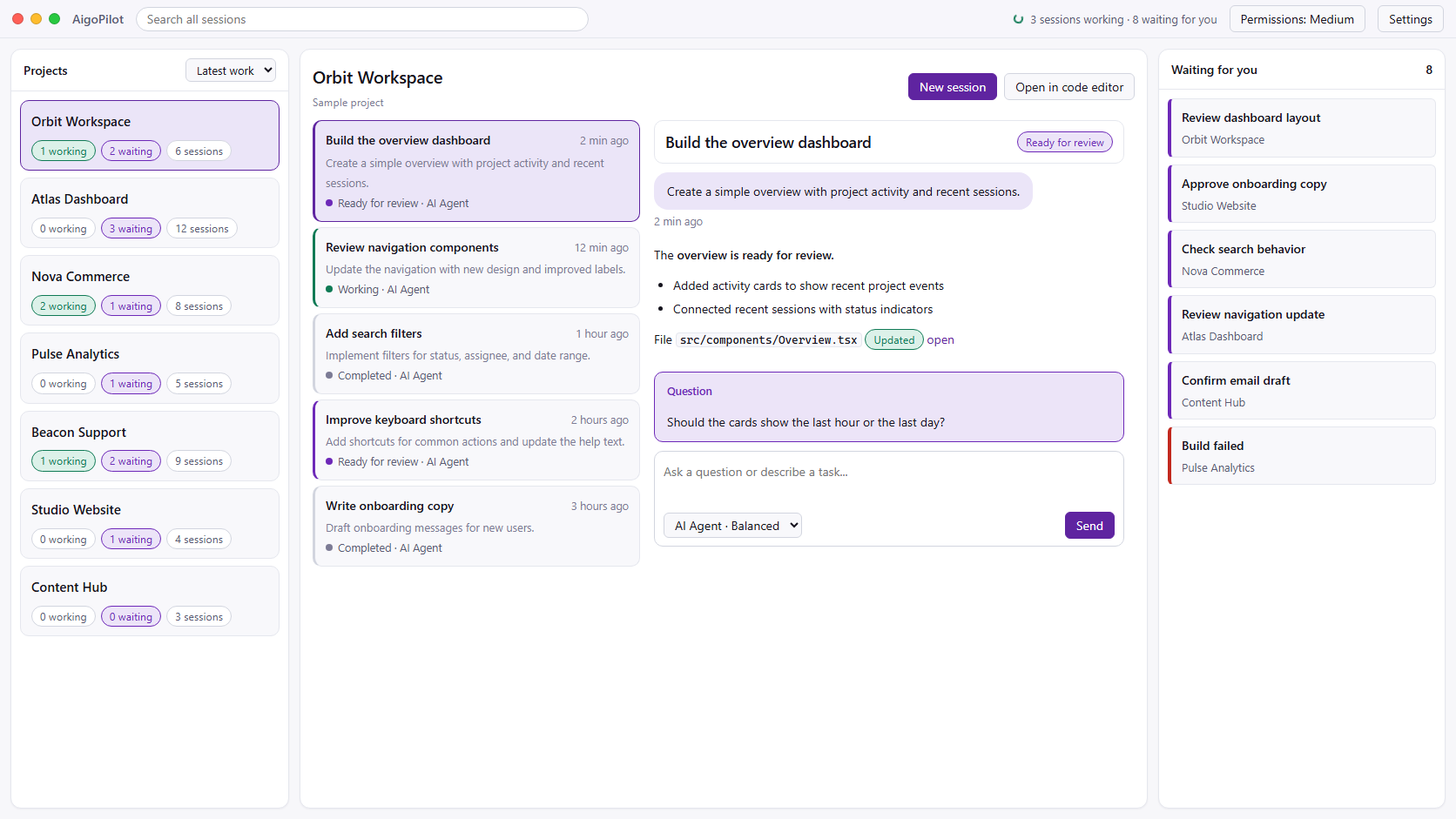
 Claude Code
 Codex
Codex GrokYour subscriptions. Your machine. Your control.
What OpenAI ships for Linux, as its docs say on 23 October 2026.
The Codex CLI runs on Linux, and OpenAI's standalone installer is one line in a terminal:
curl -fsSL https://chatgpt.com/codex/install.sh | shRun codex in a project folder and choose Sign in with ChatGPT. Codex comes with the ChatGPT plans that include it, or it can run on an API key.
OpenAI's ChatGPT desktop app for Linux, which includes Codex, is in preview for Ubuntu 24.04 and 26.04, Debian 13, Fedora 43 and 44 and Arch Linux, on x64 and ARM64. Computer use is not in the Linux preview yet. Source: ChatGPT desktop app for Linux, OpenAI's docs.
If you only use Codex, on one project at a time, OpenAI's own app may be all you need. AigoPilot is for the moment that stops being true.
Your Codex sessions in the same window as Claude Code and Grok, across every project.
Run several Codex and Claude Code sessions at once, with Grok too, and see which one is working, finished or waiting for you.
A desktop notification when a session finishes, stops midway, or waits for your answer or permission, chosen per project.
Codex runs through its own app server, so every command and file change it wants to make is judged by the studio's permission rules, as Claude Code's are, and asks you when the rules say so.
Ubuntu 22.04, Debian 12, Mint 21, RHEL and Rocky 9 work, besides the newer ones: any x86_64 Linux with glibc 2.35 or newer.
Run AigoPilot as an agent on a Linux server and drive its Codex sessions from the studio on your laptop, Linux, Windows or Mac.
Sessions, email and sales data stay on your own machine. No AigoPilot cloud account is needed to see your work.
Download the AppImage for any distribution, or the .deb for Ubuntu and Debian. Both are free, and both hold the same program. The studio then works with an AigoPilot account that has a plan, on up to three computers.
The first-run setup finds Codex and Claude Code on the machine, and installs a missing one with its maker's own installer after you say yes. Codex signs in with your ChatGPT account, in Codex's own sign-in. Every step is in installing AigoPilot on Linux.
Codex and Claude Code make different mistakes, which is why many people keep both: one builds, the other reviews. Choosing between them? Read Codex vs Claude Code. On Windows instead? See Codex on Windows.
Yes. OpenAI's ChatGPT desktop app for Linux, which includes Codex, is in preview for Ubuntu 24.04 and 26.04, Debian 13, Fedora 43 and 44 and Arch Linux, according to OpenAI's docs on 23 October 2026. AigoPilot is an independent app that runs the Codex CLI on any x86_64 Linux with glibc 2.35 or newer, Ubuntu 22.04 included, next to Claude Code and Grok.
OpenAI's standalone installer is one line in a terminal: curl -fsSL https://chatgpt.com/codex/install.sh | sh. Then run codex and choose Sign in with ChatGPT. AigoPilot can also install Codex for you with OpenAI's own installer, after you say yes.
Your own. AigoPilot starts OpenAI's official Codex CLI, which uses your ChatGPT plan or an API key you set up in Codex. AigoPilot never reads or reuses that sign-in.
Yes. Run AigoPilot as an agent on the server and pair it with the studio on your Windows PC, Mac or Linux desktop. Codex signs in on the server with a code you type in your own browser, and its sessions show up in the studio like local ones.
Any x86_64 distribution with glibc 2.35 or newer: Ubuntu 22.04 or newer, Debian 12, Fedora, Arch, Linux Mint 21 or newer, and RHEL or Rocky Linux 9. There is no ARM build yet.
The same as anywhere: 49 USD a year or 99 USD once for a lifetime licence, on up to three computers. The Linux download itself is free, and your ChatGPT plan is paid to OpenAI.
