
The thirteen permission groups
Every request of a session falls into one group, and a mode is a list of which groups go through by themselves.
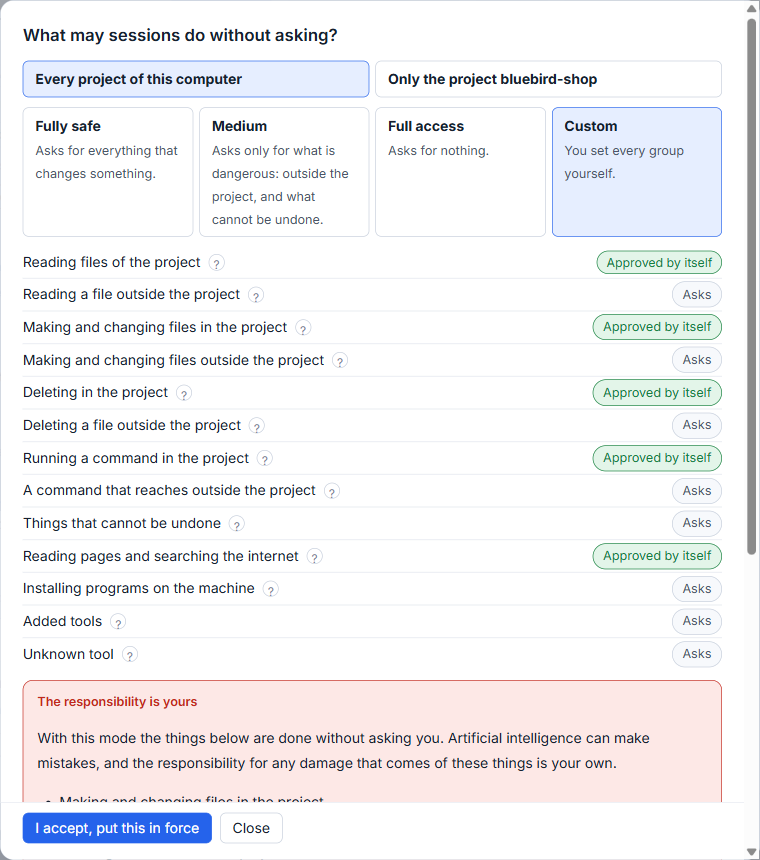
Everything a session wants to do falls into one of thirteen permission groups. A mode is nothing more than a list of which groups go through by themselves and which ask you. Once you know the groups, you can read any permission card at a glance and set a mode to match how well you trust a project.
The groups split by place as much as by action: deleting a file inside the project is a different question from deleting a folder outside it.
The thirteen groups
The last column shows what Medium, the mode in force until you choose another, does with each group. The small question mark beside a group in the permissions window says the same things in the studio's own words.
| Group | What it covers | In Medium |
|---|---|---|
| Reading files of the project | Claude Code never asks about this, in any mode. | Approved by itself |
| Reading a file outside the project | Any file not in the project folder, such as the files of your user folder. Files you attach yourself count as part of the project. | Asks |
| Making and changing files in the project | Writing a new file or changing one inside the project folder. | Approved by itself |
| Making and changing files outside the project | Writing anywhere else on the machine, such as program settings or your other projects. | Asks |
| Deleting in the project | A file or folder inside the project. If the project is in git, what was committed comes back and what was not does not. | Approved by itself |
| Deleting a file outside the project | One file outside the folder. A whole folder is in the group below. | Asks |
| Running a command in the project | Building, running tests, working with git, anything that touches the project folder only. | Approved by itself |
| A command that reaches outside the project | A command that names a place outside, or one the studio could not read well enough to know what it touches. | Asks |
| Things that cannot be undone | Deleting a folder with all that is in it outside the project, tools for disks and drives, commands that empty a database, a forced push that erases the work of others. | Asks |
| Reading pages and searching the internet | Nothing on your machine is deleted or changed. | Approved by itself |
| Installing programs on the machine | For the whole machine. Packages of the project itself are part of running a command in the project. | Asks |
| Added tools | Tools added by an extension, such as a connection to email or a browser. The studio does not know what each does. | Asks |
| Unknown tool | A tool this version of the studio does not know. | Asks |
Switch groups one by one
In Custom mode the words Approved by itself and Asks beside each group become switches. Click one and it turns to the other. Reading the files of the project cannot be switched. Custom begins from Medium's list, so a common first change is to leave everything alone and move one group. The red card follows your switches as you go, and you must still click I accept, put this in force before the list counts.
Asked once, not ten times
When you allow a request, the same request is not asked again in that session, after you continue the session, in other sessions, and after the studio restarts. The same means the same tool with the same input; the model's own description of a command does not count. One group is the exception: things that cannot be undone are asked every time. A refusal is not remembered.
The box Also for similar cases on a card goes further. It writes a rule of the project, and the card says in one plain sentence what the rule covers: every command that begins with some words, reading or changing any file in a folder, every page of a site, or every use of one tool. For commands that delete, reach outside the project, install, or cannot be undone, a rule that allows is not offered, because a rule knows how a command begins and not where it reaches. Refusing can be kept for such a group; allowing is asked every time.
The rules live in .claude/settings.local.json of the project, so Claude Code obeys them in a terminal as well. At the end of the permissions window the part Rules of the project lists them, and Take this rule out removes one.
A folder outside that belongs to the project
Sometimes a command is outside only because of one folder, say your notes next to the project. The card then offers to make that folder part of the project: any work in the folder and the folders in it, as in the project itself. Reading, changing and running commands there are judged as if inside. Deleting the folder itself is not treated as inside: it stays in the groups for deleting outside the project, so Medium still asks. The folder is kept in the project's list of extra folders and appears among its rules, so you can take it out.
For the modes that use these groups, see The four permission modes.
Small tips
Hover a group for its exact meaning
Each group in the permissions window has a small question mark that says in the studio's own words what the group covers. Read it before you switch a group in Custom.
Start Custom from Medium
Custom begins with the list of Medium. Change only the group you care about, such as making and changing files outside the project, and the red card shows the result before you accept.
Take a rule out in one click
Every rule kept for the project, including a folder made part of it, is listed at the end of the permissions window. Take this rule out removes it from the settings file.
Questions
Why am I asked about the same thing twice?
You should not be. A request that you allowed is not asked again in that session, after you continue it, or in other sessions. The one exception is the group of things that cannot be undone, which is asked every time.
Where are the rules I keep with Also for similar cases?
In the file .claude/settings.local.json of the project, so Claude Code obeys them in a terminal too. The end of the permissions window lists them, each with a button to take it out.