
Answering permission cards and questions
A session that needs you stops at a card. Here is what is on it and what each button does.
When a session wants to do something your permission mode does not allow by itself, it stops and waits for you. A card appears above the prompt box, the session shows Waiting for your answer, and the request also lands in the Waiting for you list, so you can answer from any project. The same goes for a question the session puts to you.
Which requests reach you at all depends on the mode of the project. That part is in permission modes; this article is about answering what does arrive.
Read the card before you decide
The card is headed Asks for permission. It names the tool and shows the whole command or the whole change, not a shortened version. A line under it says why it asks, for example "Why it asks: Making and changing files outside the project", which is the group the request belongs to (see permission groups). Details opens the complete request as the tool sent it.
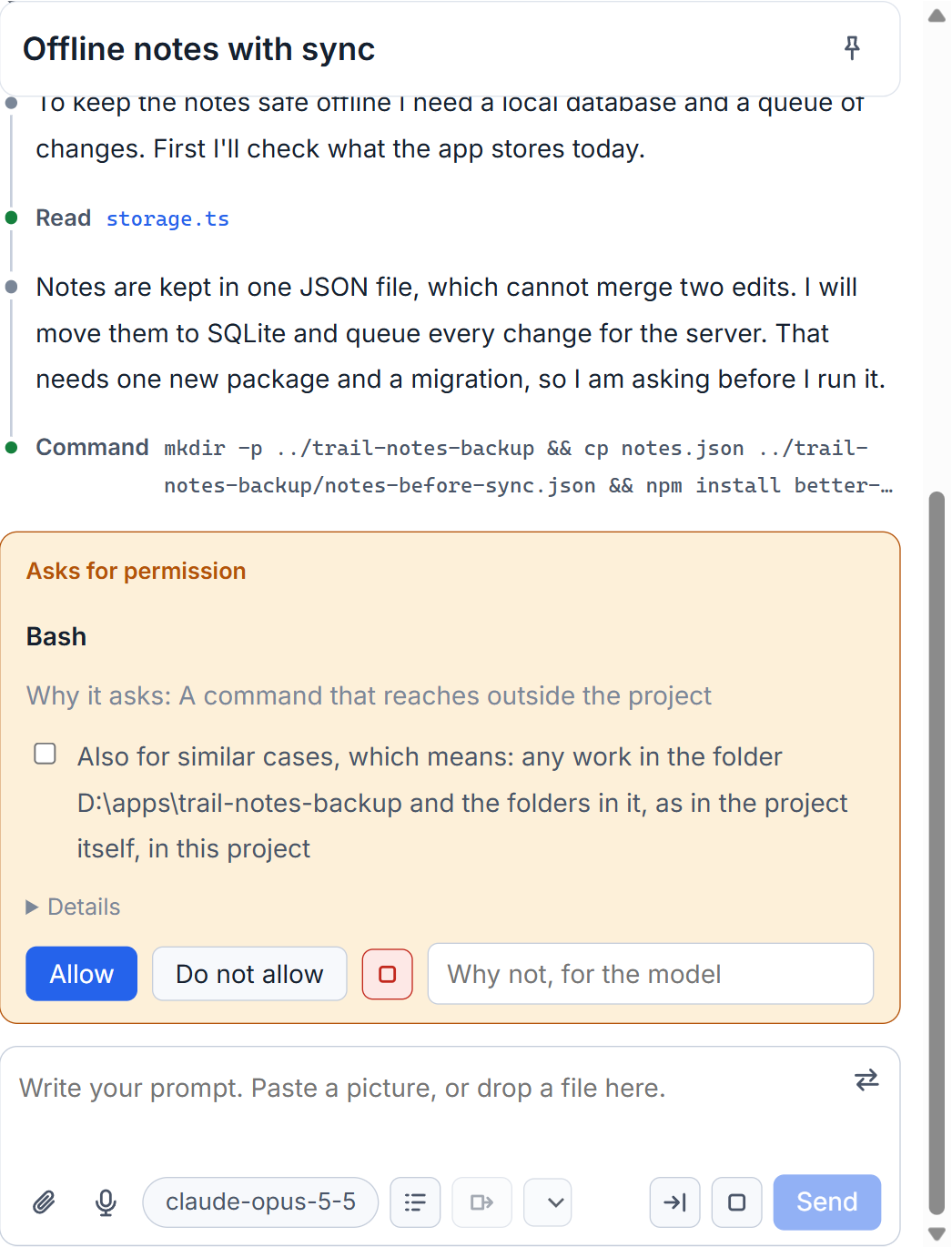
Cards look the same for Claude Code, Codex and Grok: each request of each tool is judged by the studio and shown in one way.
Allow, refuse, or refuse and stop
- Allow lets this one request go through.
- Do not allow refuses it. The field beside it, "Why not, for the model", is passed to the session with the refusal, so it knows what you wanted instead.
- The square button next to them is "Do not allow, and stop": it refuses and interrupts the turn in one click.
If you stop a turn with Stop after this step while a card is open, the card is refused for you, with a reason.
Allow a whole kind of request
Many cards carry a check box: "Also for similar cases, which means: every command that begins with ..., in this project". Tick it before you answer and the studio keeps a rule for the project. Next time a request of that kind passes without a card.
The rules are listed in the permissions window under "Rules of the project", each with a button to take it out. They are written to the project's own settings file, so they hold outside the studio too.
Not every request can have a rule. When one cannot, the card says why in one line: it is several commands in one, or it reads where keys or passwords are kept, so it is asked every time. For some groups only a refusal can be kept for similar cases.
For a session that reads outside the project there is another box: "Until this session ends, do not ask before it reads outside the project". It covers only looking: reading, listing, searching, fetching a page. Keys and passwords are still asked about, and so is anything that writes, deletes, installs or sends. While it is on, a lit sign in the row under the prompt box says "Until this session ends it reads outside the project without asking". One click on it and the session is asked again.
Plans from plan mode
In plan mode the card is called "The plan of this session" and shows the plan as text. Allow lets the session start the work. Do not allow, with a reason in the field, makes it plan again. Nothing is changed until you allow. Plan mode itself is explained in model, effort and plan mode.
Questions as a form
When Claude Code asks you something, the card is headed "Question from the model" and is a form. Each question lists its options as buttons: pick one, or several when the question allows it. Under them is an "Another answer" field for your own words. Send answer is available once every question has an answer.
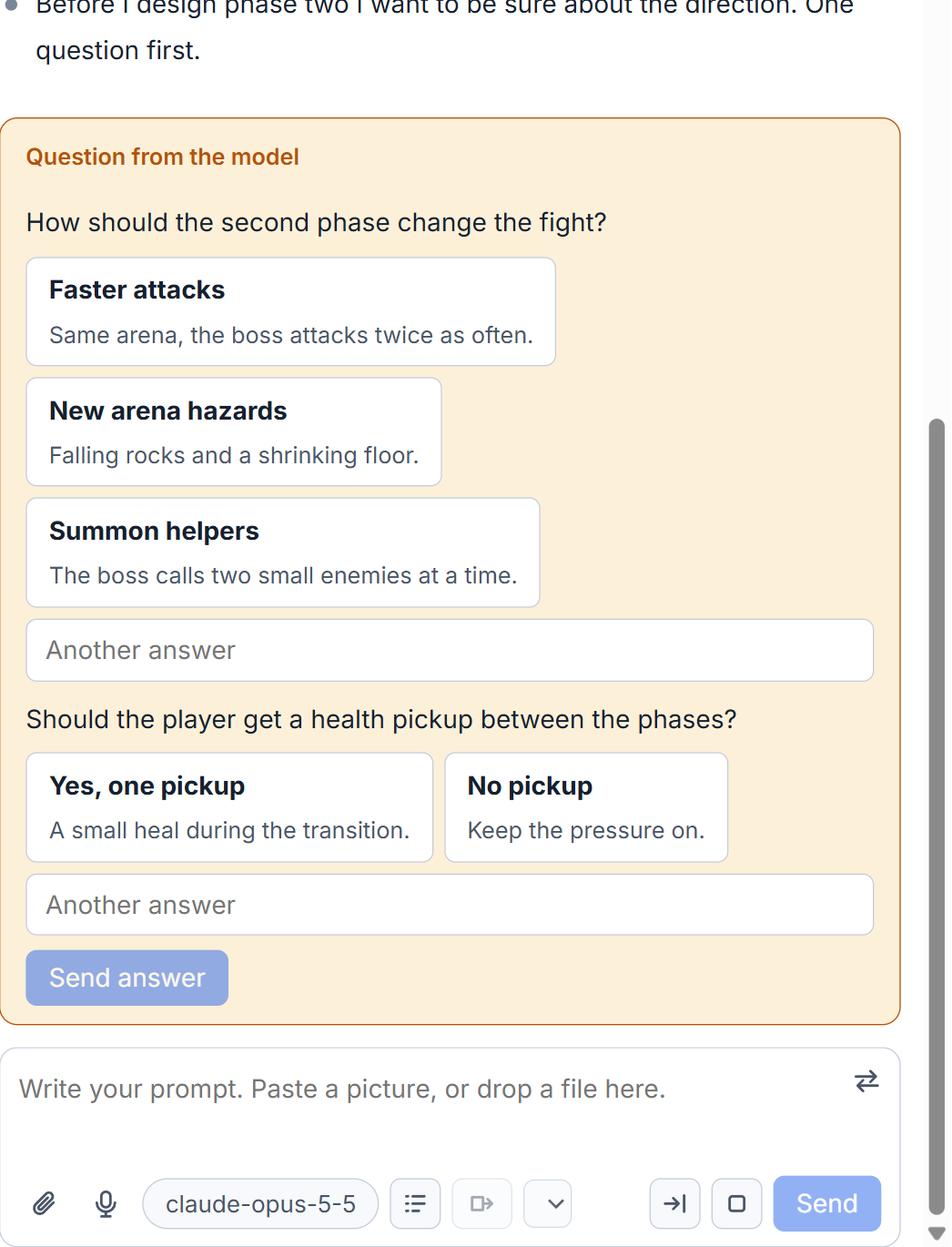
A kind of request the studio does not know still gets a card with the raw request and a box, "Write your answer". Codex questions are different: a question Codex recorded is shown as a message in the conversation, not as a form you can answer.
Small tips
Tell the model why you refused
The field Why not, for the model travels with the refusal. A short reason such as use the existing helper instead lets the session pick another route instead of asking again.
Stop being asked about reads outside the project
When a read outside the project is asked, tick the box that lasts until this session ends. Keys and passwords, and anything that writes, still ask. A sign under the box takes it back.
Questions
Can I allow a kind of command once and for all?
Tick Also for similar cases on the card before you answer. The studio keeps a rule for that project, listed under Rules of the project in the permissions window, where you can take it out.
Why does a card sometimes have no check box for similar cases?
Some requests cannot be described by a rule, for example several commands in one, or a read of where keys are kept. The card says why, and it is asked every time.