
Your limits in the title bar
The top bar shows the fullest limit of each tool, as the tool itself reports it, and says unknown where it does not know.
The top bar of the studio shows how full your usage limits are, as a percent, for Claude Code and for Codex. It is the number the tools themselves report, so you see it before a session stops with a limit message, and you see it for work you do outside the studio as well.
Nothing here is guessed. Where no number is known, the chip says so instead of showing a made-up one.
Read the chip
The chip sits in the top bar, between the Reminders chip and the permission button. For each tool it shows the fullest window the tool has reported, for example Claude weekly 41% or Codex five-hour 12%. Past 80 percent it turns orange, and past 95 it turns red. When Claude Code has not said anything yet it reads Claude limit: unknown. Codex is named only once you have used it on this computer, and Grok has no chip because Grok's own limit numbers are not read.

If you have several accounts of a tool, the chip shows the fullest window among them. The usage window lists them one by one (see The usage page), and a project's account is chosen as described in Using several subscriptions for one tool.
Click the chip to open the Usage window.
Where the numbers come from
For Claude Code, every session in the studio reports the percent to it. Between sessions the studio asks Claude Code's own usage command, once a minute by default. That command is free: no model is called, no turn is spent and no session file is left. For Codex, the numbers are read from the limits that Codex writes into each of its session files.
You can change how often Claude is asked, and ask at once:
- Click the chip to open Usage.
- Under Limits of the accounts, click Ask Claude for the percent to read it now. The line beside it says Read, at no cost.
- Next to Refresh by itself, choose every minute, every 5 minutes or off, only with the button.
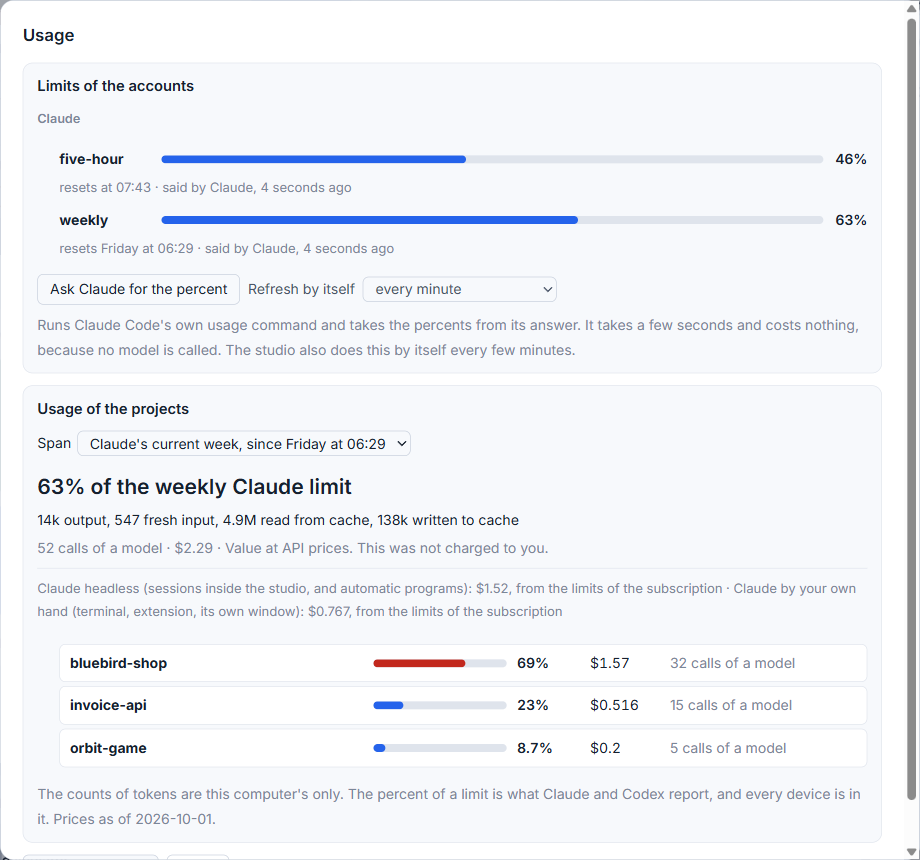
If a version of Claude Code does not answer the usage command, the studio falls back to the cheapest model with a one-word message and tells you what that was worth at API prices, so a cost is never hidden.
When the number is unknown
Claude does not give the percent to sessions of the VS Code panel. If you work only there, the chip stays unknown until you give a Claude session in the studio its first prompt, or press the button above. For work in a terminal, the optional status line keeps the percent fresh (see Guarding sessions you start outside AigoPilot).
A window that has reset can leave an old number behind. The usage window says then that the window has reset, no new number has come, and what the last one was and how long ago.
When a percent is high, what to do when you hit a usage limit lists the choices.
Small tips
Press Ask Claude for the percent for a fresh number
In the Usage window, the button under Limits of the accounts reads the percent at once. It takes a few seconds and costs nothing when this version of Claude Code answers its usage command.
Change how often the studio asks Claude
The list next to Refresh by itself offers every minute, every 5 minutes, or off. Off means the number changes only with a session or with the button.
Watch for orange and red in the chip
The chip turns orange from 80 percent and red from 95 percent of the window it shows, which is the fullest window the tool has reported.
Questions
Does reading the limit cost me anything?
No. The studio asks Claude Code's own usage command, which calls no model and uses none of your allowance.
Why does the chip say the limit is unknown?
Claude does not give the percent to sessions of the VS Code panel. It arrives with the first prompt you give a Claude session in the studio, or when you press Ask Claude for the percent.