
Using several subscriptions for one tool
Each account is a folder of one tool with its own sign-in. Each project picks one account per tool, and a session keeps its own.
You can add as many accounts of Claude Code, Codex and Grok as you have, and give each project the account it should work with. This is for people who keep a work subscription and a personal one, who work for several clients on separate plans, or who simply want a second Codex plan to take over when the first is full.
An account in AigoPilot is a folder that belongs to one tool, plus the sign-in the tool keeps in it. The studio never signs in for you and never reads what a tool stores there. It starts the tool pointed at that folder, and the tool does the rest.
Add an account
- Click the gear in the top bar to open Settings.
- Under More, click Accounts. The window Accounts and pockets opens with one part for each tool installed on this computer.
- In the part of the tool, type a name under Name of a new account, for example Work.
- Click Add account. The tool's own sign-in window opens.
- Finish signing in there. The studio asks the tool every two seconds, for up to five minutes, and the line under the account turns to the signed-in state.
The new folder is made inside the studio's own data folder, in a subfolder named accounts. Each tool also keeps its usual account, which is the folder it always used (~/.claude, ~/.codex or ~/.grok). It is listed first and cannot be renamed or forgotten.
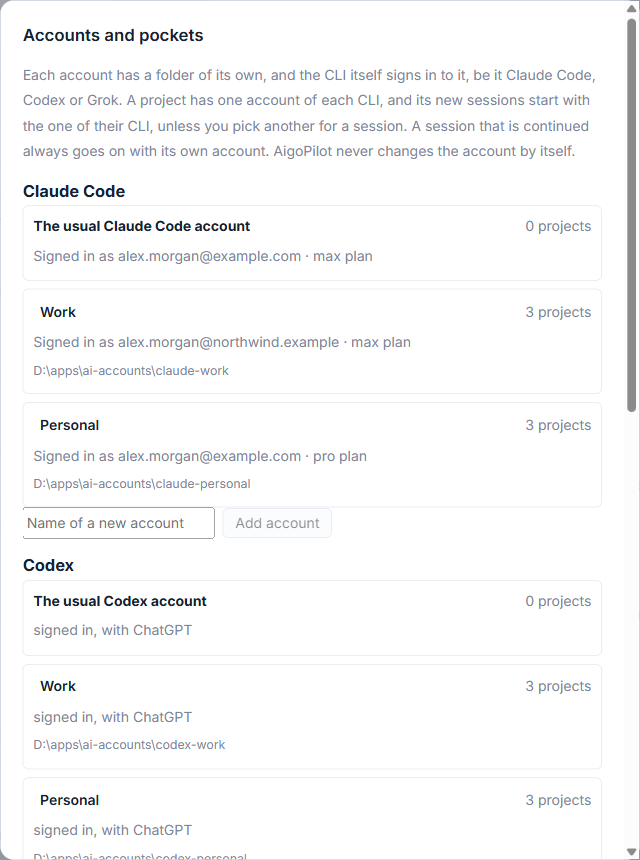
You can rename an account by typing over its name, and Forget removes one from the list. Forget only appears for an account no project uses, and it leaves the folder and its sign-in where they are.
Choose the account of a project
Each project has one account for each tool. You choose them when you add the project, where the form asks Which Claude Code account do the sessions of this project run with? (with the name of the tool), and you can change them later in the project's settings. The question appears only for a tool that has more than one account, so nobody is asked about a tool they use with a single login.

A new session starts with the project's account for the tool it uses. In the New session form you can pick another account for that one session; the project's own is marked (the project's).
What a session keeps
A session that you continue always goes on with the account whose folder holds its transcript. The studio does not move it to another account, even when you changed the project's account since. Open the session and a chip in its header says Account: and the name; the chip is shown only when the tool has more than one account.
The studio never changes an account by itself. When an account reaches its limit, nothing is switched for you: see When you hit a usage limit for what to do.
Limits stay with their account
Limits are filed under the account that reported them, and the usage window lists them account by account (see The usage page). For Codex this has a practical effect. When the plan of one Codex account is full, only prompts that go to that account wait for your word about spending bought credit. Sessions on your other Codex accounts keep working.
Who is signed in on each account, and which pocket pays for it, is explained in Who is signed in, and who pays.
Small tips
Rename an account where it stands
In the Accounts window the name of an account other than the usual one is a text box. Type over it and leave the box, and the new name is kept.
Pick another account for one session only
When a tool has more than one account, the New session form has an Account list. Your choice counts for that session only, and the project's own account is marked as the project's.
Forget an account without losing its sign-in
Forget appears beside an account only when no project uses it. It removes the account from the list and leaves its folder and its sign-in where they are.
Questions
Does a new account get the settings of my usual account?
No. A new account starts with an empty folder, so the default model, extension servers and similar choices have to be made again for it.
Will the studio move a session to another account when one is full?
No. A session goes on with the account whose folder holds its transcript, and the studio never changes an account by itself.