
Who is signed in, and who pays
The Accounts window asks each tool who is signed in, and every session says whether a subscription or a key pays for it.
AigoPilot shows, for every account of every tool, whether someone is signed in, and for every session which pocket pays for it: your subscription, a monthly credit of the provider, or an API key. This is worth a look the first time you set the studio up, and again whenever a session stops because nobody is signed in.
The studio never holds a login of its own. It asks each tool, with the tool's own commands, who is signed in, and shows the answer. No model is called for this, so asking costs nothing.
See who is signed in
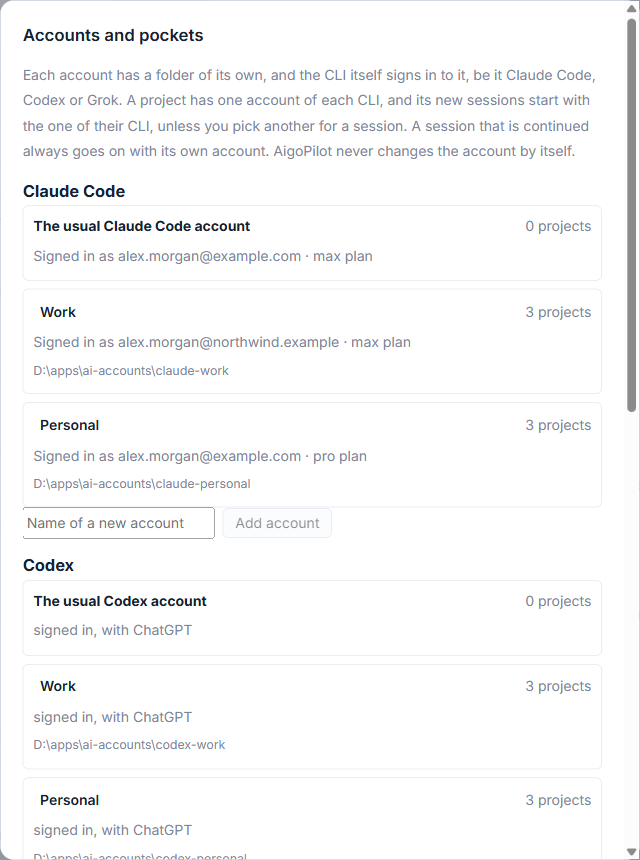
Open Settings with the gear in the top bar, then More, then Accounts. The window Accounts and pockets has one part for each tool on the computer, and under each account one line:
- For Claude Code: Signed in as the email address, and the plan, for example a Max plan.
- For Codex and Grok: signed in, with the way the tool signed in.
- For an account nobody has signed in to: Not signed in yet, in orange, with a Sign in button.
Hover the line to read the tool's own words about it. The studio asks the tools when it starts, when you open this window, and when a session fails because of its sign-in; it does not ask while it sits idle.
Sign in from the studio
- Click Sign in beside the account.
- Finish signing in in the window of the tool that opens.
- Wait a moment. The studio asks the tool every two seconds for up to five minutes, and the line changes when the sign-in has worked.
A session started with an account nobody is signed in to does not run. Under the box it says that the sign-in of the tool does not work, quotes what the tool itself said, and offers the same Sign in button. In the column of alerts the same news names the account, so that with two Grok accounts you read "Grok (Second)" rather than a bare "Grok". See The alerts column for how alerts are kept.
Which pocket pays
The header of a session carries a small mark: paid by: subscription, or paid by: key with the name of the key. The program itself reports this at the start of every turn. If it changes in the middle of a session, an alert says what it was and what it is now.
Below the accounts, a part named Which pocket pays for which way of running lists, for each tool, whether sessions run by your own hand (terminal, extension, the tool's own window), headless (sessions inside the studio and automatic programs) or through the studio's own paid keys take from the subscription, from a monthly credit of their own, or from an API key. Providers have changed such rules overnight before, so it is a table you can set. For Claude Code and Codex there is a choice for headless sessions: from the limits of the subscription (as it is today) or from a monthly credit of its own, then API rates.
A key in the environment
If Windows holds an API key variable for a tool, for example ANTHROPIC_API_KEY, that key would pay instead of your subscription. The studio takes the variable out of the environment of that tool's sessions, so the subscription pays, and raises an alert once to say so. If you want the key to pay, choose from that API key in the line that appears under the accounts for that tool.
Keys that you give the studio on purpose live in a separate window, Paid keys, in the same More list. They are kept in the Credential Manager of Windows and are not written to any file of the studio.
To add a second account first, see Using several subscriptions for one tool.
Small tips
Hover a sign-in line to read the tool's own words
The line under an account shows a short state. Hover it and the tool's own wording of that state appears, which helps when a sign-in fails for a reason the short line does not give.
Look for the paid by mark in a session header
The header of a session says paid by subscription or paid by key. The program reports it at the start of every turn, and an alert comes if it changes in the middle of a session.
Change which pocket pays for headless sessions
For Claude Code and Codex the Accounts window has a list for headless sessions: from the limits of the subscription, or from a monthly credit of their own, then API rates.
Questions
Why did the studio take my API key out of a session?
A key in the environment of Windows would pay instead of your subscription. The studio removes it from the sessions of that tool and tells you once. To let the key pay, choose from that API key in the Accounts window.
Does the studio read my login?
No. It asks each tool, with the tool's own commands, who is signed in. Signing in happens in the tool's own window.