
Pairing two computers with six digits
Six digits shown on one computer and typed on the other are the only step.
You add another computer to the studio with six digits that the other computer shows you. There is no AigoPilot account to sign in to, no server in between, no address to look up, no user name and no firewall rule. If both computers are on the same network, you type six digits and you are done.
This article explains what happens when you do that, and why it is safe to treat the digits as the only proof you need.
Add a computer
- On the other computer, open the agent and click Show six digits.
- In the studio, open Settings, then Computers. Under Add a computer the studio looks on your network, and lists each computer that has the agent open. Click yours.
- Type the six digits into the field Six digits and click Add.
If only one computer is found, it is chosen for you. If yours is not listed, click Look again, or I write the address or the code myself and type its address. A computer on another network is added with a code instead of an address; that case has its own article, Reaching your computers from another network.
The computer then joins the list, with a name and a color you can change. Setting up the agent itself is covered in Setting up a Mac as an agent and Setting up a second Windows PC.
How the computer is found
An agent announces its name on the local network, using the system's own service for this (Bonjour on a Mac, the service built into Windows on a PC). The studio asks for those announcements only when the Computers window opens and when you click Look again, never in the background. A computer that was paired before and later changed its address or port is found again by its id, so you do not pair it twice.
Why the digits are enough
The digits prove that whoever adds the computer is sitting at it. They are not a password that travels. Both computers use them to agree on a secret without sending them: anybody listening on the network learns nothing to guess against. The digits work for five minutes and for one pairing.
If you type the wrong digits three times, the computer makes new ones, so a stranger cannot try all one million. The studio says: "These are not the six digits that computer shows. After three wrong tries the digits change; read them again from that computer." If the computer shows no digits at that moment you are told to ask for new ones on it.
What stays locked afterwards
After pairing, each side keeps the other's public key. Every later connection is locked between those two keys, so nobody on the network, including the relay if you ever use it, can read or change what passes. The keys of each computer are kept in the Windows Credential Manager or the Mac Keychain where those work, not in the data file.
A computer that was never paired gets no answer at all, not even a word saying the engine is there.
The line is kept open. If it drops, because the computer slept or the network changed, the studio opens it again by itself.
Forget a computer
In the Computers window, Forget takes a computer out of the studio's list. It does not touch the computer or its sessions. It also does not change what the agent believes: the agent still has your studio in its list of paired studios. To cut the connection from the other side, open the agent's window and click Forget beside the studio. That studio can then reach the computer only after a new pairing with new digits.
When it does not answer
A computer that stops answering is named as out of reach, with the time it was last reached.
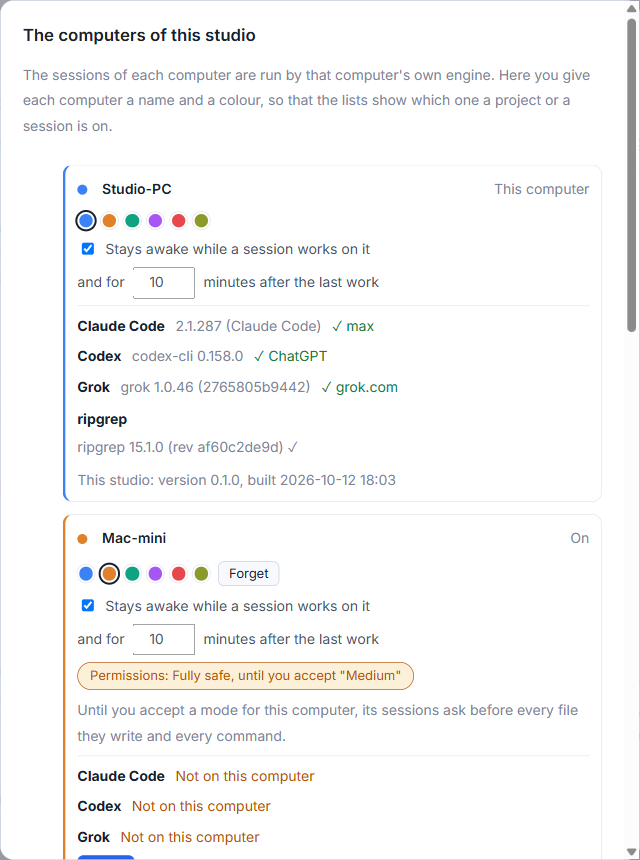
The projects on it stay in your list, paler, showing what was last read from it. When it is back, they come to life again. If the studio you are using is newer than the agent, it says the engine is old and has to be updated. See A computer is out of reach for the checks.
Small tips
Pick the computer from the list instead of typing an address
The studio lists the computers on your network that have the agent open. Click yours and only the six digits are left to type. Click Look again if it is not there yet.
Forget on both sides to cut a computer off
Forget in the studio only removes the computer from the studio's list. To stop a studio from reaching a computer, click Forget beside it in the agent's window on that computer as well.
Questions
Do I need an AigoPilot account to pair computers?
No. There is no account and no server in between. The computer you add shows six digits and you type them in the studio.
What if I type the digits wrong?
After three wrong tries the computer makes new digits, so read them again from that computer. The digits also expire after five minutes and work for one pairing.