
A computer says it is out of reach
The line is retried by itself. Here is what to check while you wait.
When a Mac or a second Windows computer that you paired with the studio stops answering, its row says Does not answer, with the time it was last reached. Its projects and sessions stay on screen, pale, showing what the studio last read from it. Nothing is deleted, and the rest of the studio works as usual. This page lists the causes in the order to check them.
What the studio does while a computer is away
The studio keeps one line open to each computer and tests it every 30 seconds, so a line that died without a word is found. When a line is down, the studio tries again after 1, 2, 4, 8 and 16 seconds, then every 30 seconds, and it never gives up. So a computer that comes back is picked up by itself, with nothing to press. A computer is known by an id its own engine chose, not by its name or address, so a changed address or a renamed computer is still the same computer.
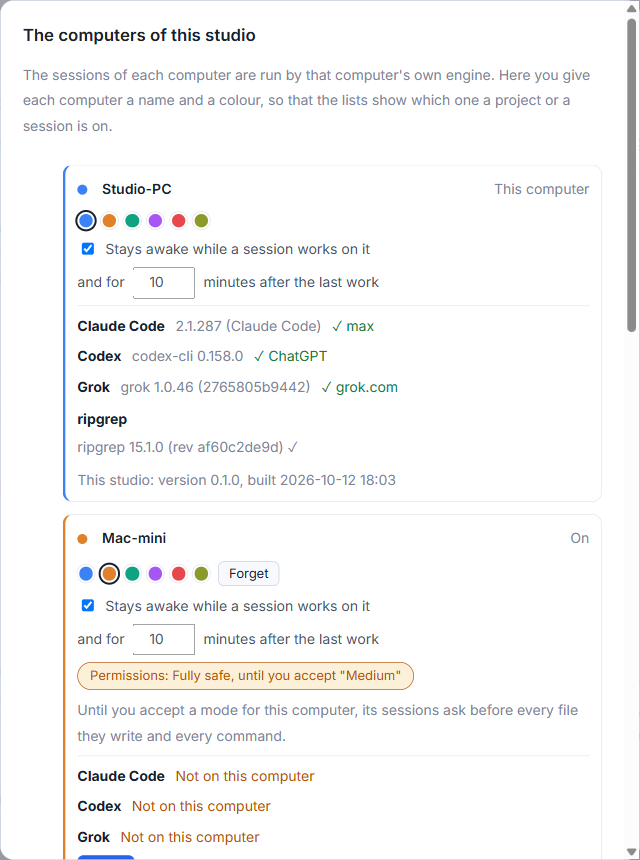
The list is in Settings, then Computers. A project on the away computer says: the computer does not answer, what you see is what was last read from it, and it stays so until the computer is back.
Check these, in order
- Is the computer on and awake? A sleeping computer does not answer. In the computer's settings you can keep it awake while a session works, and for some minutes after. That cannot hold a Mac awake with its lid closed.
- Is AigoPilot open there? The other computer answers only while its agent, or a studio, is running. Open the AigoPilot Agent. If the agent is not listening, its window says so.
- Is it on the same network? Finding a computer by name works only on one local network. If the computers are in different places, the agent can wait at a relay, and you pair with the code the agent shows beside its six digits, written where the address would go. See reaching your computers from outside.
- Did Windows ask about the network? The first time a program listens, Windows asks whether it may use the network. Allow private networks only. If you declined, allow the program in the Windows Firewall settings.
- Was it paired, and are the digits right? A message such as "Nothing answers at that address. Is that computer on, and on this same network?" means the studio found no one there. "These are not the six digits that computer shows" means the digits were wrong. After three wrong tries the digits change, so read them again from the other computer. The code is new each time the digits are shown.
- Are the two builds compatible? Two builds that cannot talk to each other are refused. See below.
Versions that do not fit
If the studio is older than the engine it reached, it says: "This studio is older than the engine it reached. Update the studio." If the engine is older, it says so and the agent needs an update. An agent from before updates could be sent by the studio is shown as "An older agent that does not name its build" and has to be replaced by hand once. After that it updates itself. For every case, see updates.
When nothing helps
In the studio, press Forget on the computer's row to take it out of the list. The computer itself and its sessions are not touched. Pair it again from Add a computer with new digits. In the agent's window, Forget next to a studio does the same on that side, and that studio can pair again with new digits.
The iPhone app has its own Check the connection, which tests the phone's network, the address and the studio in turn and says where the line breaks. If a Mac or laptop does not answer even after all of this, report it with both build lines.
Questions
Do I lose sessions when a computer is out of reach?
No. They stay on that computer. The studio shows what it last read, retries the line by itself, and updates when the computer is back.