
Processor, memory and programs a session left behind
Find out which session slows your machine, and close what an ended session left running.
An AI session does more than talk. It starts compilers, test runs, dev servers, sometimes a whole editor, and some of those keep running after the session is over. The Processor and memory window shows what each open session and the programs it started take from the computer right now, and which programs were left running by sessions that have ended.
It answers the usual question on a slow machine: is it the sessions, and which one?
Open the window
Select a project and click Processor and memory, next to New session and Workers. The window is named after the computer it is about, so if the project sits on a Mac or a second PC you see that computer's numbers, not your own.
Each project card also carries a small chip with the memory and processor its sessions take. It turns red when that is far above what is usual for the project.
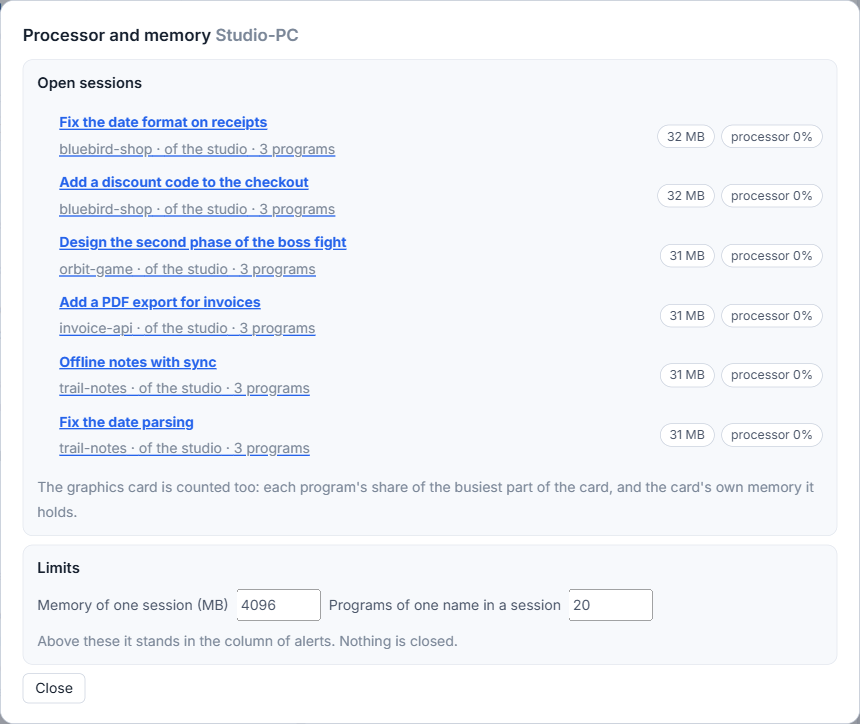
Read the list of open sessions
Under Open sessions, each row is one session with a program open on that computer. It shows the title, the project, whether it is a session of the studio or outside the studio (started in VS Code or a terminal), and how many programs it has. On the right are chips for memory, processor and, when it uses the graphics card, graphics.
- Memory is shown in MB or GB. A chip turns red when the session is above the memory limit.
- Processor is a percent of one core. On the first look it says "at the next look", because a figure needs two readings to compare.
- Graphics on Windows is the program's share of the busiest part of the card, and the card's own memory it holds. On a Mac the window says why a figure is unknown.
Click a row to open it and see every program of that session, with its name, number and its own memory and processor. The window reads again every five seconds, but only while it is open and in view.
Programs left behind
When a session ends, programs it started can keep running. The studio remembers what it saw in each session's tree. A program that is still running while its session is gone appears in a separate box titled Left behind, under the session it came from, with its memory and processor. The box appears only when there is something in it. The list is kept in the studio's data file, so a restart does not forget it.
Nothing is closed by itself. To close one, click Close beside it. The studio asks: "Close "name"? Whatever it has not saved is lost." Click Yes, close to go on. Close all does the same for every program in the box, after one question.
Set the limits
At the bottom of the window, under Limits, two numbers decide when the studio tells you:
- Memory of one session (MB), 4096 unless you change it.
- Programs of one name in a session, 20 unless you change it.
Type a new number and leave the field; it is saved. Above a limit, an alert appears in the column of alerts: a session's memory above the limit, too many programs of one name under a session, or programs left behind. The studio checks about once a minute. The limits only tell. They do not stop or close anything.
For background programs that you want to keep, see Background workers of your projects. The alerts feature page has the overview.
Small tips
Click a session to see its programs
A row shows the totals of one session. Click it to open the list of every program it started, each with its own memory and processor share, largest first.
Look for the red chip on a project
Each project shows the memory and processor its sessions take now. The chip turns red when that is far above what is usual for the project, before you open any window.
Raise the memory limit for a heavy build
If a session legitimately needs more than 4096 MB, type a larger number under Limits and leave the field. The alerts then fit your work instead of repeating.
Questions
Will the studio close programs by itself?
No. A program is closed only when you click Close and answer yes, and only if it is in the Left behind list at that moment.
Does the limit stop a session that uses too much memory?
No. The two limits only raise an alert in the column. Nothing is stopped or closed because of them.