
Alerts to your own Telegram bot
Your own bot, your own chat, and notes that never contain the conversation or code.
The studio can send the same short notes that Windows notices carry to a Telegram bot that you made yourself. Your phone then buzzes when a session finishes or needs you, even when you are away from the computer and the iPhone app is not set up. The note says which project and session it is about and what happened. It never contains the conversation or any code.
Partly built. The Telegram part is built and tested against a stand-in for Telegram. Only notices go today, plus reminders that come due and workers that did not start after Windows started. Memory, limits and the other kinds of alert do not go yet.
Make the bot
The bot is yours. Nobody at AigoPilot runs it or sees it.
- In Telegram, open a chat with BotFather, Telegram's own bot for making bots, and create a new bot.
- BotFather ends by giving you a key that looks like
123456:ABC.... Copy it. - Open a chat with your new bot and send it any message. This is how the studio will find your chat.
Connect it to the studio
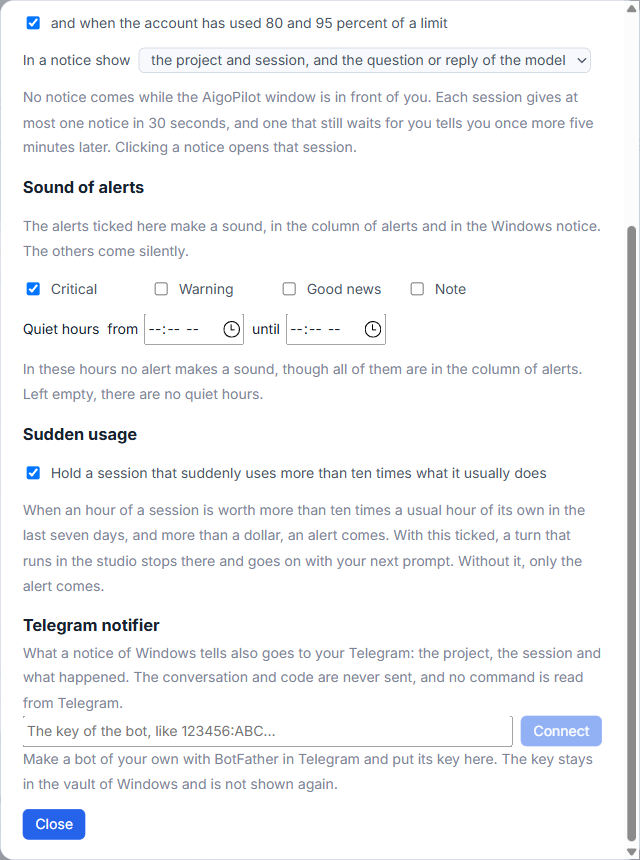
- In the studio open Settings, then Notices. The Telegram notifier part is at the bottom of that window.
- Paste the key into the field and click Connect. The key goes into the Windows Credential Manager. It is not written to the studio's data file and it is not shown again.
- Click Find my chat. The studio looks at the bot's messages once, finds the private chat you wrote from, and says The news goes to followed by your name.
- Tick Tell me, then click Send a trial message.
The trial message is read back from Telegram, letter by letter. If what came back is what was sent, the studio says so, and you should see the message in Telegram. If Find my chat says the bot has no message, write to the bot in Telegram first. If it says another program reads the messages of the same bot, make a separate bot for AigoPilot.
What goes, and what does not
A note is the project name on the first line, then the session's name and what happened. The studio does not send the question a session asked or the reply it wrote, whatever you chose under In a notice show. If you chose no names, the note is only "AigoPilot" and a plain line.
The same switches as for Windows notices apply: the kinds you ticked, the per-project switch, and no note while the AigoPilot window is in front of you. Nothing comes back the other way. The studio reads no command from Telegram. See Windows notifications, sound and quiet hours for those switches.
Check that it is working
Beside the bot's name a chip says Connected, last contact with a time, or Down since. Under it, the last messages are listed, each with a state:
| State | Meaning |
|---|---|
| Not gone | Written down in the studio, waiting for the line to come back. It goes by itself. |
| Arrived | Telegram took it, with the same letters. |
| Arrived with other letters | Telegram took it but the text differs. An alert tells you. |
| Not known to have arrived | The request left and no answer came. It may have arrived, so it is not sent again by itself. |
| Not accepted | Telegram said no. |
For the last two, a Send again button appears. If Telegram stays out of reach for five minutes, an alert says so in the column of alerts, and it closes when the line is back.
Disconnect
Click Forget it. The key leaves the vault and the chat is forgotten. Untick Tell me instead if you only want a pause. You can also delete the bot in BotFather.
Small tips
Send a trial message before you rely on it
After connecting, click Send a trial message. The studio reads the message back from Telegram and compares it letter by letter with what it sent, then tells you whether it arrived whole.
Give AigoPilot a bot of its own
If another program reads the messages of the same bot, Telegram refuses the search for your chat. Make a separate bot in BotFather just for the studio.
Send again a note that may not have arrived
A note marked Not known to have arrived is never sent twice by itself, because it may have come through. If you did not get it, click Send again beside it.
Questions
Can I control sessions from Telegram?
No. The studio only sends notes. It reads no command from Telegram. It looks at the bot's messages once, when you click Find my chat, to learn which chat to write to.
Is the conversation sent to Telegram?
No. A note holds the project, the session name and what happened. The question a session asked and the reply it wrote are not sent, whatever you chose for how much a notice shows.