
Windows notifications, sound and quiet hours
Choose when a session may interrupt you, what the notice reveals, and when it must stay silent.
When you are in another window, AigoPilot can tell you through Windows itself that a session needs you: it asked a question, it wants permission, it finished, or it stopped midway. A click on the notice opens that session. This is the way to start a session, leave for coffee and still come back at the right moment.
Partly built. The notices and the sound are built and tested, but they have not been confirmed on every Windows setup. Windows can block notices for a program, and the notice settings window tells you when it does.
Open the notice settings
- Click the gear in the top bar to open Settings.
- In the More group, click Notices. The Windows notices window opens.
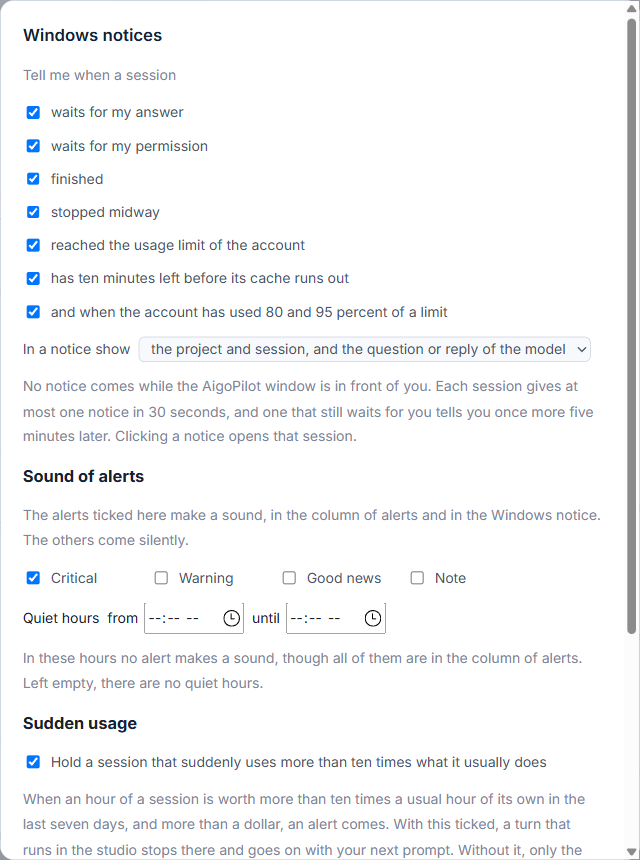
If Windows is not showing notices at all, the top of this window says why. Either notifications are off in Windows, or Do not disturb is on, or AigoPilot itself is switched off in Windows Settings, System, Notifications. Fix it there; the studio cannot change it.
Choose what you are told
Under Tell me when a session there is one tick box for each kind of notice:
- waits for my answer
- waits for my permission
- finished
- stopped midway
- reached the usage limit of the account
- has ten minutes left before its cache runs out
- and when the account has used 80 and 95 percent of a limit
To silence one project, open that project, click the sliders icon Settings of this project next to its name, and untick Notices of this project.
Decide how much a notice shows
The drop-down In a notice show has three choices. The first shows the project and session, and the question or reply of the model. The second shows only the project and session. The third, no names (for when others see your screen), shows only "AigoPilot" and a plain line, so a notice on a shared screen gives nothing away.
When a notice does not come
The rules are fixed, and they explain most silences:
- No notice comes while the AigoPilot window is in front of you.
- Only changes are told. What was already true when the studio started is not.
- Each session gives at most one notice in 30 seconds.
- A session that still waits for your answer or permission is told once more, five minutes later.
Everything is also in the column of alerts, even a kind you switched off here.
Sound and quiet hours
Below the notice choices, Sound of alerts has four tick boxes: Critical, Warning, Good news and Note. Only the ticked levels make a sound, both in the column of alerts and in the Windows notice. By default only Critical is ticked.
Under Quiet hours, fill in from and until. In those hours nothing makes a sound, though every alert still appears in the column. The hours may cross midnight, for example from 23:00 until 07:00. Left empty, there are no quiet hours.
One exception: an alert that says a paid key's budget is used up makes its sound whatever the hour.
Window closed
Closing the studio's window does not stop it. It stays beside the clock, and while sessions run the engine goes on telling you about them, even with no window open. A click on such a notice starts the studio on that session. This part is described in Staying awake, starting with Windows, tray and backups.
Small tips
Hide names before you share your screen
In the notice settings, set In a notice show to no names. A notice then says only AigoPilot and a plain line, so nothing about your projects appears on a shared screen.
Set quiet hours that cross midnight
Quiet hours may start in the evening and end in the morning, for example from 23:00 until 07:00. Alerts still reach the column, only the sound is held back.
Silence one noisy project
Open the project, click the sliders icon next to its name, and untick Notices of this project. The other projects keep telling you, and its alerts still appear in the column.
Questions
Why do I get no notice when I am looking at the studio?
By design. No notice comes while the AigoPilot window is in front of you, since you can already see the session. The alert is still in the Alerts column.
Why does the notice window say Windows is not showing notices?
Either notifications are off in Windows, Do not disturb is on, or AigoPilot is switched off in Windows Settings, System, Notifications. The studio cannot change those settings for you.