
Shared project rules and context for every tool
The rules move into AGENTS.md, CLAUDE.md names that file in one line, and the studio shows the whole change before it writes anything.
Claude Code reads a project's rules from CLAUDE.md and never opens AGENTS.md. Codex does the opposite. Grok reads both, but only in a folder it was told to trust. If each tool gets a file of its own, the two files drift apart within weeks, and the tool you switch to works from stale rules.
AigoPilot keeps the rules in one file, AGENTS.md, and makes CLAUDE.md name it in one line. It shows you the whole change first and writes only when you say yes.

Open the plan
Select a project and click One file for every tool under its name. A window titled One file of instructions for every tool opens. Its first line says how the files stand, for example The instructions of this project are in CLAUDE.md, which only Claude Code reads. Nothing is written until you press the write button.
The window reads how the two files stand and offers the fitting change:
- Only
CLAUDE.mdexists: its parts go toAGENTS.md, andCLAUDE.mdbecomes the line@AGENTS.mdplus whatever is Claude Code's alone. - Only
AGENTS.mdexists: aCLAUDE.mdof that one line is made, andAGENTS.mdis not touched. - Both hold the same text:
CLAUDE.mdbecomes the one line. - Both exist and differ:
AGENTS.mdkeeps every letter it has, and the parts ofCLAUDE.mdit lacks come after them, or stay inCLAUDE.md, as you choose. CLAUDE.mdalready namesAGENTS.md, or neither file exists: there is nothing to do.
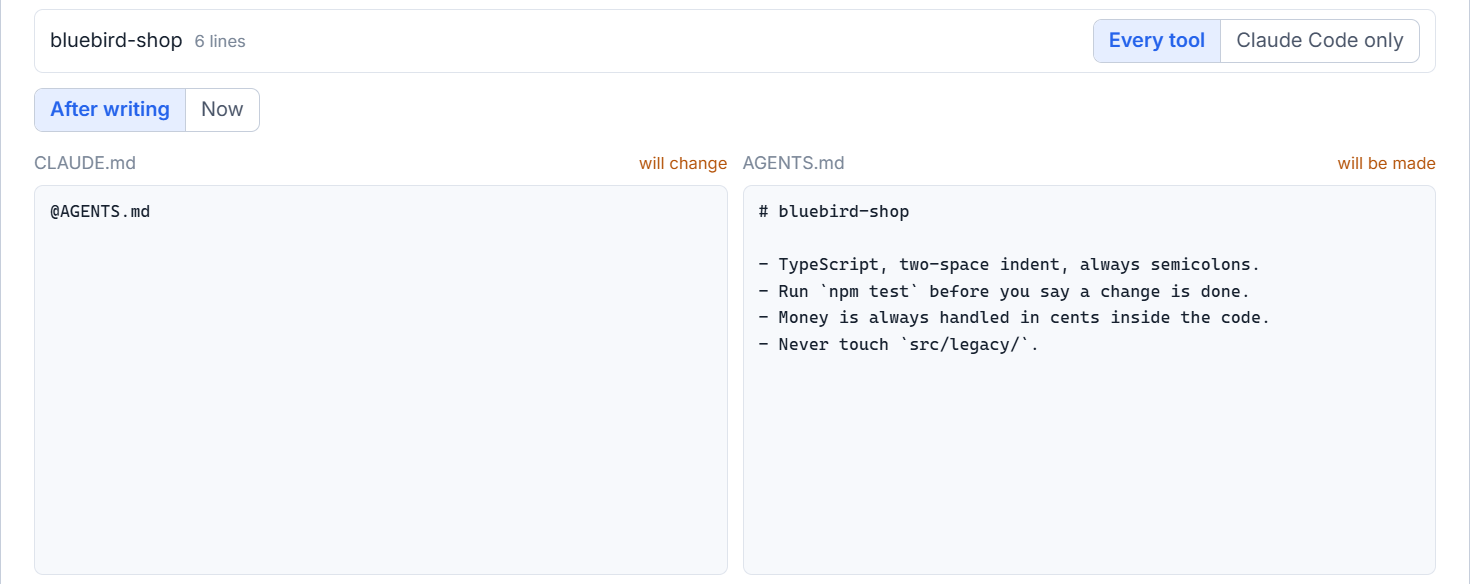
Decide where each part goes
The studio cuts the file into parts at its headings of the first two levels. Under Where each part of CLAUDE.md goes, each part has two choices, Every tool and Claude Code only, and all start on Every tool. A part moves letter for letter. Nothing in it is changed or left out.
If you do not want to sort the parts yourself, click Ask Claude Code which parts are Claude Code's alone. A model of the project's own subscription reads the parts and says, for each, whether it is for every tool, with a few words of why. That is all the model does: the studio moves the text, and a reply that is not a plain list of this kind is thrown away. Your own choice on a row always wins, and you can change each row afterwards.
The two previews, After writing and Now, show both files as they will be and as they are. CLAUDE.md is marked will change and AGENTS.md will be made, or not touched.
Claude's notes stay where they are
Claude Code also keeps notes about each project in its own folder. The studio does not copy them. When a project has such notes, one line at the end of AGENTS.md says where they are, beginning with MEMORY.md, so the other tools can read what Claude learned. Lines in your file that name another file with @ move as they are, and the window counts them, because Claude Code opens such a file by itself while Codex and Grok do not.
Write it, and take it back
- Check the previews.
- Click Write CLAUDE.md + AGENTS.md.
- Read the green line: Written. The copy of before is here: and a path.
- Click Close.
Before anything is written, a dated copy of both files goes into the studio's own data folder, never beside your files. Each file is written whole under another name, moved into place and read back. If a file changed after the window showed it to you, nothing is written and the window says so.
The button Put back as it was restores the last change, as long as nobody has written the two files since. If something was written, it refuses, so that nothing is lost. Read again loads the files again after you edit them yourself.
Before you say yes
A session the studio starts is led to the project's file even if you have not written anything, where its tool would not read it by itself. With only CLAUDE.md, Codex is given a setting that makes it read that file too, and Grok is told where the file is. With only AGENTS.md, Claude Code is told to read it. Nothing of this is written to your files. The list of what acts on a session names it, and a band above the box says it as well, with a Not now key.
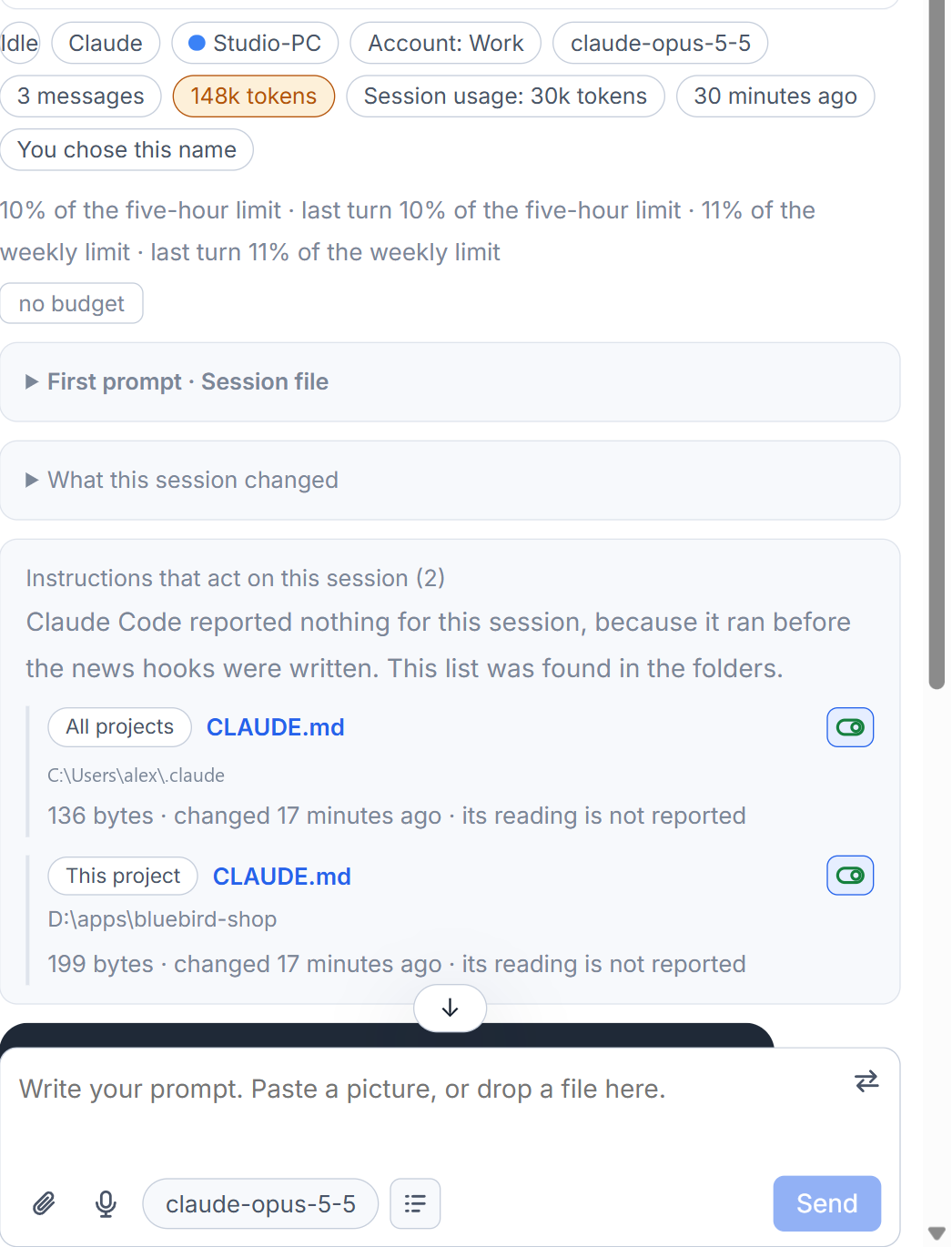
Once the files are shared, moving the project to another tool loses none of its rules.
Small tips
Move a part of CLAUDE.md by hand
Each part has two choices, Every tool and Claude Code only. Your choice on a row always wins over what the model proposed, and the previews follow at once.
Compare Now with After writing
The two previews can be switched between the files as they stand today and the files as they will be. With only CLAUDE.md today, the Now side of AGENTS.md is empty.
Find the copy of your files before writing
After writing, the window shows a green line with the path of the dated copy of both files. It lives in the studio's data folder for as long as you keep it.
Questions
Does the studio copy Claude Code's notes about my project?
No. One line at the end of AGENTS.md says where the notes are, beginning with MEMORY.md, so another tool can read them. The notes themselves stay in Claude Code's folder.
Where is the backup made before the files are written?
In the studio's own data folder, in a dated folder for the project, and not beside your files. The green line after writing shows the path.