
The instruction files behind a session
CLAUDE.md, AGENTS.md and settings files shape a session. The studio lists them and warns when one changed behind your back.
A session does not start from nothing. Before your first word, its tool has read files that tell it how to behave: CLAUDE.md, AGENTS.md, settings files, the notes the tool keeps about the project. If one of them says something you did not know about, the session will follow it and you will wonder why.
The studio lists every one of those files for a session, says who wrote each last, lets you switch a file off, and warns you when a session edits one.
See what a session reads
Open a session and look for the card Instructions that act on this session, with a count in brackets. Click it to open the list.
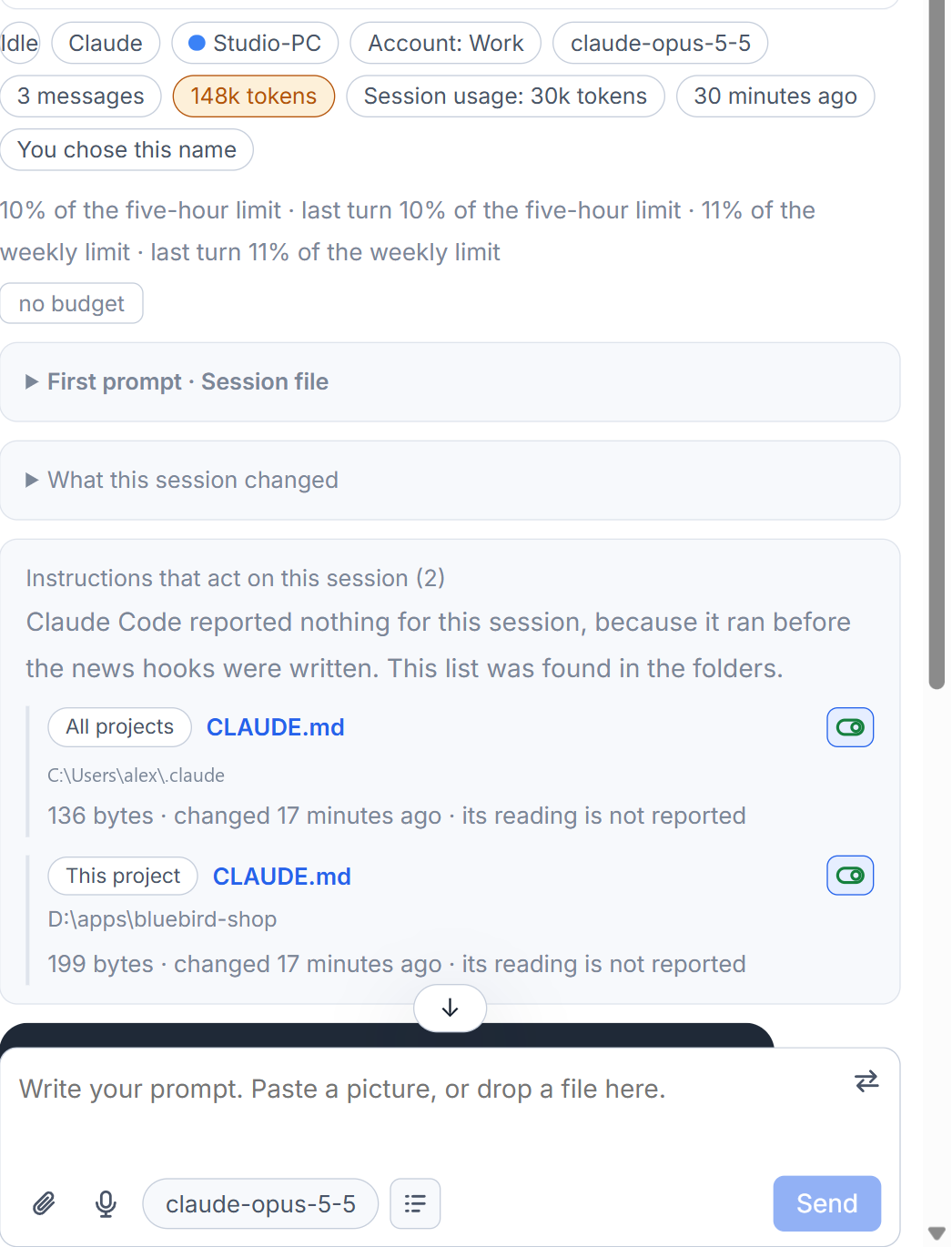
Files are listed in the order the tool read them. Each row has:
- a label for where it acts from: All projects, This project, This machine only, Organisation, Auto memory or Settings;
- the file name (click it to open the file in your code editor) and its folder;
- its size, when it last changed and when the session read it;
- who wrote it last, such as "Written by the session ..., 5 minutes ago".
If a file changed after the session read it, the row says the session still has the earlier version.
For Claude Code, what it read comes from the tool's own report. The auto memory and the settings files, which it never reports, are found on disk. A session that ran before that report existed gets its whole list from the folders, and the card says so. Codex and Grok sessions show the card only when there is something to say: the file their tool said it read, or something the studio added, which is then explained in a line starting "Added by AigoPilot".
A file written by another session
This is the case the list was made for. If a session you have not looked at wrote a file that this session then read, the card is marked as a warning and says "N written by another session", and the row of the session in the project list gets a small file sign. That is how a session picks up rules nobody saw being written. Opening the list counts as having seen them, and the warning goes away.
Who wrote a file is known from the transcripts. A file written by a shell command is counted too; a write by a program that the command started is not seen.
Turn a file off and on
A Markdown instruction file has a switch on its row. Switching it off gives the file a second ending, .aigopilot-off, so the tool no longer finds it. The next session of that tool does not read it. Nothing is written into the file. Switch it on again and the file gets its own name back; its row says "Turned off" in between.
Settings files, which hold permissions and hooks, have no switch and are never renamed.
When a session edits its own instructions
An edit to an instruction or settings file by a session rises to the top of the Waiting for you list as "Changes to instructions". Open it to see the change line by line and to Put back the old content, or accept it with Seen, keep it. The steps are in what a session changed.
If you want one file for several tools instead of separate ones, that is the subject of shared project rules.
Small tips
Open an instruction file from its row
The file name on a row is a button. It opens that file in your code editor, unless the file is switched off or gone.
Spot a session that read unseen rules
A small file sign on a session's row in the list means it read instruction files that another session wrote and that you have not seen. Opening the list clears it.
Questions
Does turning a file off delete it?
No. Its name gets .aigopilot-off added so the tool no longer finds it, and nothing is written into the file. Switching it on gives the name back.
Why can I not turn off a settings file?
Settings files hold permissions and hooks, so they are never renamed. Only Markdown instruction files have the switch.