
What a session changed
A list of the files the session itself changed, line by line, and a way back when it edits its own rules.
Once a session has worked for a while, the first question is what it did to your files. Above the conversation, a card called What this session changed answers that: every file the session wrote, one row each, and the change itself under a row when you open it.
It is for reading and checking. It does not commit, stage or merge anything, and it never writes to your git repository.
Open the list
- Open the session.
- Click What this session changed above the conversation. Closed, it already shows the number of files and the lines added and removed, such as "2 files +4 −0".
- Read the rows. Each has a sign for what became of the file (+ new, ~ changed, − deleted), its name, and the lines added in green and removed in red.
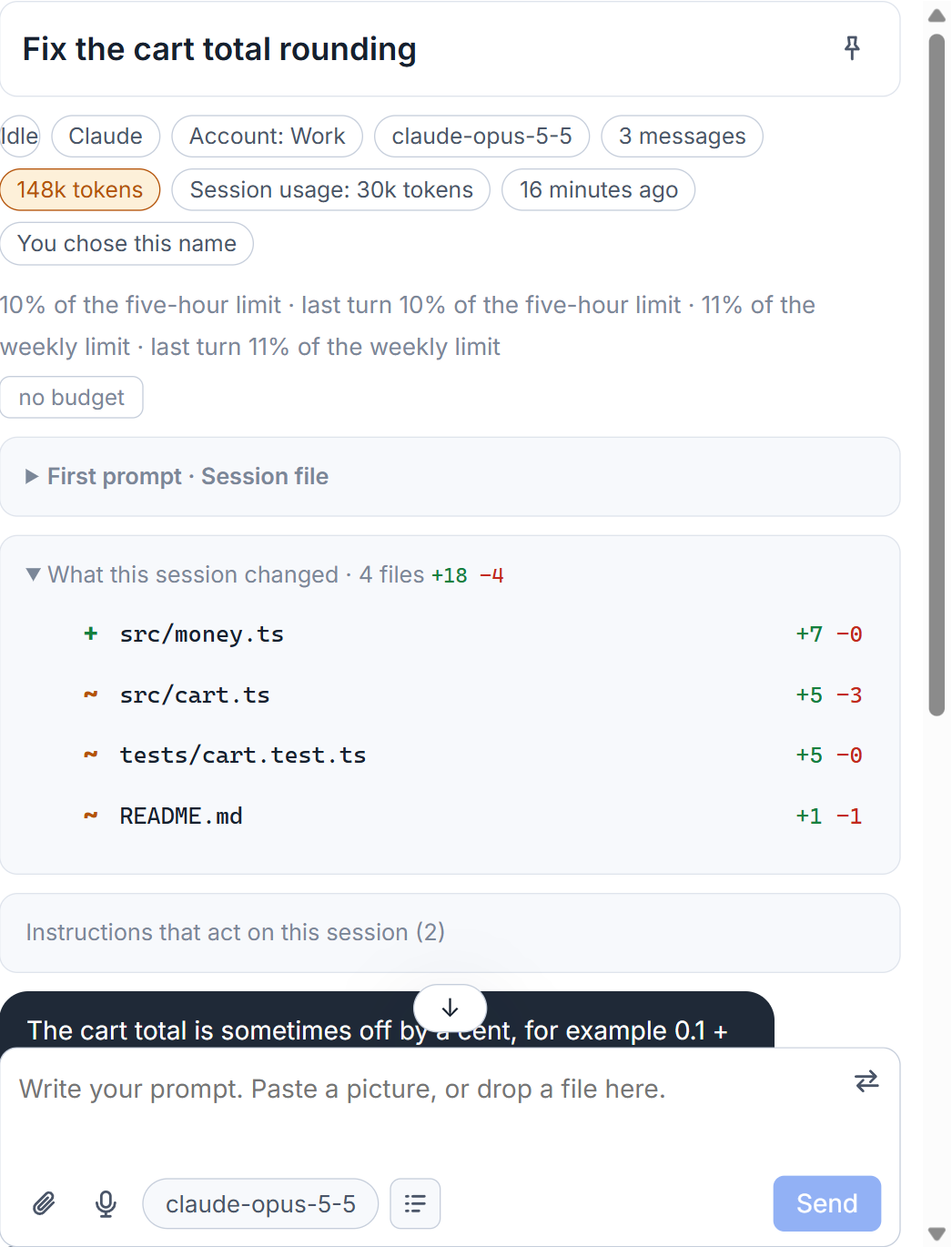
The list is asked of the computer the session runs on, and only when you open it, because looking at a large project takes a second. It is read again when the session has written something since.
Only files the session itself wrote are listed. The studio finds them in the session's own transcript, so what another session changed in the same folder does not appear as this one's. A file written by a shell command counts too (with >, tee, sed -i, Set-Content, cp, mv and the like). A write done by a program that the command started is not seen. A file that is not text shows "no text" instead of lines, and a very long list ends with a count of the files not shown.
Read one change
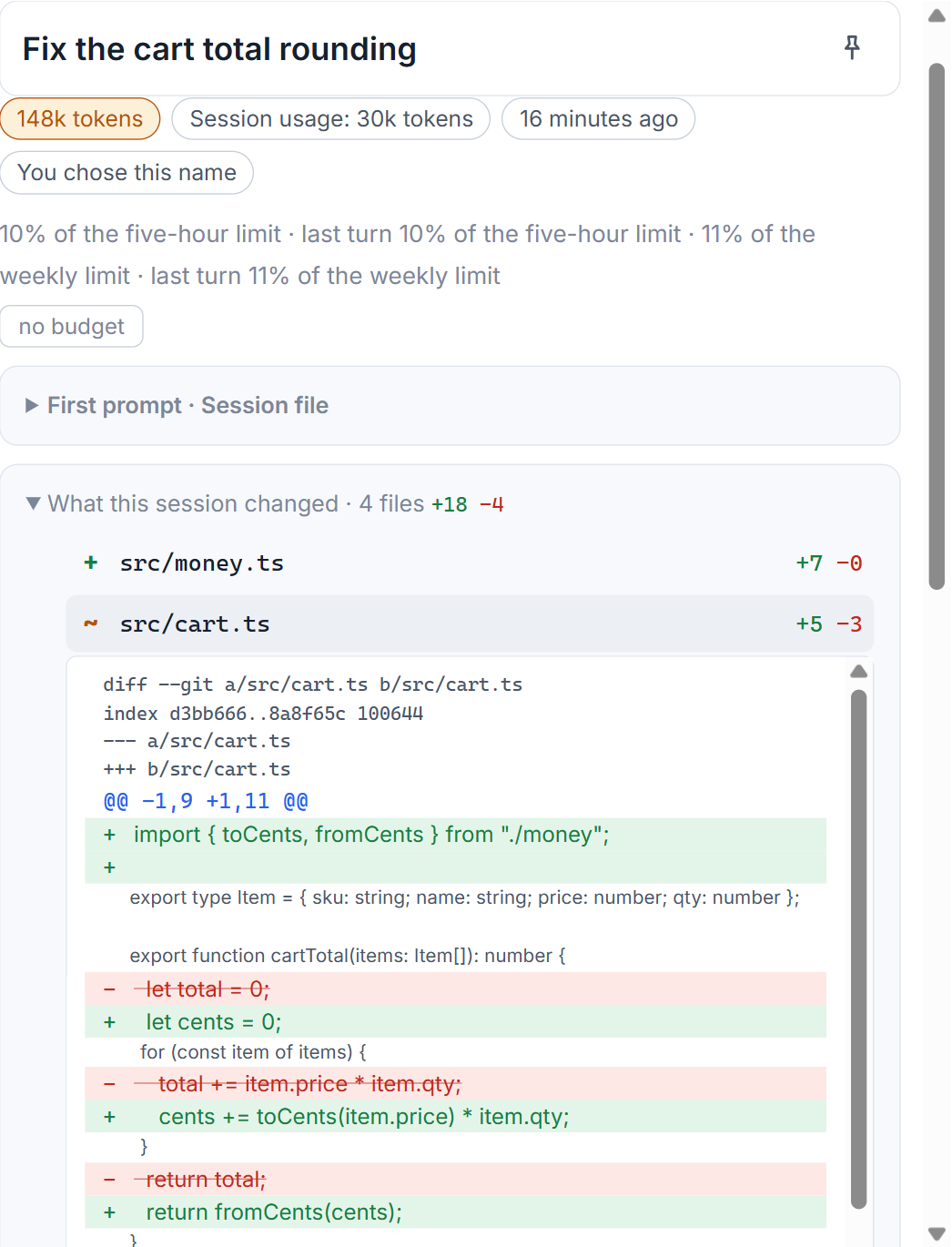
Click a row and the change opens under it: removed lines in red, added lines in green, with a few lines around them for context. A change that is very long is cut after a set number of lines, and says so.
With git and without
When the project is under git, the change is the file as it stands now against the last commit made before the session began. Git is only asked to read, with its optional locks turned off, so a look does not even touch the index of your project. A test of the studio fails if that ever changes.
Without git, which is the case for a new folder or a computer that has none, the row still exists. The change is rebuilt from the edits the session made, and the card says: "There is no git here. The change of each file is rebuilt from the session's own edits." If what the file was before is not known, you see only the session's own edits in the order they were made, and the card says that too.
When a session changes its own instructions
One kind of change gets more than a row. If a session edits a file that tells sessions how to behave, such as CLAUDE.md, AGENTS.md or a settings file, the change rises to the top of the Waiting for you list under "Changes to instructions". Such a file sets the rules for every session that reads it afterwards, often without anyone looking.
Click it to see the change line by line. Then choose:
- Put back restores the file as it was before. For a file the session created, the button reads Take away.
- Seen, keep it accepts the change and clears the item.
- Open in the code editor opens the file itself.
Putting back is refused if the file changed again after that edit, because it would undo the later changes too. Before it puts anything back, the studio saves what the file holds now in its own data folder. If the studio had never seen the file before the change, it shows what the file holds now and cannot put it back. The list of files a session reads is in the instruction files behind a session.
Small tips
Put back an instruction edit safely
Before Put back restores a file, the studio saves what the file holds now in its own folder. If you change your mind, the later content is still there.
Questions
Does AigoPilot need git to show changes?
No. With git it compares each file with the last commit made before the session began. Without git it rebuilds the change from the edits the session made, and says so.
Can AigoPilot commit or stage the changes?
No. Git is only read here. There are no commit, stage or merge buttons.