
Codex in the studio
A Codex session streams while it works, asks the studio before each command, and shows its limits in the title bar like Claude does.
Codex sessions in AigoPilot work like Claude Code sessions. They stream their answer while they work, they ask you before a command or a change of a file, their models come from Codex itself, and their limits show in the title bar. A few things differ, and they are listed here so that none of them surprises you.
You need the Codex program on the computer and a signed-in account. If it is missing, the setup page offers to install it, and it asks first (see First-run setup).
How a Codex session runs
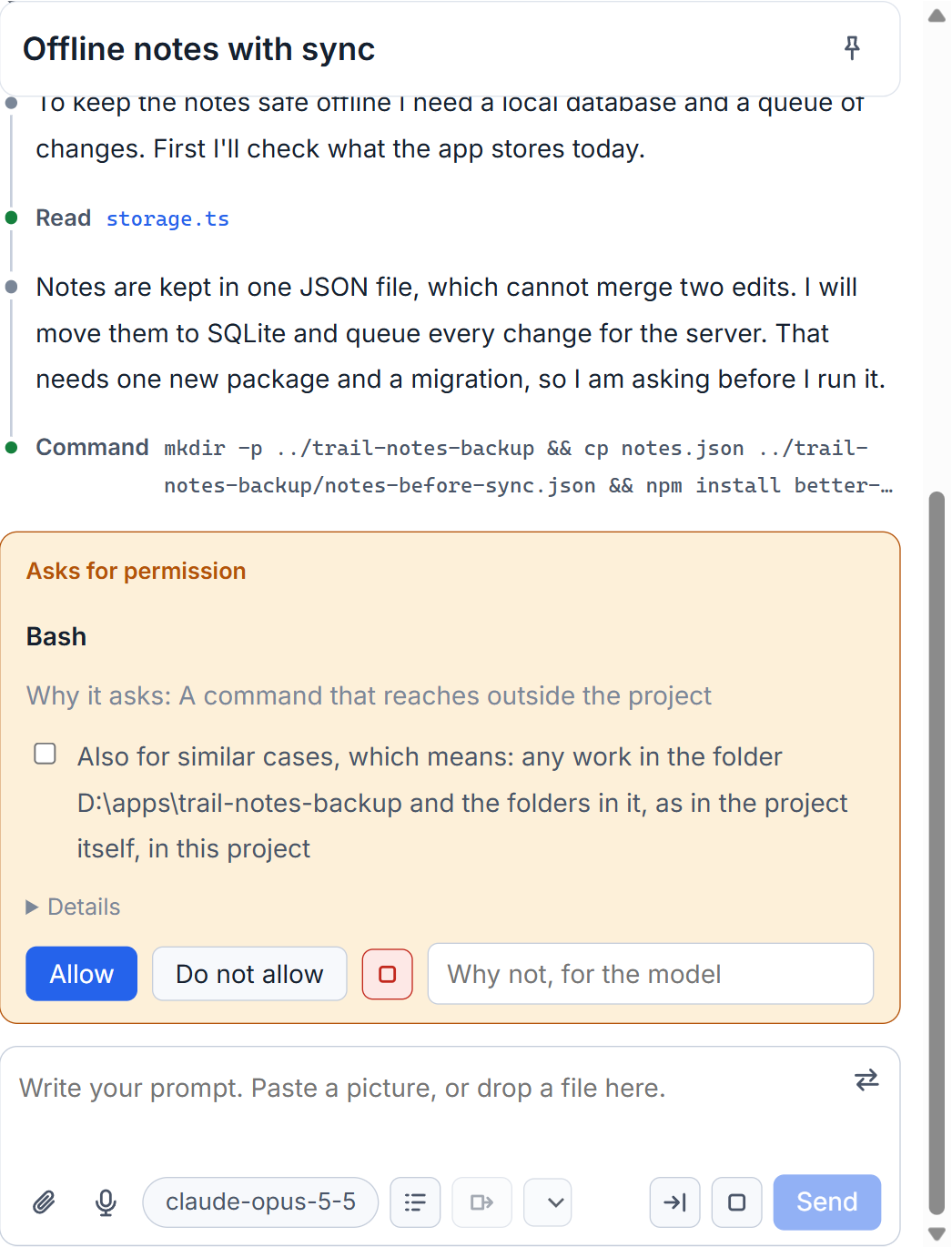
By default the studio talks to Codex through its own protocol, codex app-server. Every command and every file change that Codex wants comes to the studio before it happens, and the studio puts it in a permission group and judges it by your mode, exactly as for Claude Code. What the mode allows then runs as your own Windows user. What it does not allow becomes a card in the studio, and a refusal ends that command without ending the turn: your words follow into the same turn and Codex does what you said instead.
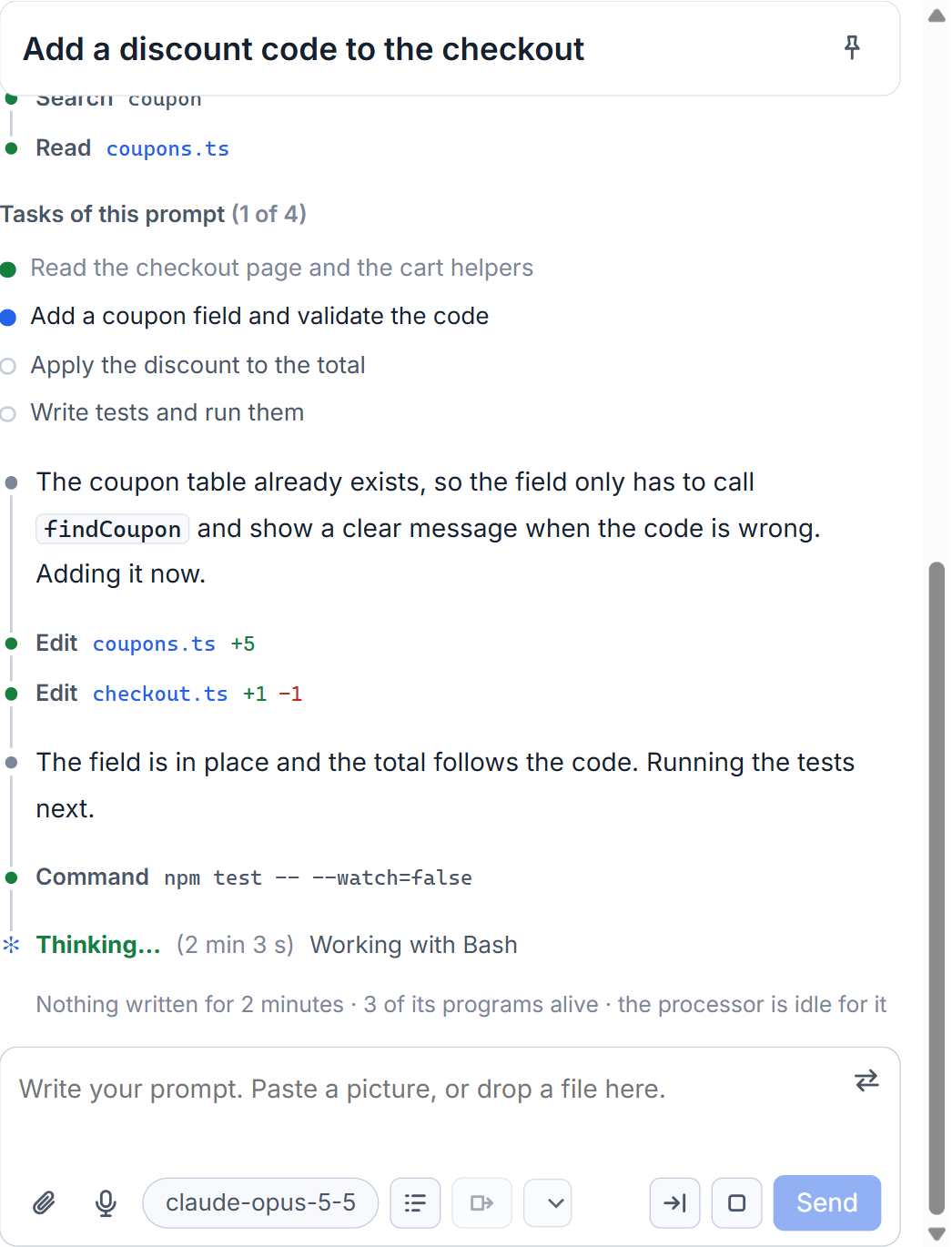
While it works you see its steps as they happen, its summary of its reasoning, and a line such as Worked for and the time when the turn is over. A session that was begun in the Codex app or in a terminal is listed too, and you can continue it from the studio. If the same conversation is still open in the Codex app, Codex refuses the prompt and the studio tells you to close it there first.
Permissions, and the older way
In the permissions window, near the end, the part How Codex runs holds one box: Codex asks before it acts, as Claude does. It is ticked by default. Untick it only if a version of Codex stops working this way. New Codex sessions then run the older way, codex exec, where Codex works inside its own sandbox and asks nothing. Whatever falls outside the sandbox is refused without a word, and on Windows that sandbox can cut commands off from the network. That is why the studio's way is the default.
Models, speed and effort
The model list in the prompt box is what Codex on that computer offers, read from Codex's own cache. A model you choose is used from the next turn, and the session says so. If Codex does not take the model you asked for, a note says which one the turn really used. Codex also has a speed choice: Fast answers sooner and uses the allowance of your plan about 2.5 times as quickly. The model is the same and the answers are no better or worse.
Two things of Claude Code are missing for Codex: the plan mode sign in the box, and the commands that appear when you type /. The context bar of a Codex session shows only its total, because Codex does not say what its memory is made of.
Limits and bought credit
Codex writes its limits into every session file, and the studio reads them from there. They show in the title bar and on the usage page like Claude's (see Your limits in the title bar), kept per account if you have several.
When the plan window of an account is used up, going on would spend credit you bought. So the studio holds the next prompt to that account and shows Spend the credit; the answer holds until that window resets. The setting Do not spend bought credit without asking is in the Paid keys window, under Bought credit of Codex. This was tested with the studio's stand-in for Codex, and not yet seen on a real plan that ran out.
Small tips
Close the conversation in the Codex app first
A conversation that is open in the Codex app cannot take a prompt from the studio. The studio says so and names the app. Close the conversation there and send again.
Decide about bought credit once
The Paid keys window has a part, Bought credit of Codex, with the box Do not spend bought credit without asking. With it ticked, a prompt waits when the plan is used up until you press Spend the credit.
Expect a new Codex model from the next turn
A model you choose for a running Codex session is used from the next turn, and the session says so. If Codex does not take it, a note names the model the turn really used.
Questions
Why did Codex refuse my prompt?
The same conversation is probably open in the Codex app or in Codex inside VS Code. Close it there and send the prompt again.
Does Codex ask before it runs a command?
By default yes. Every command and every file change comes to the studio, which judges it by your permission mode. The box Codex asks before it acts, as Claude does, in the permissions window turns this off.