
The nine session states
A session is working, waiting, finished, held by a limit, stopped, idle or archived, and each one looks different.
Every session in AigoPilot is in one of nine states, and the state is written on its row in plain words with a colored sign. Reading it is how you decide whether to look at a session now, later or never. A session that finished is not drawn like one that asks you something, and neither looks like one that died halfway.
The studio works the state out from the session file the tool writes, from the news Claude Code sends through its hooks, and from whether the tool's process is still alive. It does not read terminal text. Where the file cannot prove a state, the studio says "may be" instead of claiming it.
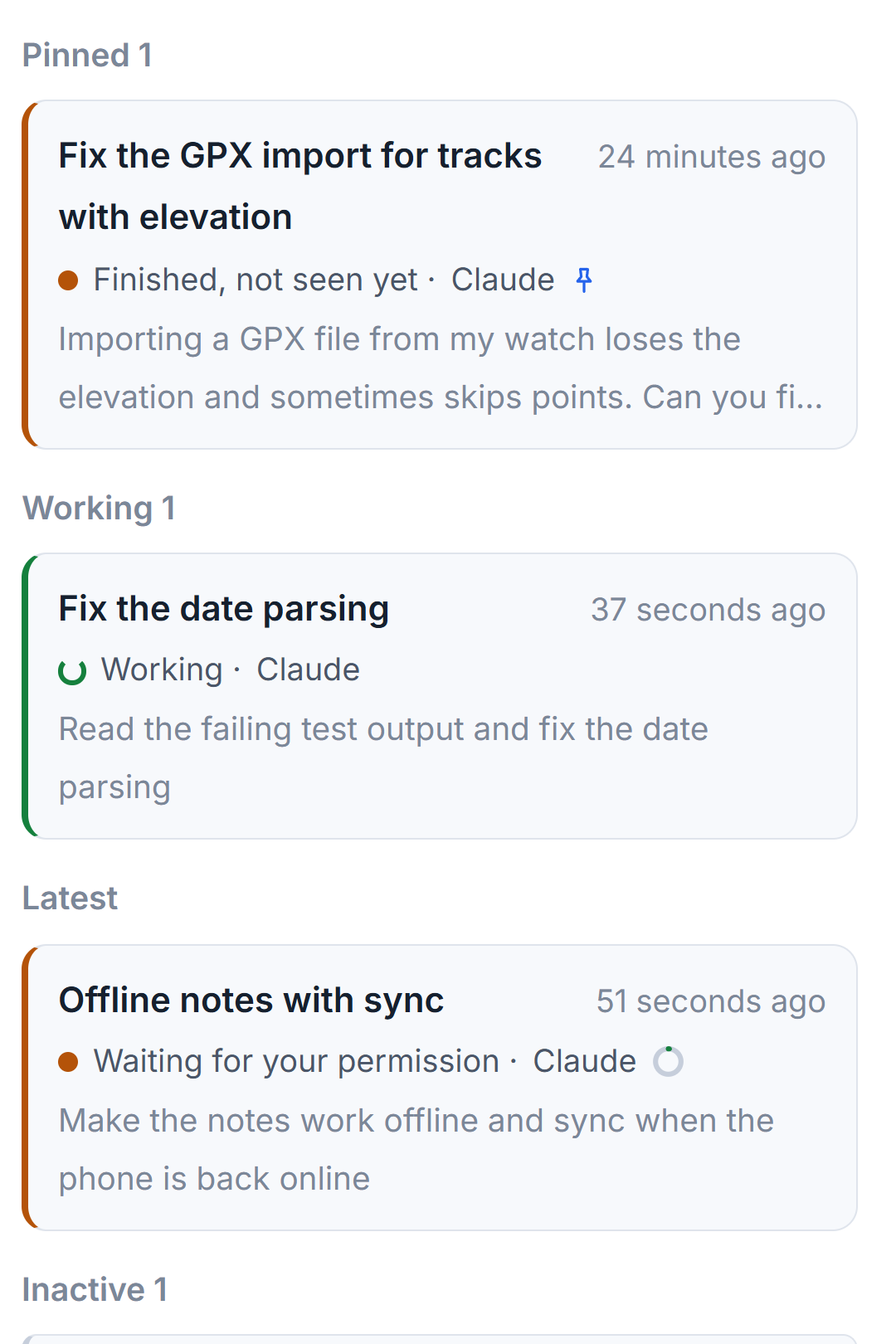
The nine states
| State | Sign | What it means and what to do |
|---|---|---|
| Working | Turning green sign | The session wrote something in the last 45 seconds, or a tool call is still running. Do nothing. |
| Waiting for your answer | Amber dot | The model asked you a question. Open the session and answer. |
| Waiting for your permission | Amber dot | Claude Code itself reported that the session asks for permission. In the studio, open it and choose Allow or Do not allow. |
| May be waiting for your permission | Amber dot | A tool call has had no result for ten minutes. The file cannot tell a permission prompt from a long task, so open it and look. |
| Finished, not seen yet | Amber dot | The turn ended and you have not opened the session since. Read the answer. |
| Reached the usage limit | Hollow amber ring | The account's limit is used up. It waits for the clock, not for you. |
| Stopped midway | Red dot | The model was in the middle of work and has written nothing since. Send a prompt to go on. |
| Idle | Grey dot | The turn ended and you have seen it. |
| Archived | Grey dot | You put the session away. It is in the archived line at the end of the list. |
The four amber dots are the ones that need you. They are what fills the column described in The list of what is waiting for you.
How the quiet ones are decided
Some of the lines above depend on time. A prompt that gets no answer for five minutes turns a session from Working to Stopped midway. A tool call that stays open turns it to May be waiting after ten minutes, and to Stopped midway after a day. A session that hit the limit shows the limit state for up to a week; after that it counts as stopped, because the limit has long since reset.
For a session the studio runs, a silent stretch of 30 seconds or more adds a line under the conversation. It says how long nothing was written and, after a minute, whether the session's programs are still alive and whether the processor is busy for them. A line such as "Claude Code says Bash is still at work" means a command is simply slow. Work a session left running in the background, such as a server or a long build, is counted there as running in the background.
What the studio does with an unclear state
When you open a session the studio is not running, a grey help line under its state chip explains the three uncertain states in a sentence. For Waiting for your permission it tells you to answer in the program where the session is open. The studio does not continue a session it did not start until you say so. See Sessions you started in VS Code or a terminal.
A session file can contain a line the studio cannot read. The studio skips it, still opens the session, and says on the sheet how many lines it skipped.
Where the states show
The same words and signs appear in three places: the row of the session in its project, the card of the project as counts, and the column on the right for the amber ones. In a project's list, sessions are grouped as Pinned, Working, Latest, Waiting for you and Inactive; the Waiting for you group there also holds Reached the usage limit and Stopped midway, so that nothing needing a decision hides among the idle ones. See Rename, pin and archive sessions for the list itself.
Small tips
Open a finished session to quiet its amber sign
Finished, not seen yet turns to Idle as soon as you open the session, because opening it counts as seeing it. You do not need to answer anything.
Read the line under a session that went quiet
After 30 seconds without output, a session the studio runs shows how long it has been silent, whether a tool is still at work, and, after a minute, how many of its programs are alive and how busy the processor is for them.
Tell a limit from a stop by the ring
A session that reached the usage limit has a hollow amber ring, not a filled dot, because it waits for the clock and not for you. A red dot means it stopped midway.
Questions
Why does a session say May be waiting for your permission?
A tool call has had no result for ten minutes, and the session file alone cannot show whether that is a permission prompt or a slow task. Open the session to see which it is.
What does Stopped midway mean, and how do I go on?
The model was in the middle of work and has written nothing since, for example because the studio or the program was closed. Send a prompt in that session and it continues from where it was.