
Working on another computer
The studio stays on your main PC while another computer does the work.
Some work needs a particular machine. An iPhone app needs Xcode, and Xcode needs a Mac. A Unity project may sit on the laptop with the better graphics card. With AigoPilot you keep the studio on your main Windows PC and let the other computer do the work: its sessions appear in your list, and you prompt, approve and read from where you sit.
Partly built. Agents run on Windows and macOS. The studio window itself runs on Windows only. An agent for Linux, sessions inside WSL, and the full studio on a Mac or Linux are planned, not built.


How it works
The other computer runs the AigoPilot agent. It is the same program as the studio, started in a mode that has no project list, only a small window and an icon beside the clock (in the menu bar on a Mac). Behind that window runs the engine that actually starts sessions, reads the folders and watches the processes. Your studio talks to it over an encrypted line, and from then on the page asks that computer the same questions it asks your own.
That means the session runs there. Its files are there, its programs run there, and it uses the Claude Code, Codex or Grok installed on that computer with the accounts signed in on it. Your PC shows and steers it. The pieces you will meet in order are:
- Put the agent on the other computer: a Mac or a second Windows PC.
- Pair the two with six digits: Pairing two computers with six digits.
- If the computer is on another network, reach it through the relay.
- Let the studio install Claude Code and Codex there, then add or carry a project.
Every computer in one list
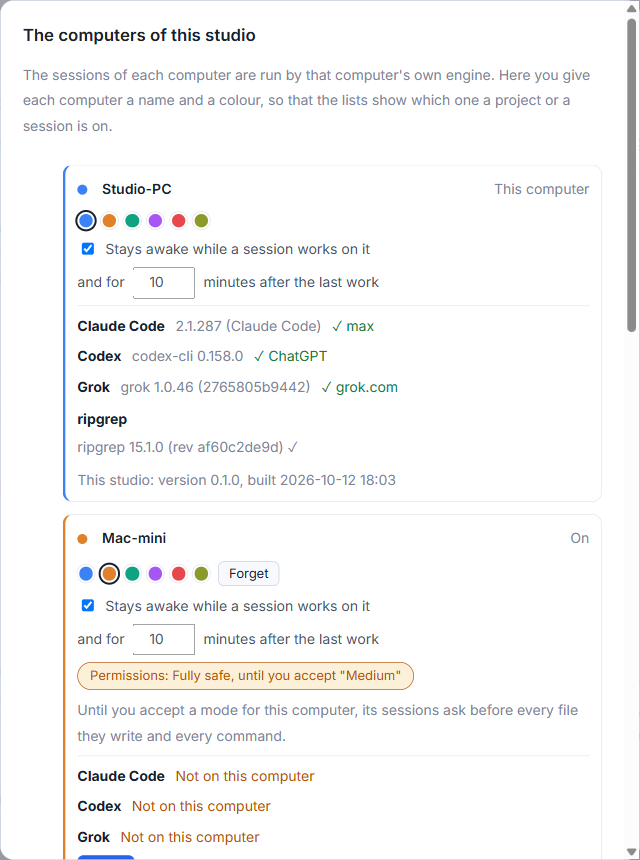
Open Settings, Computers. Each computer has a row with its name, a color, and whether it is on. You can rename it and pick one of six colors in place. From then on, every project and every session carries that name and color, so you always see where it lives. A computer that is switched off goes pale instead of disappearing, and says when it was last reached.
When you add a project, the New project window asks Which computer is the project on? and lets you walk that computer's folders, go up a folder, and make a new one.
What you can do over there
Start, continue, stop and read sessions, answer their questions, and decide their permission cards, exactly as on your own computer. The Processor and memory, Workers and Carry to another computer buttons of a project work on the computer it is on. A computer whose engine is older than your studio says so, and updates itself when its sessions are idle.
Permission mode for each computer
The permission mode is chosen for each computer separately. Until you accept a mode for a computer, its sessions ask before every file they write and every command. The row of that computer in the Computers window has a chip for it, and the bar at the top names the mode of the computer the open project is on. See Permission modes.
Usage, alerts and staying awake
Alerts of every computer arrive in the one Alerts column, marked with the computer's name. The Usage window has a switch for each computer, and a project's share of usage counts all of them. Each computer also has its own setting for staying awake while a session works there; see Staying awake, starting with Windows, tray and backups. When a computer stops answering, the studio says it is out of reach and shows what was last read from it. A computer is out of reach covers what to check.
More on the idea and what it does not yet do is on the remote computers page.
Small tips
Give each computer a name and a color
In the Computers window, click a computer's name to rename it in place, and pick one of six color swatches. Every project and session on it then carries that name and color.
Add a project by browsing the other computer's folders
In the New project window, pick which computer the project is on, then walk its folders, go up a level, or make a new folder there, without typing a path.
Questions
Can I run Claude Code on my Mac from my Windows PC?
Yes. Put the AigoPilot agent on the Mac and pair it with six digits. Its sessions then appear in the studio on your PC and you start, answer and stop them from there.
Does the studio run on a Mac?
Not yet. The studio window runs on Windows. Agents run on Windows and macOS. A Linux agent and the studio on Mac and Linux are planned.