
Awaiting their reply: emails you cannot miss
The answers that matter stand above everything, ring until you read them, and are chased once if they do not come.
Some emails matter more than the rest: the answer to a partnership request, a reply from a journalist, a buyer who said they would come back to you. Await their reply is a mark you put on such a conversation. Marked conversations stand above everything else in the mail column, and when the other side answers, the studio rings until you open the email. If no answer comes, you are reminded once, with a follow-up already written for you.
The mark is yours alone. Nothing about it is written to the mail server, and it never changes how the AI judges an email.
Mark a conversation
- Open the email, or rest the pointer on its row in the column.
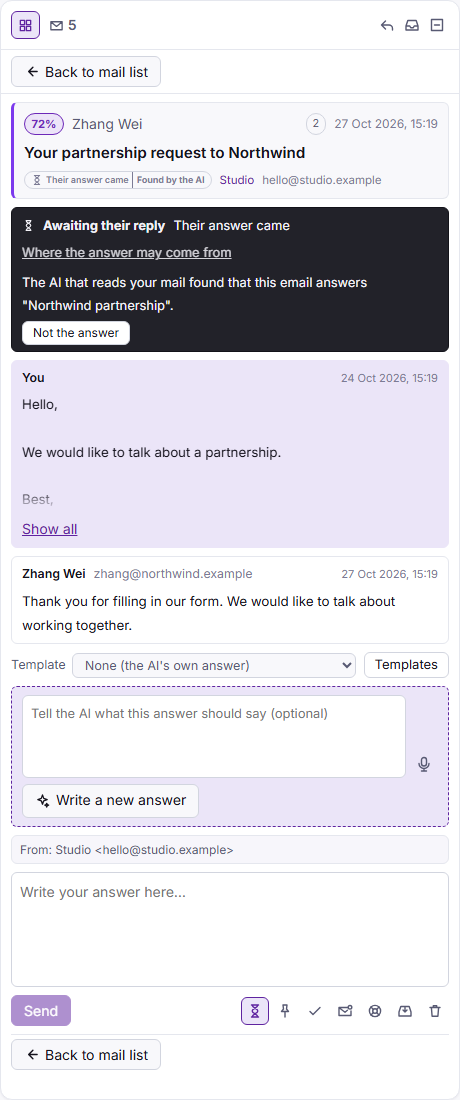
- Click the hourglass beside the pin. Its help reads Await their reply.
The conversation moves to the group Awaiting their reply at the top of the column, above the pinned ones. It stays there in every order and every list, also once you answered it and also when it grows old. Click the hourglass again (Stop awaiting their reply) to take the mark off. Marking the conversation done, putting it in the bin or removing its mailbox takes the mark off too.
A form on a company's site
When you asked through a contact form, there is no email of yours to mark. Click the hourglass with a plus at the top of the column, Await an answer from a company. Give it a Name, the Domains its answer may come from and, if you know them, the Addresses, one on each line, then Save. Until the first email arrives it is one short line in the group, with No email yet and the days it has waited.
What counts as their answer
An email counts when it belongs to the marked conversation, comes from one of its addresses, or comes from one of its domains or a sub-domain of them. For Gmail, Outlook, Yahoo, iCloud and the other public providers only the exact address counts, since anyone can write from those domains. Your own domain never counts.
Answers often come from somewhere else: you write to one company and its partner replies in a new thread. So the AI that reads your mail is also told which answers you await, and when it finds one it joins the email to the mark, labelled Found by the AI. If it is wrong, click Not the answer: that email leaves the mark and is never joined to it again. Where the answer may come from lets you change the name, domains and addresses at any time.
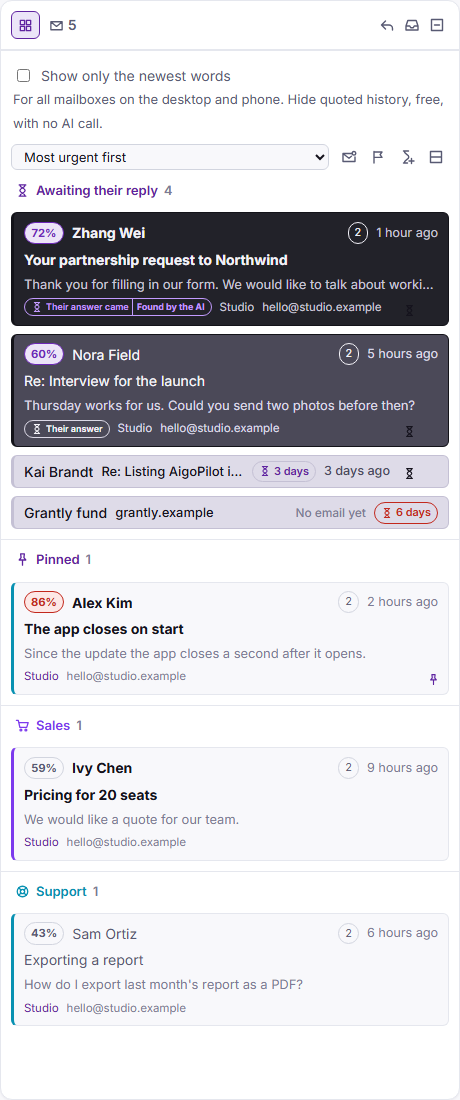
How a marked conversation looks
- Their answer came: an unread answer, drawn in strong colours so you cannot miss it.
- Their answer: the answer is read, still clearly stronger than an ordinary row.
- You wrote last, or nothing came yet: one short, pale line with an hourglass and the days since your last message. The days start again with each answer of yours, and turn red once the reminder is due.
The ring
When their answer arrives, the desktop plays a sound of its own, twelve seconds long, even with the studio hidden in the tray. It plays again 5, 10, 15 and 20 minutes later, then stops, and it stops at once when you open the email on the desktop or the phone. In the quiet hours of your alerts it stays silent. A desktop notice comes with it and opens the email. To turn both off, untick an answer I await came, or has not come in time under Tell me when a session in the notice settings (see notifications and sound).
The iPhone app has the same mark and its own sound for it, chosen under When an answer you await comes. With Ring again until I open it on, the phone rings again 5 minutes after the first notice, 15 minutes after that, then every hour, and stays silent while you are at the studio and in quiet hours. The notice names only the project, never a word of the email.
Note. The iPhone app is not on the App Store yet; see the iPhone app. On the desktop the mark works now on Windows, a Mac and Linux.
When no answer comes
After five days without an answer you get one reminder, on the desktop and the phone, and the project's own AI subscription writes a short follow-up in the language of the conversation, when the mailbox lets AI read its mail. The band of the email offers Put it in my answer or Throw it away. Nothing goes until you send it, and it waits in the outbox like any answer. Change the days in the settings of any project that has a mailbox, under Mailboxes of this project, at Remind me when an awaited answer has not come in: 1, 2, 3, 4, 5, 7, 10, 14, 21 or 30. The choice holds for the whole studio. Write a follow-up asks for one at any time once you wrote last.
The reminder comes once for each stretch of waiting. When you write to them again, the days start over and a new reminder can come.
Questions
Is the mark sent to my mail server?
No. It is kept by the studio alone. Your mail server and your other mail programs never see it.
What if the answer comes from another address?
Add the domain under Where the answer may come from. The AI that reads your mail is also told which answers you await, and it can join an email from elsewhere, labelled Found by the AI. Not the answer undoes that for good.
Does the follow-up go by itself?
No. It is written for you and put in your answer box only when you click Put it in my answer. It goes when you send it, after the outbox wait.