
What AigoPilot does
One window for every AI coding session you run, on the subscriptions you already pay for.
AigoPilot is a Windows program that puts every AI coding session you run, across all your projects, in one window. It works with Claude Code, Codex and Grok, the command-line tools from Anthropic, OpenAI and xAI, on your own subscriptions or keys. It contains no model of its own and it does not resell access to one.
You need it when you keep several sessions going at once and lose track: which one asked a question ten minutes ago, which one finished, which one is waiting for a permission you have not seen.
Partly built. Running and watching sessions is built and used every day. Email for projects, the Marketplace plugins and the iPhone app work but are newer. The rest of the business side, such as marketing and sales tools beyond keyword research, is in development. The iPhone app is not on the App Store yet.
What you see when you open it
Your projects are listed on the left. AigoPilot finds them by itself from the history that Claude Code, Codex and Grok already keep on your computer, so there is nothing to import, and nothing in that history is changed. Choose a project and its sessions appear next to it, grouped by whether they are working, waiting for you or idle. Choose a session and the conversation opens. A column on the right gathers everything that needs you: a permission to approve, a question to answer, a session that has finished.
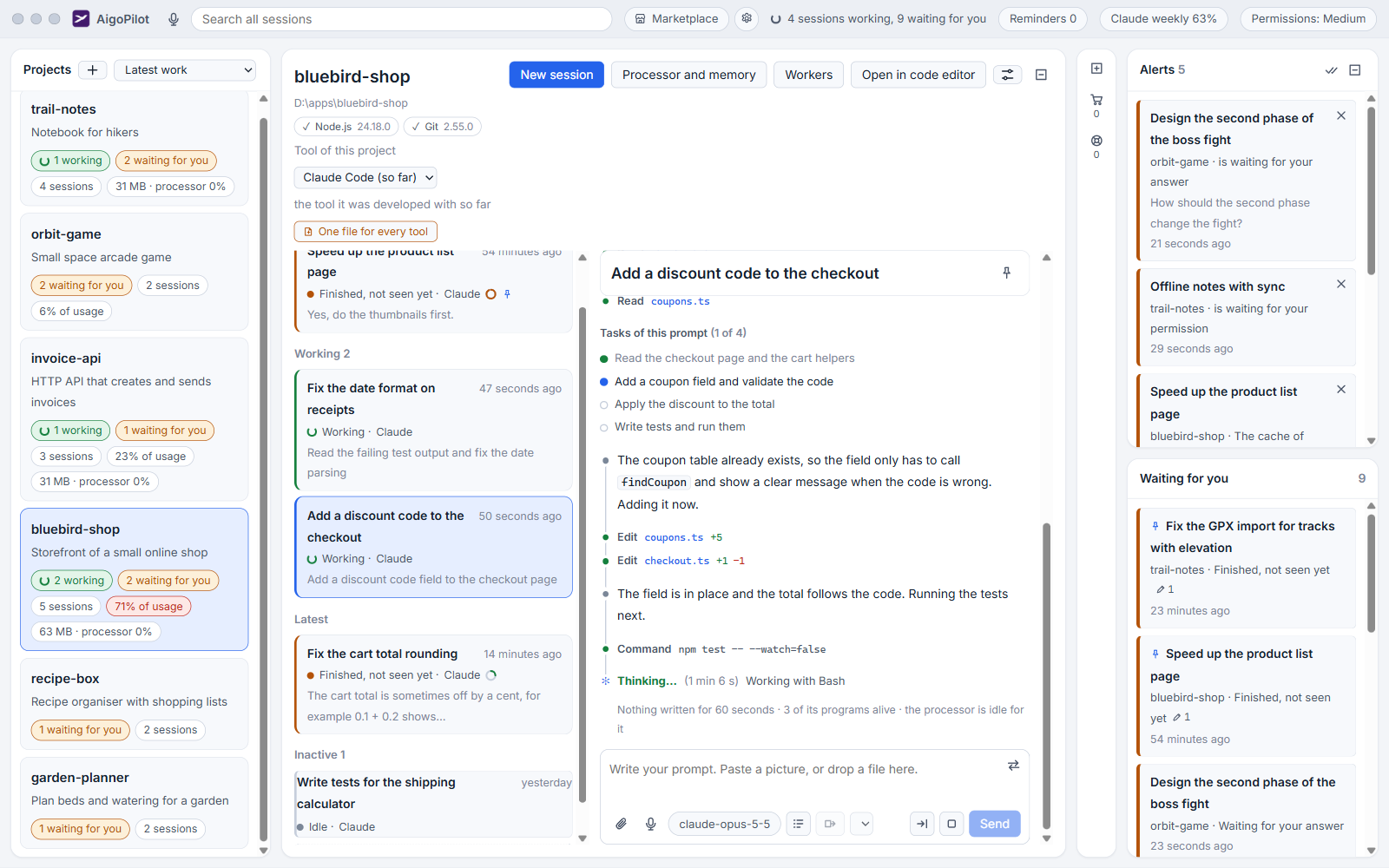
Every session carries one of nine states. The state comes from the tool's own hooks and from whether its process is alive and its transcript is still growing, not from reading terminal text. When AigoPilot cannot tell, it says "maybe" and does not claim. The studio tour walks through each area.
What you do inside a session
- Start a named session, or continue an earlier one. Sessions you began in VS Code or a terminal are listed too, and the studio asks before it takes one over.
- Write prompts with pictures and files, and answer the questions and permission cards a session raises.
- Change the model, the effort and plan mode while a session runs.
- See which files a session changed.
- Hand a full conversation to a fresh session, or continue the project with another tool.
Whose subscription it uses
Yours. A session is started only through the official program of the tool, signed in to your account, so the cost lands where it would if you typed in a terminal. AigoPilot never reads, stores or reuses a password, token or cookie. It asks each tool who is signed in, and shows which account pays for each session and how much of each limit you have used, as a percent.
Everything AigoPilot keeps sits in one file in your user folder. There is no AigoPilot cloud account to sign in to. Your prompts go to Anthropic, OpenAI or xAI through their own tools, exactly as they do from a terminal.
More than one computer, and a phone
The studio window runs on Windows. A Mac, or a second Windows computer, can run sessions for it once the AigoPilot agent is installed there and paired with six digits. A project can be carried to the other computer with its sessions. The iPhone app shows the same sessions and lets you answer from anywhere.
What it is not
- Not an AI model, and not a place to buy one. You pay the makers of the tools directly.
- Not a terminal and not a code editor. It has a button that opens the project in your editor.
- No git worktrees, and no commit or pull request buttons. It reads git to show changes and never writes to it.
- No studio for Mac or Linux. That is not built.
The Marketplace adds paid and free plugins, such as SearchPlan for keyword research. Before installing anything, read what you need.
Questions
Does AigoPilot replace Claude Code or Codex?
No. It runs the official tools and shows their sessions in one window. You still need the tool and its subscription, and you pay its maker.
Is there a Mac or Linux version of AigoPilot?
There is no studio for Mac or Linux. A Mac can run sessions for your Windows studio through the AigoPilot agent.